Before you even think about getting rid of an old computer, there are a few critical steps you can't afford to skip. This isn't just about spring cleaning; it's about protecting your business from data breaches, compliance nightmares, and losing information you can never get back.
Your Essential Pre-Disposal Security Checklist
When an old computer is retired, it's holding a treasure trove of sensitive information. Tossing files in the trash or doing a quick format is like leaving the front door of your office wide open. It's shockingly easy for someone with basic recovery software to pull up "deleted" client lists, financial statements, and private employee data.
This pre-disposal checklist is your first line of defense. It's the non-negotiable process that ensures you've secured your valuable assets and closed any digital backdoors before the machine ever leaves your sight.
Start With A Comprehensive Data Backup
First things first: back up everything you need to keep. Once you start the data destruction process, there's no undo button. The goal here is to make sure every critical file—from client histories to operational documents—is safely preserved.
A solid backup plan looks like this:
- Pinpoint Your Critical Data: Go through the machine and identify every file that matters. Think documents, spreadsheets, databases, important emails, and any custom software configurations.
- Use a Secure Backup Method: Don't rely on just one method. A great strategy is to use both a physical external hard drive and a secure cloud service. This gives you a local copy and an off-site backup for complete peace of mind.
- Verify, Verify, Verify: This is the step everyone skips, and it's a huge mistake. Don't just assume the backup worked. Go into your backup location, open a few random files, and make sure they are readable and complete. To get this right every time, it's worth reviewing some data backup best practices.
Deauthorize Software and Log Out Everywhere
That old computer is still connected to a spiderweb of software licenses and cloud accounts. Forgetting to cut these ties is a recipe for disaster, leading to potential compliance fines, security breaches from old accounts, and paying for software you don't even use anymore.
A critical initial step in your pre-disposal security checklist is to understand when and how to remove the hard drive from your computer before recycling. This physically separates your data from the machine, adding an essential layer of security before the hardware is handed over.
Before you go any further, be methodical about signing out of every single application and service. Make sure to cover:
- Licensed Software: Deauthorize programs like Adobe Creative Suite or Microsoft Office. This frees up the license so you can install it on a new computer and keeps you from violating any user agreements.
- Cloud Services: Log out of Google Workspace, Dropbox, iCloud, and any other cloud platform. This is crucial for preventing unauthorized access down the line.
- Company Accounts: Disconnect the machine from all company-wide systems. This includes your CRM, project management tools, internal network drives, and anything else tied to your business operations.
Once you’ve worked through this checklist, you’ve built a secure foundation for the next, and most important, phase: permanent data destruction. You’ve saved what you need and slammed the door shut on any lingering digital connections.
Choosing Your Data Destruction Method
Once you've backed up everything you need, it's time to tackle the original data. Your mission, should you choose to accept it, is to make that information completely and permanently unrecoverable. Just dragging files to the trash won't cut it—that’s like tearing the table of contents out of a book while leaving all the pages intact. To truly protect yourself or your business, you need a deliberate, irreversible way to destroy the data.
The right approach really hinges on two things: how sensitive the data is and what kind of hard drive you're working with. Your options range from sophisticated software wipes to good old-fashioned brute force, and each has its place.
This decision tree gives you a quick visual to help map out your first few moves, depending on whether the computer is still usable.
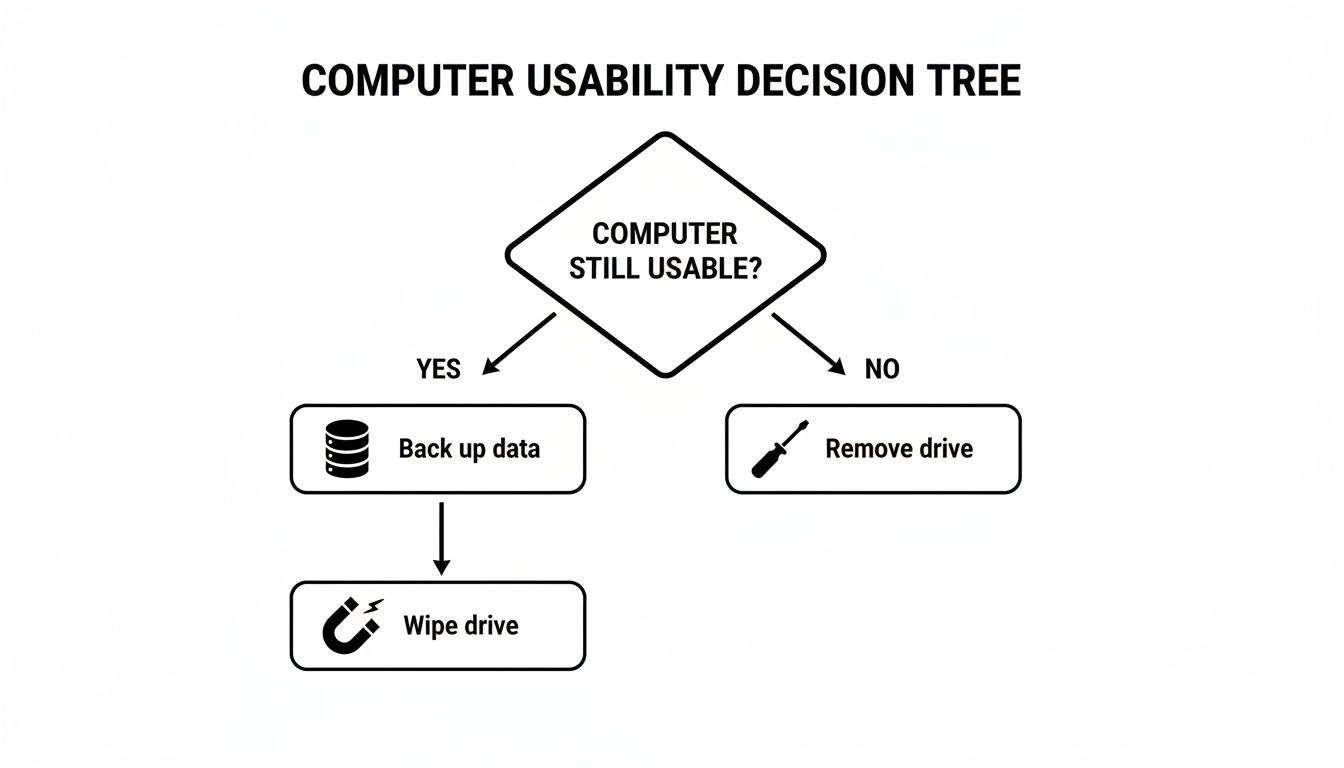
As you can see, the first choice—whether to keep the hard drive in the machine or pull it out—is a fork in the road that directs everything else.
Software-Based Wiping for Reusable Drives
If the plan is to reuse, donate, or sell the computer, smashing the hard drive to bits is obviously off the table. This is where software-based wiping, or data sanitization, comes in. This process works by overwriting every single sector of the drive with random, meaningless data, often in multiple passes.
A software wipe is like scribbling over every single word on every page of a book until nothing is remotely legible. It’s thorough.
A classic tool for this is Darik's Boot and Nuke (DBAN), especially for older spinning hard drives. Be warned, the process can take many hours, but it’s a rock-solid way to ensure your old files can't be brought back with standard recovery tools. It's a great, cost-effective option for typical office computers that haven't stored highly regulated information.
Cryptographic Erasure for Modern Drives
Here’s a trick that saves a ton of time. Many modern solid-state drives (SSDs) and even some hard disk drives (HDDs) are what we call self-encrypting drives (SEDs). Right out of the box, they automatically encrypt everything written to them with a built-in digital key. This feature provides a ridiculously fast and secure way to sanitize a drive.
With cryptographic erasure, you don't actually overwrite anything. You just delete the one thing that makes the data readable: the encryption key.
Once the key is gone, all that encrypted data on the drive instantly becomes a nonsensical jumble of characters. It's permanent, irreversible, and takes seconds.
This is the go-to method for any organization using modern hardware. It’s just as secure as a full software wipe but without the long wait. The type of drive you have really matters here; you can learn more about SSD vs. HDD technology to get a better handle on your equipment.
Physical Destruction: The Ultimate Guarantee
Now, for drives that held the really sensitive stuff—think patient health records, trade secrets, or critical financial data—there's no room for half-measures. When there can be zero chance of data recovery, physical destruction is the only way to go.
And I don't mean taking a hammer to it in the back parking lot. Professional services use specialized machinery to guarantee total obliteration.
- Shredding: Think of an industrial paper shredder, but for metal. It cuts the hard drive and its platters into tiny, confetti-like pieces, making reconstruction impossible.
- Pulverizing: This is exactly what it sounds like. The drive is essentially ground into dust, completely destroying the platters where your data lived.
- Degaussing: Specifically for magnetic drives (HDDs), a degausser uses an incredibly powerful magnetic field to instantly and permanently scramble the data patterns on the platters.
This is the gold standard for industries bound by strict compliance rules like HIPAA or for any business that values absolute security above all else. Yes, the drive is gone for good, but you get priceless peace of mind knowing the data is, too. Choosing the right path is a critical step in learning how to dispose of old computers safely.
What to Do with Old Computers: Donating, Recycling, or Trading In
So, you've securely wiped all the data from your old computers. Now what? You're left with a pile of hardware, and what you do next matters a great deal—not just for the environment, but for your company's reputation, too. Making a responsible choice here ensures your obsolete tech doesn’t end up in a landfill, where it can leach hazardous materials into the ground for decades.

You really have three main paths forward: donating, recycling, or trading in. Each one has its own set of benefits. The best route for you will depend on the age and condition of the equipment, plus what your business hopes to achieve—whether that’s supporting the community, being a good environmental steward, or getting a little money back.
Giving Back Through Donation
If your old computers are still in decent working order, donating them is a fantastic way to support your local community and give your hardware a second life. Think about it: a machine that’s too slow for your demanding business applications could be a total game-changer for a local school, a non-profit, or a community center operating on a shoestring budget.
Before you drop them off, just be sure to check a few things:
- Do they actually need it? Give the organization a quick call to make sure they can use the specific models you have.
- Is the hardware complete? Don’t just hand over a tower. Make sure you include the power cord, keyboard, and mouse so it's ready to use right out of the box.
- Can you get a tax deduction? Many non-profits are registered charities, meaning your donation could be tax-deductible. Always ask for a receipt for your records.
This is a simple but powerful way to demonstrate corporate social responsibility and make sure your old tech keeps providing value.
The Environmental Must: Certified E-Waste Recycling
When a computer is truly at the end of its life—too old, broken, or slow to be useful to anyone—certified e-waste recycling is the only responsible option. These devices are full of materials like lead, mercury, and cadmium that are toxic if they aren't handled correctly. Tossing them in the dumpster isn't just irresponsible; in many places, it's flat-out illegal.
This is where finding a certified recycler is absolutely critical. You want to look for vendors that hold either an R2 (Responsible Recycling) or e-Stewards certification. These credentials are your proof that the recycler meets the highest standards for environmental safety, data security, and worker protection.
A certified recycler won't just dump your old PCs in a landfill overseas. They will responsibly dismantle the machines, safely process the hazardous components, and recover valuable materials like gold, copper, and aluminum for reuse.
This process is a vital part of the circular economy and a fundamental step in knowing how to dispose of old computers safely. It's also a formal piece of a company's overall IT asset management strategy. To dig deeper, check out our guide on IT asset management best practices.
Cashing In with Trade-In Programs
There's a third route, especially for newer equipment: trade-in programs. Many manufacturers and big-box retailers like Apple or Best Buy will give you credit for your old devices, which you can then apply toward new gear. For a business that’s upgrading, this can be a financially smart move to help offset the cost.
It’s convenient, for sure, but remember that your data is still your responsibility. Even if the trade-in partner says they offer data wiping services, you should always perform your own secure data destruction before handing over the device. Never, ever trust a third party with this critical security step.
The global focus on this is massive and growing. The electronic waste recycling market isn't just an environmental issue; it's a huge economic driver, projected to hit USD 147.9 billion by 2035. Laptops and PCs are the biggest piece of that pie, making up 45.0% of the market and highlighting just how critical responsible disposal has become.
Ultimately, whether you donate, recycle, or trade in, the goal is always the same: ensuring your old computers are handled securely and responsibly, from the moment they leave your office to their final destination.
Navigating E-Waste Regulations And Data Compliance
When it's time to retire old business computers, you're not just clearing out storage space. You're handling a serious legal and environmental responsibility. Getting this wrong isn't a small mistake; it can lead to massive fines, a damaged reputation, and even legal battles. A tangled web of federal, state, and local laws dictates exactly how you must manage electronic waste and the sensitive information stored inside.
These regulations really boil down to two core concerns. First, your old computers are packed with hazardous materials like lead and mercury that can leach into groundwater if they're just dumped in a landfill. Second, the hard drives inside are treasure troves of data protected by strict privacy laws. Simply tossing an old machine in the dumpster is a high-stakes gamble you can't afford to take.
The first step toward a bulletproof disposal process is understanding what you're up against.
Staying On The Right Side Of Environmental E-Waste Laws
The environmental rules are all about preventing pollution. While the U.S. doesn't have a single, overarching federal law mandating e-waste recycling, a patchwork of state-level legislation creates a pretty complex map to navigate.
Right now, over 25 states have their own e-waste laws on the books. These rules often flat-out prohibit dumping electronics in the regular trash, forcing businesses to work with certified recyclers.
- Location Matters: A business in California has a completely different set of rules to follow than one in Florida. It's on you to research the specific laws for your state and city to stay out of trouble.
- Producer Responsibility: Many states use an "extended producer responsibility" model. This puts the burden on manufacturers to fund and manage recycling programs for their own products, which can often mean free or low-cost recycling options for your business.
This isn't just a local problem; it's a global one. E-waste is piling up at an alarming rate, projected to blow past 60 million metric tons in 2025. Even with that staggering number, only a tiny fraction is actually disposed of correctly. You can explore electronic recycling statistics on wifitalents.com to see the full scope of the issue.
Data Protection: The High-Stakes Side Of Disposal
As serious as the environmental rules are, data security regulations come with even bigger teeth. Failing to properly wipe a hard drive before it leaves your control isn't just an oversight—it can legally be classified as a data breach. That means mandatory reporting, investigations, and crushing fines.
Different industries have their own specific standards for data protection, and those rules follow a device all the way to its grave.
A perfect example is healthcare. Under the Health Insurance Portability and Accountability Act (HIPAA), a retired computer from a doctor's office is still considered a live container of protected health information (PHI) until that data is verifiably and permanently destroyed. A single HIPAA violation can easily spiral into millions of dollars in penalties.
Other critical regulations you need to know about include:
- Gramm-Leach-Bliley Act (GLBA): This is for financial institutions, requiring them to safeguard consumers' private financial data.
- Sarbanes-Oxley Act (SOX): Publicly traded companies are held to strict standards for securing financial records.
- Payment Card Industry Data Security Standard (PCI DSS): If you handle credit card information, this standard applies to you.
The key thing to remember is that these laws demand more than just destroying the data—they require you to prove you did it. This is precisely why a professional service that provides a Certificate of Destruction is so critical. It creates a paper trail that can stand up in an audit and is a fundamental part of learning how to dispose of old computers safely.
When To Hire A Professional IT Disposal Service
For a single home computer, you can probably handle the data destruction and recycling yourself. But when you’re talking about business computers, even for a small company, the stakes are completely different. Trying to manage IT asset disposition (ITAD) in-house can quickly turn into a minefield of compliance risks, logistical nightmares, and, worst of all, potential data breaches.
Deciding when to hand this job over to a professional service isn't just about convenience—it's a critical business decision.
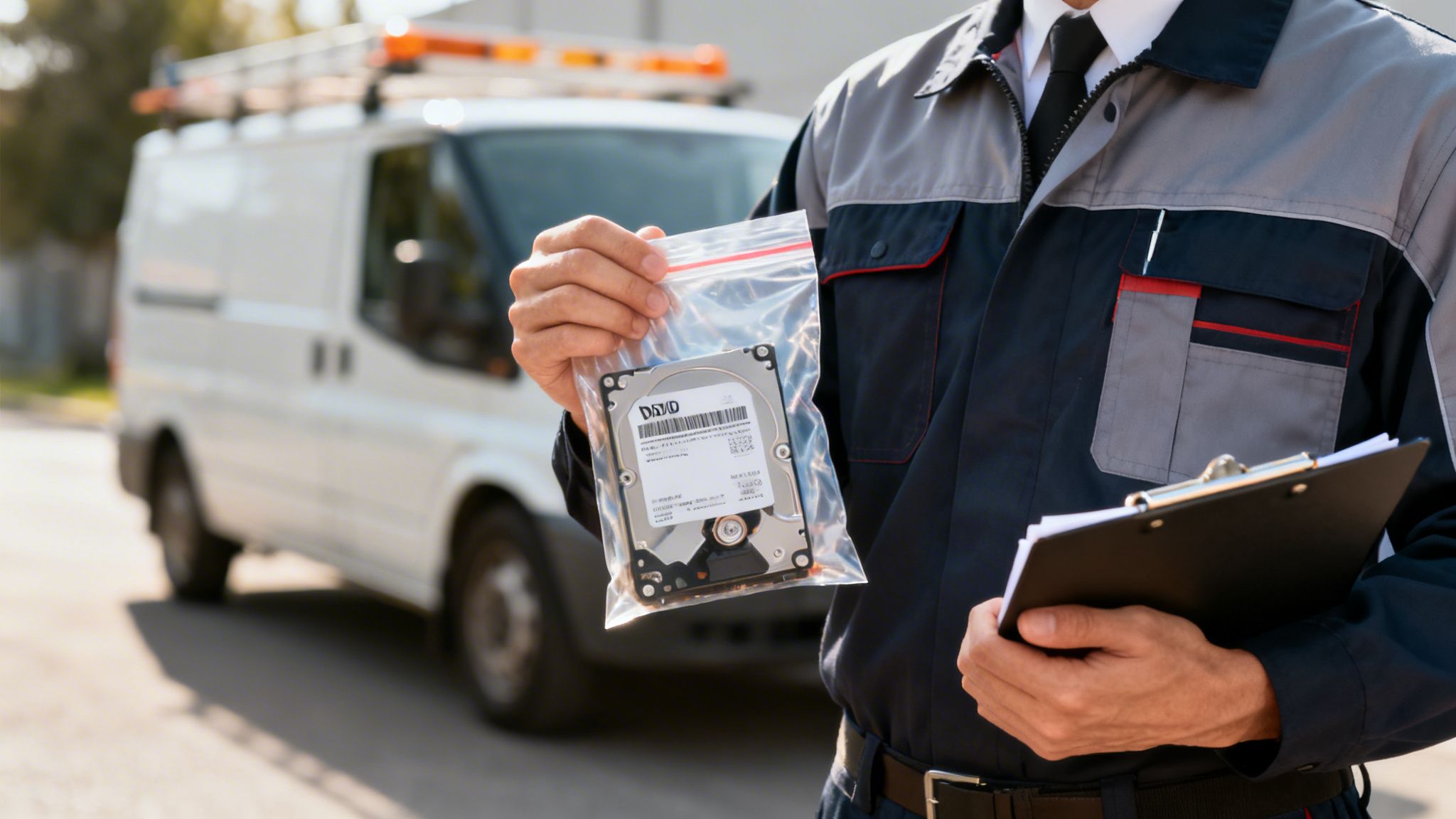
For most businesses, there’s a clear tipping point where the cost of a single mistake is far, far greater than the expense of hiring experts. A professional service turns a high-risk task into a secure, documented, and fully compliant process, giving you a level of peace of mind that a DIY approach simply can't offer.
Key Signs You Need Expert Help
So, how do you know when you've crossed that line? There are a few red flags that tell you it’s time to bring in a certified partner. Ignoring them can expose your business to some serious financial and reputational damage.
Keep an eye out for these telltale signs:
- You're Retiring Multiple Devices: Getting rid of one or two machines is one thing. But a bulk refresh involving five, ten, or even 50 computers is a major security operation that demands a documented, repeatable process.
- You Handle Highly Sensitive Data: If your business is in a regulated industry like healthcare (HIPAA), finance (GLBA), or legal services, the data on your old drives is legally protected. For you, professional, certified destruction isn't a best practice—it's a strict compliance requirement.
- You Lack Internal Expertise: Be honest—do you have someone on your team who is an expert in data sanitization standards and e-waste regulations? If the answer is no, trying to do it yourself is a huge gamble.
- You Need Verifiable Proof of Destruction: For audits, internal records, or just to sleep at night, you need more than a verbal "yep, it's done." You need a formal Certificate of Destruction for every single hard drive.
The moment you require a legally defensible paper trail, you need a professional service. That Certificate of Destruction is your official proof that you performed due diligence, protecting you from liability if a data breach investigation or regulatory audit ever comes your way.
A Practical Checklist For Vetting Disposal Partners
Choosing the right partner is every bit as important as deciding to hire one in the first place. Not all "recyclers" are the same. Some outfits do little more than ship your old equipment overseas, creating a massive security and environmental mess that could come back to haunt you.
A trustworthy vendor will be transparent, certified, and obsessed with security. Before you sign anything, walk through this checklist.
Vetting Your Disposal Vendor Checklist
Here’s a practical guide to the questions you should be asking any potential ITAD partner to ensure they're legitimate and can truly protect your business.
| Verification Area | What to Ask/Check | Why It Matters |
|---|---|---|
| Industry Certifications | Are you NAID AAA Certified for data destruction? Are you R2 or e-Stewards certified for recycling? Can I see your certificates? | These are the gold standards. They prove the vendor meets rigorous third-party requirements for security, environmental responsibility, and employee safety. |
| Chain of Custody | What does your chain-of-custody process look like? How do you track my assets from pickup to final destruction? | You need a documented trail. This should include serial number scanning, secure transport in locked vehicles, and access-controlled facilities. |
| Destruction Methods | Do you offer on-site destruction? What methods do you use (shredding, degaussing)? | On-site shredding is the most secure option, as your data never leaves your property intact. It lets you witness the destruction firsthand. |
| Insurance Coverage | Do you carry professional liability insurance that specifically covers data breaches? What are the coverage limits? | This is your financial safety net. A reputable vendor will have robust insurance to protect you in a worst-case scenario. |
| Final Documentation | Can I see a sample Certificate of Destruction? What information does it include? | The certificate should be detailed, listing each asset's serial number, the destruction method, and the date it was performed. This is your proof of compliance. |
Hiring a professional service is really an investment in risk management. It’s the only way to guarantee that the process of how to dispose of old computers safely is handled correctly from start to finish, protecting your data, your clients, and your company's future.
Turning Disposal Into A Company Policy
Knowing how to wipe one computer is one thing, but creating a documented, repeatable process for every device is what separates a prepared business from a vulnerable one. This is where a formal IT Asset Disposition (ITAD) policy comes in. Think of it less as a chore and more as a proactive security strategy for your company's data.
An ITAD policy sets clear, consistent rules for what happens when a device reaches the end of its life. It's a living document that should cover everything from how data is backed up, which data destruction methods are approved, and how you vet your disposal vendors.
For any business juggling more than a handful of devices, a solid grasp of IT Asset Lifecycle Management is the foundation for a truly secure and compliant policy.
Your ITAD policy isn't just an internal guideline; it's your best defense in a regulatory audit. It's the documented proof that you’ve done your due diligence, which can save you from massive fines and the reputational fallout of a data breach.
By putting a formal process in place, you make training new staff straightforward, ensure every department handles old tech the same way, and build a verifiable paper trail for compliance. This isn't just about tossing out old hardware—it's about building a framework that protects your business from future risks as technology evolves.
Questions We Hear All the Time About Computer Disposal
When it's time to get rid of old computers, a lot of questions pop up. Getting clear, straightforward answers is crucial, so we've put together some of the most common ones we field from businesses and individuals alike.
"Can't I Just Smash the Hard Drive with a Hammer?"
It’s tempting, and frankly, it probably feels pretty effective. But taking a hammer to a hard drive is a surprisingly unreliable way to destroy data, especially for any kind of business information.
The internal platters that hold your data are tougher than they look. A few good whacks might shatter the casing, but the platters themselves can often survive. A determined person with the right tools could still potentially recover data fragments.
For any data you can't afford to have exposed, professional physical destruction is the only real answer. This means shredding the drive into tiny, confetti-like pieces or degaussing it with incredibly powerful magnets. When it comes to sensitive business data, a DIY approach just isn't worth the gamble.
"What's a Certificate of Destruction? Do I Really Need One?"
Think of a Certificate of Destruction (CoD) as your official receipt proving that your old devices—and more importantly, the data on them—have been properly and permanently destroyed. A certified IT disposal vendor issues this document, and it's a vital part of your compliance and risk management strategy.
A proper CoD will typically detail:
- The unique serial numbers of every single hard drive destroyed.
- The exact method of destruction used, like shredding or pulverizing.
- A documented chain of custody that tracks your assets from the moment they leave your hands to their final destruction.
For any business, this isn't just a piece of paper. It's your legal proof of due diligence. If you're ever audited or face questions after a data breach, that CoD is what shields you from liability.
"Do I Need to Worry About Data on Old Printers and Routers?"
Yes, absolutely. This is one of the most common blind spots we see. People often forget that many modern office devices are essentially specialized computers.
Your office printer or copier? It likely has an internal hard drive that stores a cached image of every single document it has ever scanned, printed, or faxed. That could be anything from financial reports to employee records.
Likewise, network routers can hold sensitive network configurations, Wi-Fi passwords, and even logs of internet traffic. Before you get rid of any "smart" office device, you have to perform a factory reset. If it contains a removable hard drive or memory card, that component needs to be destroyed with the same care as a computer's hard drive.
Keep your business running without IT headaches.
GT Computing provides fast, reliable support for both residential and business clients. Whether you need network setup, data recovery, or managed IT services, we help you stay secure and productive.
Contact us today for a free consultation.
Call 203-804-3053 or email Dave@gtcomputing.com