Deciding on the best practice management software for dentists really comes down to your practice's unique needs for accessibility, data control, and of course, budget. For many new or multi-location practices, the flexibility and lower startup cost of cloud-based software is a clear winner. On the other hand, a large, established practice with heavy imaging demands might find that on-premise software offers the control and performance they can't live without.
Choosing Your Practice's Digital Foundation
Picking a practice management system (PMS) is one of the most important business decisions you'll make—it's far more than a simple IT purchase. This software becomes the central nervous system of your entire operation, touching everything from clinical workflows and the patient experience to how you manage billing and stay HIPAA compliant. Get it wrong, and you're looking at frustrated staff, operational headaches, and a potentially painful data migration down the line.
This guide is here to help you filter out the marketing hype. We’ll give you a practical framework for looking at your options, so you can make a choice that actually supports your practice's long-term vision. We're going to dig deeper than generic feature lists to provide a real-world analysis for small and mid-sized dental practices.
Key Evaluation Pillars
To find the right PMS for your dental office, you need to weigh a few core factors. Each of these directly impacts your day-to-day operations, your bottom line, and your ability to grow.
- Deployment Model: This is the first major fork in the road—choosing between a cloud-based (SaaS) system or one installed locally on your own servers (on-premise).
- Essential Features: What are the non-negotiable clinical and administrative tools you need to automate tasks and deliver better patient care?
- Security & Compliance: How will the system help you protect patient data and what's the plan for backups and disaster recovery?
- Total Cost of Ownership: You have to look beyond the sticker price to understand the true, long-term financial commitment.
By looking at the decision through these four lenses, you can move from feeling overwhelmed by all the options to feeling confident in your final choice. This methodical approach ensures the software works for you, not the other way around.
A Quick Comparison of Software Types
That first choice between cloud and on-premise software will immediately narrow your search and frame every other decision. Understanding the core trade-offs is the perfect starting point.
| Software Type | Best For | Key Advantage |
|---|---|---|
| Cloud-Based PMS | New, growing, or multi-location practices | Accessibility, scalability, lower initial cost |
| On-Premise PMS | Large, single-location practices with high-volume imaging | Data control, performance, long-term TCO |
| Hybrid Solutions | Practices needing a balance of cloud convenience and local control | Customizable security and accessibility |
We'll dive into each of these areas in more detail throughout this guide, giving you the insights to pick a system that will help your practice thrive for years to come.
The Core Features That Drive a Modern Dental Practice
When you're hunting for the right practice management software, it's easy to get buried in endless feature lists from vendors. The truth is, a successful modern dental practice runs on a handful of key tools working together. These core functions fall into two buckets that really form the heartbeat of your office: what happens in the operatory (clinical) and what happens at the front desk (administrative).
Getting these two sides to communicate effectively is where the magic happens. A system that’s brilliant clinically but clumsy on the administrative side will just create bottlenecks and frustrate your team. The real goal is finding a unified platform where both sets of tools support each other, making everyone's job easier.
Essential Clinical Workflow Tools
Think of your clinical software features as the digital extensions of your most trusted instruments. They’re what allow you to diagnose, plan treatments, and show patients what's going on with much more clarity and precision. The best tools don't just store data; they help you tell a compelling story about a patient's oral health.
Three clinical pillars really make a difference:
- Comprehensive Charting: This is so much more than a simple tooth diagram. A top-tier system gives you detailed periodontal charting to track pocket depths and gum health over time. It should also have intuitive restorative charting, letting you map out existing work, decay, and proposed treatments with just a few clicks. That visual record is gold for patient education and case acceptance.
- Intuitive Treatment Planning: Good software turns treatment planning from a rigid, static list into a flexible, multi-phase module. You should be able to build out several treatment options, present them clearly to patients with the associated costs, and then track which plans are accepted. This helps patients feel in control and gives your practice a clear roadmap for managing complex cases.
- Integrated Digital Imaging: Your practice management software absolutely must serve as the central command for all your diagnostic images. This means it needs to talk directly to your digital X-ray sensors, intraoral cameras, and any Cone Beam Computed Tomography (CBCT) scanners you use. When an image instantly populates in the patient's chart, you stop wasting time hunting for files and create a complete, accessible clinical record.
Powering the Front Office with Administrative Automation
While the clinical tools are all about patient care, the administrative features are what keep your practice running as a healthy, profitable business. These functions are designed to automate the repetitive tasks, cut down on human error, and get your revenue cycle moving faster. When your front office is running smoothly, your clinical team can put all their energy into treating patients.
A smartly automated front office is the key to unlocking hidden profit. By cutting down on administrative hours and getting payments in the door faster, these tools often deliver a direct and measurable return on investment—sometimes paying for the software itself in a surprisingly short time.
As you look at different systems, it's crucial to identify the essential practice management software features that will give your specific practice the biggest lift. Key administrative functions to focus on are patient communication, billing, and reporting.
- Automated Patient Communication: Today’s systems can handle appointment reminders via text and email, which is a massive help in reducing no-shows—a rate that can creep up to 10% in some practices. This feature also automates recall notices, filling your schedule without tying up your staff on the phone for hours.
- Simplified Billing and Insurance: This might be the single most important administrative function. Your software needs to make it easy to create and fire off electronic insurance claims, track their status in real-time, and post payments quickly. Getting a handle on your claims process directly impacts your cash flow and reduces the headaches for your billing staff.
- Insightful Financial Reporting: You can't manage what you don't measure. A solid PMS will give you detailed reports on production, collections, accounts receivable, and case acceptance rates. These numbers give you a clear, data-backed view of your practice's financial health, helping you spot trends and make smarter business decisions.
Cloud vs. On-Premise: A Crucial Decision Framework
One of the very first decisions you’ll make when picking practice management software is also one of the most lasting: cloud or on-premise? This isn't just a technical detail. The choice fundamentally shapes your practice's budget, daily workflow, IT needs, and even your ability to grow. It’s a strategic fork in the road.
To get this right, you have to move beyond generic pro/con lists. The best choice for a brand-new single-operatory clinic is often completely different from the right fit for an established multi-location group. It’s all about context.
The Cloud Model: A Focus on Accessibility
Cloud-based software, often called Software as a Service (SaaS), has become the go-to for many modern practices. With this model, your software and all your patient data live on the vendor's secure, remote servers, which you access over the internet. This neatly shifts the heavy lifting of server maintenance, security updates, and data backups from your front office to the software company.
For many dentists, this is a huge relief. The financial model is a predictable monthly or annual subscription, which makes budgeting a breeze and eliminates the five-figure shock of buying a new server. This is especially appealing for new practices or those looking to expand without massive capital outlays.
But the real game-changer is remote access. A dentist can review charts from home the night before a big case. A specialist can consult on an X-ray from a different office. Your front desk team can manage the schedule or process payments even if they aren't physically at the practice.
- Predictable Costs: You pay a recurring subscription that covers the software, support, and all future updates. No surprise hardware bills.
- Automated Security and Backups: The vendor handles HIPAA compliance on their end, applies security patches, and backs up your data—drastically reducing your IT burden.
- Easy Scalability: Adding a new user or a new location is usually as simple as upgrading your subscription plan. The software grows as you do.
Of course, this convenience has one critical dependency: your internet connection. If your internet goes down, your practice goes down. A business-grade, high-speed internet service with a backup is non-negotiable.
The On-Premise Model: A Focus on Control
The traditional on-premise model is the opposite. You buy the software licenses outright and install them on a dedicated server that physically sits in your office. Here, you own the hardware, you own the licenses, and all your patient data resides on your own equipment. This gives you absolute control over your data.
This complete data sovereignty is the number one reason practices still choose on-premise solutions. Performance is a close second. Because data is flying across your internal network—not the public internet—accessing massive files like 3D CBCT scans can be significantly faster. For a high-volume imaging center, an oral surgeon, or an ortho practice, that speed difference is palpable. To understand how various cloud models affect business operations, see this helpful guide on the benefits of cloud computing for small businesses.
The decision really boils down to your practice's core priority. If you value seamless remote access and predictable, low upfront costs above all else, the cloud is a natural fit. If total data control and performance that's independent of your internet provider are paramount, an on-premise system is the stronger choice.
This flowchart helps visualize that initial fork in the road based on what drives your practice.
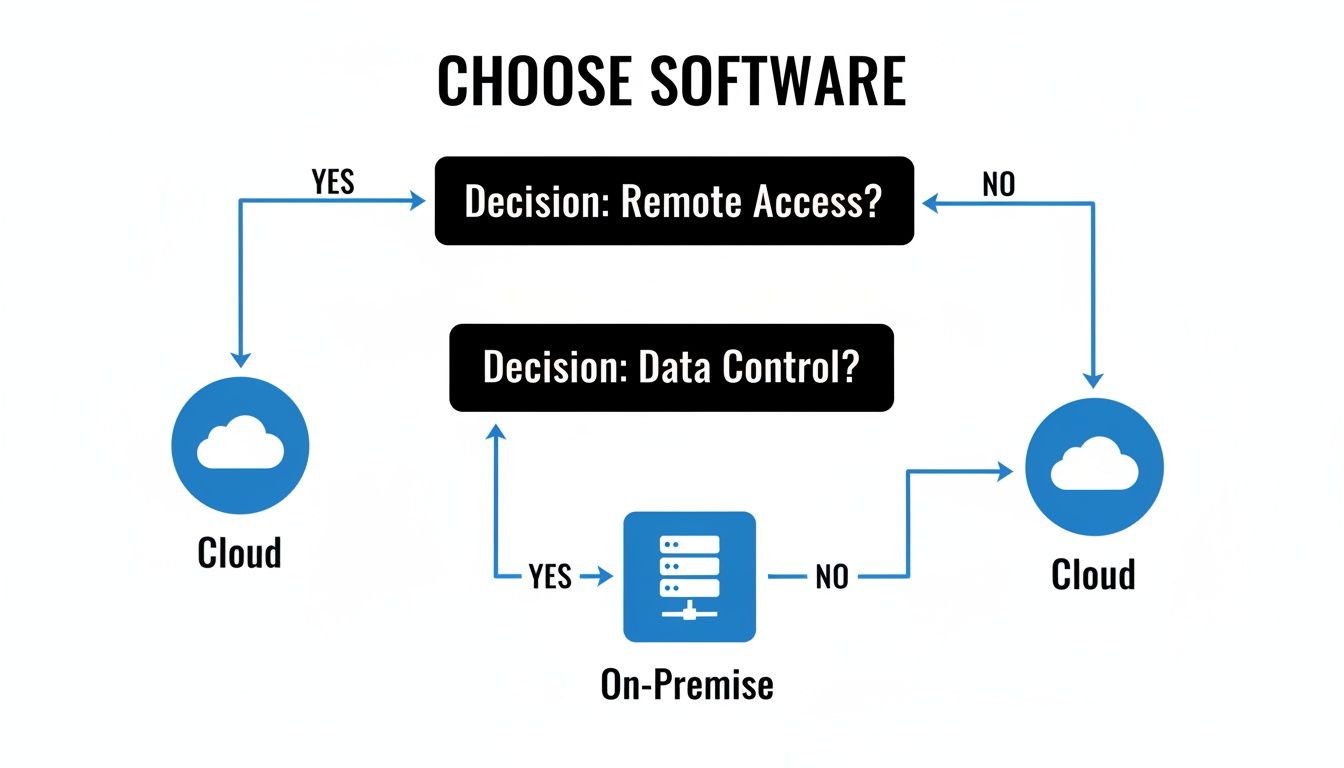
As the graphic shows, a need for remote access steers you toward the cloud, while a focus on maintaining direct control over your data points you toward an on-premise server.
Of course, the control of an on-premise setup comes with immense responsibility. You are solely in charge of purchasing, maintaining, and eventually replacing the server hardware. You're also on the hook for all security measures, software updates, and—most critically—a bulletproof backup and disaster recovery plan. This almost always requires a trusted IT support partner. The upfront investment is also significant, covering the server itself, software licenses, and professional setup.
To help clarify the trade-offs in real-world scenarios, let's break it down by situation.
Cloud vs On-Premise Dental PMS a Situational Comparison
This table compares the two models based on common practice scenarios and priorities, helping you see which path aligns better with your specific needs.
| Consideration | Cloud-Based Software (SaaS) | On-Premise Software | Key Takeaway for Dentists |
|---|---|---|---|
| Upfront Cost | Low. No server purchase required. Just first month's subscription. | High. $5,000 – $15,000+ for a server, licenses, and IT setup. | Cloud is far easier on the budget for new practices or those wanting to preserve capital. |
| Remote Access | Native. Access your full PMS from any device with an internet connection. | Complex. Requires a VPN and expert IT setup; can be slow and less secure if not done right. | If your team needs to work from home or multiple locations, cloud is the clear winner. |
| Data Control | Vendor has custody of the data on their servers. You have access rights. | Absolute. Your data lives on your server in your office. You have 100% control. | For practices where total data sovereignty is a non-negotiable, on-premise is the only option. |
| IT Management | Minimal. Vendor handles backups, security, and updates. You just manage users. | Significant. You are responsible for everything: hardware, backups, security, and disaster recovery. | On-premise requires either a dedicated IT staff member or a reliable managed IT services provider. |
| Performance | Dependent on internet speed. Large imaging files can be slow to load. | Very fast. Data transfer is over your local network, ideal for heavy imaging/CBCT use. | If your practice is built around 3D imaging, on-premise performance can be a major advantage. |
| Scalability | Simple. Add users or locations by adjusting your subscription. | Complex. Requires hardware upgrades and potential downtime. | Cloud software scales seamlessly as your practice grows. |
Ultimately, choosing between cloud and on-premise isn't about which one is "better" in a vacuum. It's about which one is better for your practice. It's a calculated decision that hinges on your size, specialty, budget, and where you see your practice in the next five to ten years.
Navigating HIPAA Compliance and Data Security

When you're choosing the best practice management software for dentists, protecting patient data isn't just a feature—it's your most important non-clinical responsibility. HIPAA compliance is not a switch you can flip on. It’s an entire ecosystem that involves your software, your team’s daily habits, and frankly, some expert IT guidance.
A vendor that says their platform is “HIPAA compliant” is only telling you half the story. The software might have the right security tools built-in, but true compliance comes down to how your practice actually uses those tools and the safeguards you wrap around them.
The very first step is an absolute deal-breaker: you must have a signed Business Associate Agreement (BAA) from your software vendor. This is a legal contract that makes the vendor responsible for protecting the electronic Protected Health Information (ePHI) they handle for you. Without a BAA in hand, you’re non-compliant before you’ve even started, leaving your practice wide open to serious legal and financial trouble.
Core Security Features You Cannot Overlook
Once the BAA is settled, your dental PMS needs a solid set of tools to lock down ePHI from anyone who shouldn't see it—whether that's an external hacker or an internal team member. These features are the technical foundation of your practice's security.
- Data Encryption: All patient data has to be scrambled and unreadable, both "in transit" (when it’s sent over a network) and "at rest" (when it's just sitting on a server). This makes the data useless to anyone without the correct authorization key.
- Role-Based Access Controls: Your front desk coordinator doesn't need to see the same level of clinical detail as a periodontist. This feature lets you create specific roles—receptionist, hygienist, office manager—and limit their access to only the information they absolutely need to do their job.
- Detailed Audit Logs: The system must keep a running, unchangeable log of every single action. You need to know who accessed what data, exactly when they did it, and any changes they made. This log is your best friend when investigating a potential breach or simply holding team members accountable.
And when it comes to patient communication, make sure any texting or email features are just as secure. A good resource for selecting HIPAA compliant texting apps can help you avoid accidentally exposing sensitive information. These security basics are your first line of defense.
Beyond the Vendor: The Critical Role of Independent Backups
Here’s a hard truth every practice owner needs to hear: your vendor's backup is not a disaster recovery plan. A cloud vendor’s backup is designed to protect you from their server failing. It offers almost no protection from threats happening on your end, like a ransomware attack that encrypts your files or a staff member accidentally deleting a whole block of patient records.
Relying solely on your software vendor for data backups is like giving the only key to your house to a stranger. You need your own copy, under your own control, to be truly secure.
A real disaster recovery plan follows what we in the IT world call the 3-2-1 backup rule. It’s simple: maintain at least three copies of your data, store them on two different types of media, and keep at least one of those copies completely off-site.
For a modern dental practice, this looks like a layered strategy:
- Vendor Backup (Cloud PMS): This is your first, most basic layer, handled by the software company.
- Local Backup (On-Premise PMS): If you run a server in your office, a local backup to a separate device is a must for quick recovery from small hiccups.
- Independent, Encrypted Cloud Backup: This is your true safety net. It means using a separate, third-party service to automatically back up your entire system to a secure, encrypted cloud location that has nothing to do with your PMS vendor.
This layered approach is the only way to truly protect your practice from catastrophic data loss, whether it's from ransomware, equipment failure, or even a fire or flood. Setting this up correctly can be complex, which is why working with an IT provider who understands dental practices isn't a luxury—it's essential. For more on this, our guide on IT support for dental offices goes into much greater detail.
Calculating the True Cost and ROI of Your Software
When you're shopping for practice management software, it's easy to get fixated on the sticker price. But that initial invoice is just the tip of the iceberg. To really understand what you'll be spending, you need to look at the Total Cost of Ownership (TCO)—every single expense tied to that software over its entire lifespan.
The cost structure for a traditional on-premise system is worlds apart from a cloud-based one. Each has its own set of ongoing—and sometimes hidden—costs that can catch you by surprise if you're not prepared.
Understanding Total Cost of Ownership
With an on-premise system, the software license you buy upfront is only the beginning of your investment. You're building and maintaining your own IT infrastructure, and those costs add up quickly.
- Hardware Investment: You'll need a dedicated server, which can easily run from $5,000 to $15,000. And that's not a one-time purchase; expect to replace that hardware every 5-7 years to keep things running smoothly.
- Licensing and Upgrades: On top of the practice management software license itself, you're also paying for operating system licenses, database software (like Microsoft SQL Server), and often hefty fees for major version upgrades down the line.
- IT Support and Maintenance: This is a big one. You either need an in-house IT person or an outside consultant on retainer. They're responsible for keeping the server healthy, applying critical security patches, managing backups, and being on call when something inevitably breaks.
For a cloud-based (SaaS) system, the costs are generally more predictable, but you still need to read the fine print.
- Subscription Fees: This is your recurring monthly or annual payment. The good news is that it typically bundles software access, routine updates, and basic support into one fee.
- Data Migration Charges: Moving years of patient records from your old system to a new cloud platform is a complex job. Most vendors charge a one-time fee for this service.
- Integration Costs: Does the software need to talk to your imaging devices or a specialized third-party service? If those integrations aren't part of the standard package, expect to pay extra monthly fees to connect them.
Managing all these software-related expenses is a discipline in itself. To get a better handle on it, it's worth reviewing the best practices for software license management to make sure you're not leaving money on the table.
Measuring Your Return on Investment
Once you have a clear picture of the costs, you can start connecting them to real-world financial gains. Calculating the Return on Investment (ROI) for your PMS isn't about a fuzzy feeling of "being more efficient"—it’s about tracking concrete numbers that prove the software is paying for itself.
A well-chosen PMS should not be an expense; it should be a profit center. By tracking key metrics before and after implementation, you can precisely quantify how the software is contributing to your bottom line.
Here are the key areas where a great PMS delivers a measurable ROI:
- Reduced Administrative Hours: Start by tracking how much time your team spends on manual tasks like appointment reminders, insurance eligibility checks, and pulling daily reports. Good software can automate these jobs, freeing up dozens of hours a week. That's time your staff can now spend on high-value work, like following up on unscheduled treatment and building patient relationships.
- Faster Insurance Payment Cycles: A modern PMS with a clean electronic claims workflow can slash your accounts receivable. If your system helps you get paid in 25 days instead of 45, that’s a massive improvement to your practice’s cash flow.
- Increased Case Acceptance: This is where the money is. When your software seamlessly integrates with your imaging and allows you to present treatment plans visually, patients understand the need and are more likely to say "yes." Bumping up case acceptance by just 5-10% on larger procedures can add tens of thousands of dollars in revenue each year.
- Improved Patient Retention: Automated recall systems are your best defense against a leaky bucket. The right software ensures patients don't fall through the cracks for their hygiene appointments. Since improving patient retention by just 5% can boost practice profitability by 25% or more, this feature pays for itself almost immediately.
Finally, don't forget to scrutinize the vendor's support. If your system goes down and you're stuck on hold for hours, any potential ROI evaporates in a cloud of lost production and staff frustration. Always check their Service Level Agreements (SLAs) for guaranteed response times so you know help will actually be there when you need it.
Making a Confident Choice with a Software Scorecard
You’ve sat through the demos, listened to the sales pitches, and weighed the pros and cons of cloud versus on-premise. Now comes the hard part: making the final call. It’s easy to get swayed by a slick presentation or a charming salesperson, but the best way I've seen to cut through the noise is to use a simple, objective tool: a software scorecard.
This isn't just about making a list. It's about turning a subjective "shopping" trip into a systematic evaluation. A scorecard forces you and your team to define what actually matters for your daily operations before you get distracted by bells and whistles. It becomes your anchor, ensuring you compare every option against the same well-defined standards.
Building Your Custom Scorecard
A great scorecard starts with a team huddle. Get everyone in a room—your dentists, hygienists, assistants, and front office staff—and brainstorm every feature you can think of. Divide them into "must-haves" and "nice-to-haves." This is crucial because the feature that saves your front desk three hours a week might not even be on a dentist's radar.
Next, group your criteria into logical categories. Here’s a basic framework to get you started:
- Clinical Workflows: How intuitive is the periodontal and restorative charting? Can you easily build and present complex treatment plans? Does it integrate directly with your specific X-ray sensors and CBCT scanner?
- Administrative & Patient Tools: Does it offer automated appointment reminders via both text and email? Can you verify insurance eligibility in real time? How straightforward is the electronic claims process?
- The Technical & Financial Picture: What are the vendor’s guaranteed support response times (SLA)? What is the real total cost of ownership over five years? How complex will the data migration be from your old system?
A well-built scorecard makes the final decision almost obvious. When one vendor clearly scores higher on the features you’ve collectively identified as most important, you can move forward with confidence, knowing your choice is backed by data, not just a gut feeling.
Scoring and Prioritizing Vendors
Once you have your criteria, give each one a "weight" based on its importance to your practice. Be honest here. A feature like seamless integration with your existing $80,000 CBCT machine is a non-negotiable deal-breaker; that gets a heavy weight. Something like an internal team chat feature might be a "nice-to-have," so it gets a much lower weight.
Now, pop this into a simple spreadsheet. As you evaluate each vendor, score them on a scale of 1-5 for every line item. Multiply the score by the weight to get a true picture.
| Feature | Weight | Vendor A Score | Vendor A Weighted | Vendor B Score | Vendor B Weighted |
|---|---|---|---|---|---|
| CBCT Integration | 10 | 5 | 50 | 2 | 20 |
| Insurance Verification | 8 | 4 | 32 | 5 | 40 |
| Patient Reminders | 7 | 5 | 35 | 5 | 35 |
| Total Weighted Score | 117 | 95 |
This simple math immediately cuts through the clutter. It gives you a clear, numerical reason for your choice, which is incredibly helpful when you need to justify the decision to partners or other stakeholders.
Planning for a Smooth Transition
With a winner chosen by your scorecard, the focus shifts from selection to implementation. A smooth "go-live" day is the direct result of meticulous planning, not luck. Your migration checklist should cover these key points:
- Data Cleansing: Work with your current software provider to clean up patient records and accounts before you attempt to move them.
- Staff Training: Book several role-specific training sessions with the new vendor. Your hygienists don't need to know the billing module inside and out, and vice-versa.
- Hardware & Network Audit: Have your IT support confirm that your workstations and network can handle the new software’s demands.
- Contingency Planning: Set a firm "go/no-go" date and have a backup plan ready in case critical issues pop up during the final tests.
Using a scorecard to find the best practice management software for dentists and then following up with a solid migration plan is the surest way to make sure your new investment pays off from day one.
Common Questions We Hear About Dental Software
Once you’ve settled on what feels like the right practice management software, a whole new set of practical questions usually surfaces. It's one thing to choose a system; it's another to live with it day-to-day. Let's walk through some of the most common hurdles and questions we hear from practices making a change.
A lot of dentists first ask about the timeline. How long does this really take? For a standard software migration, you should plan for about four to eight weeks from your initial kickoff to the final "go-live" day. This isn't just a flip of a switch; the process involves carefully pulling your data, cleaning it up, mapping it to the new system's fields, and a whole lot of testing.
What Could Go Wrong When Switching Software?
Changing your practice's core software is a major operational shift, and it absolutely comes with risks. The two biggest things that can go wrong are data corruption and practice downtime. If your patient data isn't mapped perfectly from the old system to the new one, you can end up with a clinical and administrative disaster. We're talking scrambled records, lost treatment notes, and billing chaos.
Downtime is the other major headache. A poorly managed transition can bring your front desk to a screeching halt, leaving you unable to schedule patients, process payments, or even pull up a chart for hours—or worse, days. That translates directly to lost production and a team that’s pulling their hair out.
This is precisely where having a dedicated IT partner is a game-changer. Think of them as the project manager who speaks both "dentist" and "tech." They'll work directly with your software vendor to head off these problems, ensuring your data stays intact and planning the cutover to cause the least possible disruption to your actual patient care.
Why Is It So Hard to Switch from One Cloud Platform to Another?
You'd think moving from one cloud system to another would be simple, but it can be surprisingly tough. The biggest obstacle is often data export limitations. Some cloud vendors simply don't make it easy to get a complete, usable backup of your own data in a standard format you can take somewhere else.
This creates a nasty situation known as "vendor lock-in." The technical pain and financial cost of extracting your data and moving to a competitor are so high that you feel trapped, even if you’re not happy with the software or the service you're paying for.
If We’re Using Cloud Software, Do We Still Need Local IT Support?
Yes, 100%. Even when your main software lives in the cloud, your local office network is the highway everything runs on. Your IT support team is still critical, just for slightly different reasons.
- Network Stability: They make sure your internet connection is solid, secure, and fast enough to keep your cloud PMS from lagging.
- Workstation Security: Every single computer in your office that accesses patient data is a potential vulnerability. IT support handles the security patches, monitoring, and antivirus to keep them locked down.
- Hardware and Peripherals: You still have printers, signature pads, intraoral scanners, and digital X-ray sensors. Local IT is the team you call when a sensor stops talking to the cloud software or a scanner goes on the fritz.
Cloud software doesn't get rid of the need for IT expertise; it just changes the focus. Your IT partner’s job is to make sure all the technology inside your four walls works flawlessly so you can always access your systems in the cloud.
Wrapping It All Up
Choosing the right practice management software is a major decision, but it doesn't have to be an IT nightmare. The goal is to find a system that lets you focus on your patients, not on troubleshooting technical glitches.
At GT Computing, we specialize in helping dental practices like yours navigate these exact challenges. From setting up a secure network that meets HIPAA standards to ensuring your new software and imaging devices talk to each other flawlessly, we're here to provide fast, reliable support. Think of us as your on-call IT department.
Ready to make a change without the headache? Let's talk about your practice's specific needs.
Give us a call at 203-804-3053 or send a message to Dave@gtcomputing.com for a free consultation.
Keep your business running without IT headaches.
GT Computing provides fast, reliable support for both residential and business clients. Whether you need network setup, data recovery, or managed IT services, we help you stay secure and productive.
Contact us today for a free consultation.
Call 203-804-3053 or email Dave@gtcomputing.com
.