It’s a feeling every professional dreads: the sickening crunch of an iPhone hitting the pavement, or the slow, inevitable fade of a battery that just won't hold a charge. When your phone is your office, a shattered screen or a dead battery isn't a minor hiccup—it's a full-blown work stoppage. This guide is for the busy professional in Winter Haven who needs to get their iPhone fixed fast, without the guesswork.

What to Do When Your Lifeline is Down
For a real estate agent who relies on their phone for client calls and contracts, or a doctor managing patient records on the go, a broken iPhone brings business to a grinding halt. You’re suddenly cut off from your calendar, your contacts, and your ability to get work done. It’s more than just losing a gadget; it's like having your office door locked from the outside.
And you're certainly not alone. The smartphone repair market was a staggering USD 19.2 billion industry in 2023, and it's on track to more than double. What are the biggest culprits? Cracked screens make up 42% of all repairs, with failing batteries coming in second at 25%. These numbers show that a broken phone is a common, frustrating reality for millions.
The Case for a Local Winter Haven Repair Shop
When your iPhone gives up, the last thing you want to do is ship it off and wait days for its return. The security of your data and the speed of the fix are paramount. That’s where a local iPhone repair shop in Winter Haven, FL really shines.
- Get Back to Work Faster: Most common fixes, like replacing a screen or battery, can often be handled in about an hour. You can drop it off and get back to your day with minimal disruption.
- Talk to a Real Person: Nothing beats a face-to-face conversation. A local technician can look at the damage, give you a straight answer on the cost, and explain exactly what needs to be done. No confusing support tickets or long hold times.
- Invest in Your Community: Choosing a local business means your money stays right here in Winter Haven, supporting other local families and businesses.
Think of it like any other essential service. Just as you’d want to find reliable computer repair services near you for your office network, having a go-to expert for your mobile tech is just as critical. Our goal with this guide is to walk you through your options, explain the costs, and give you the confidence to get your digital life back on track without missing a beat.
What's Wrong With My iPhone and What Will It Cost to Fix?
When your iPhone goes on the fritz, it’s easy to panic. But figuring out what's actually broken is the first step to getting it fixed. Most iPhone troubles boil down to a handful of common culprits, sort of like the usual suspects for car trouble. Once you know what you’re dealing with, you can find the right iPhone repair in Winter Haven, FL, and get a realistic idea of the cost.
Let's be real: the undisputed champion of iPhone disasters is the shattered screen. One clumsy drop, and suddenly you're staring at a spiderweb of glass that makes your phone a pain to use. Right behind that is the classic dying battery. If your phone can't even make it to lunchtime without a charge or just randomly shuts down, the battery has likely seen better days.
Breaking Down Repair Price Ranges
Trying to nail down an exact repair cost can feel a bit like guesswork. The final price really depends on which iPhone model you have and just how bad the damage is. Still, we can give you a pretty good ballpark for what to expect from local shops here in the Winter Haven area. For a broader perspective, you can also check out this helpful guide on the general cost to fix an iPhone to see how prices stack up.
Here’s a quick look at what you might be paying for common fixes:
- Screen Replacement: This is one of the most common—and necessary—repairs. For newer iPhones, a new screen will typically run you between $150 and $350. Thankfully, older models are usually cheaper to fix.
- Battery Replacement: Think of this as a quick tune-up for your phone. A fresh battery breathes new life into your device and generally costs between $70 and $120.
- Charging Port Repair: If your iPhone refuses to charge, the port might just be full of lint or could be damaged internally. This fix is usually in the $80 to $130 range.
- Water Damage Treatment: This one's the wild card. The cost is all over the place because a technician has to do a full diagnostic to see what was fried. It could be as low as $100 or climb past $400 if major components need replacing.
Remember, these are just estimates. A technician needs to see your specific phone to give you a firm price based on the actual parts and labor required.
A cracked screen isn't just ugly; it can also break the phone's water-resistant seal and open the door for more problems down the line. To see what goes into a proper fix, you can learn more about our specific approach to cracked screen repairs. The best move is always to get a professional quote to know exactly what your iPhone repair in Winter Haven, FL, will cost.
When your iPhone takes a tumble, the big question is: where do you go for help? In Winter Haven, you're basically looking at two paths, and it feels a lot like choosing between your car's dealership service center and your trusted local mechanic. One offers the official stamp of approval, the other offers speed and value.
An Apple Authorized Service Provider (AASP) is the dealership equivalent. You're guaranteed to get Original Equipment Manufacturer (OEM) parts, and the technicians working on your phone have been trained directly by Apple. If your iPhone is still under warranty or you're covered by AppleCare+, this is your safest bet. Going anywhere else could void that coverage, which is a risk you don't want to take with a new device. The trade-off? It often costs more, and you might be without your phone for longer, especially if it has to be shipped out.
The Case for Independent Repair Shops
Then you have the local independent repair shops. For many of us, these are the heroes of the story. They’re fast. We’re talking common fixes like screen swaps or new batteries done in about an hour. For a busy professional, that’s a game-changer. You can't just put your life on hold for a day or two waiting for a phone repair.
This flowchart gives a good idea of how a technician starts diagnosing the problem, whether it's the screen, the battery, or a charging port acting up.
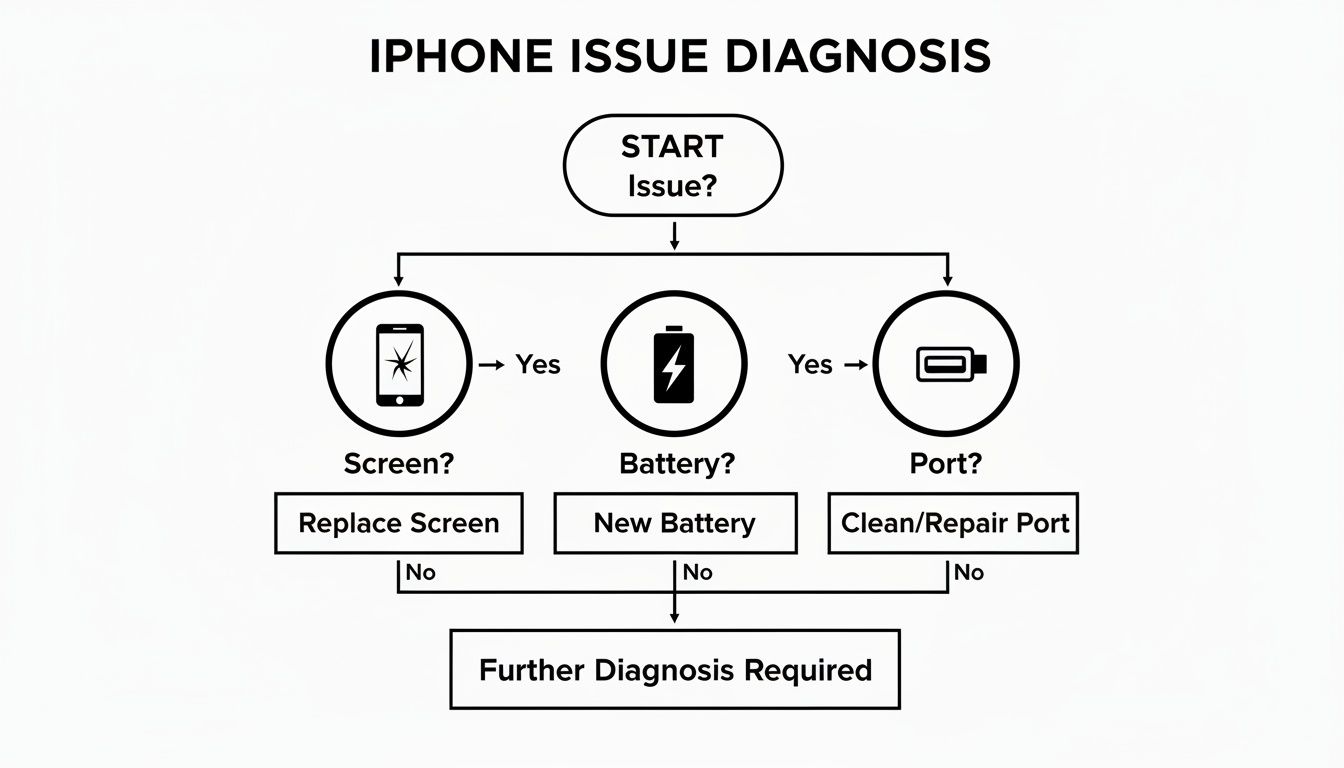
It really just maps out the troubleshooting steps, showing how different symptoms point to different solutions. It’s a good way to visualize what’s going on inside your phone.
For many, the decision comes down to a simple cost-benefit analysis. Is preserving a warranty on an older device worth the extra cost, or is a quick, affordable fix from a reputable local expert the more practical choice?
Weighing Cost and Convenience
Let's be honest, cost is a huge driver. The numbers don't lie: a whopping 68% of users choose independent shops over the official stores. Why? Because they can save up to 45% on the final bill. In 2023 alone, these local businesses grabbed 35% of the entire U.S. smartphone repair market, which tells you they're doing something right. You can dig into more smartphone repair industry statistics if you're curious about these trends.
What this really means for folks here in Winter Haven is that a local shop isn’t just a "budget" option; it’s a smart, mainstream choice. They stay competitive by offering a mix of quality parts, lightning-fast turnarounds, and the ability to talk directly to the person fixing your device—something you rarely get with a big corporation. The trick is to find a shop that has a solid reputation and is known for using high-quality components.
Ultimately, choosing between an Apple Authorized provider and an independent iPhone repair shop in Winter Haven, FL, comes down to your situation. If your phone is new and still under warranty, stick with Apple. It's the only way to be completely sure. But if it's an older model and you need it fixed fast without breaking the bank, a well-regarded local technician is almost certainly your best move.
How to Prepare Your iPhone for Repair

Before you hand your iPhone over to a technician, it's smart to take a few minutes to get it ready. Think of it like prepping your house before a contractor comes over—you’d secure your valuables and clear a path for them to work. Doing this for your phone protects your data, safeguards your privacy, and helps the repair go as smoothly as possible.
Your iPhone is a hub for your personal and professional life, packed with everything from family photos to sensitive client information. That makes backing it up the single most important thing you can do. A proper backup is your safety net, ensuring that even if the worst happens and your device needs to be wiped, your digital world is safe and sound.
Create a Secure Backup
You’ve got two main ways to back up your iPhone: using iCloud or connecting it to a computer. Neither is better than the other; it’s all about what works for you. The goal is the same: create a full copy of your data.
Backing Up to iCloud:
- Make sure your iPhone is connected to a solid Wi-Fi network.
- Head to Settings, tap your name at the top, and then select iCloud.
- Tap on iCloud Backup and check that the feature is toggled on.
- Hit Back Up Now and let it run until it’s finished.
The iCloud method is incredibly convenient because it stores your backup on Apple’s servers, meaning you can access it from just about anywhere.
Backing Up to a Computer:
- On a Mac: Just plug in your iPhone, open Finder, and click on your device in the sidebar. From there, click "Back Up Now."
- On a PC: Connect your iPhone and open iTunes. Click the little phone icon near the top left, then select "Back Up Now."
Backing up to a computer is usually faster than using iCloud and doesn't eat into your cloud storage. It's a fantastic alternative. If you'd like more in-depth guides on this and other device maintenance topics, feel free to browse our repair and support section.
Protect Your Privacy and Security
Alright, with your data safely copied, the next job is to secure the device itself before your iPhone repair in Winter Haven, FL. These next steps are all about preventing anyone from getting into your accounts or personal files.
First, you absolutely have to turn off Find My iPhone. Many repair diagnostics and software tools simply won't run with this security feature active, preventing the technician from doing their job. To do it, go to Settings > [Your Name] > Find My, tap Find My iPhone, and toggle it off. You'll need your Apple ID password to confirm.
For a bulletproof layer of security—especially if your phone holds sensitive business data—think about completely erasing your iPhone after you've backed it up. This is the only way to 100% guarantee no one can access your information. You can do this in Settings > General > Transfer or Reset iPhone > Erase All Content and Settings.
Lastly, pop your SIM card out. It’s a simple step that only takes a second. While it's not absolutely essential for most repairs, it’s just one more easy way to protect your cellular plan and personal phone number.
Key Questions to Ask Your Repair Shop
When you need an iPhone repair in Winter Haven, FL, you’re not just looking for a quick fix. You’re handing over a device that’s central to your life and business, and you need to trust the person on the other side of the counter. The best way to build that trust is to walk in prepared with a few smart questions.
Think of it less like a transaction and more like a brief interview. The answers you get will tell you everything you need to know about their expertise, the quality of their work, and how much they value you as a customer.
Start with the obvious: the cost. Never just drop off your phone without asking, "Can I get a detailed, itemized quote first?" A trustworthy shop will have no problem breaking down the cost of both the new parts and the labor involved. This simple question is your best defense against surprise fees popping up on the final bill.
Getting the Scoop on Parts and Warranties
Once you’ve sorted out the price, it’s time to dig into the quality of the repair itself. The two biggest factors here are the parts they use and the guarantee they offer on their work.
A great question to lead with is, "Do you use OEM (Original Equipment Manufacturer) parts, or high-quality aftermarket ones?" OEM parts come directly from Apple’s supply chain, so they're a perfect match. That said, there are some fantastic aftermarket parts out there, but asking this shows the shop you care about quality and helps you understand their standard.
Next, you absolutely have to ask about the warranty. A shop's warranty is their promise to you that they stand behind their repair.
- Warranty on Parts: How long is the replacement screen or battery covered? 90 days is a decent minimum, but some of the best shops will offer a year or even a lifetime guarantee.
- Warranty on Labor: What happens if the part fails because of a mistake during installation? Ask if their labor is covered, too. This protects your investment.
A technician's experience is the foundation of a good repair. Don’t hesitate to ask, "How long have your technicians been repairing iPhones?" An experienced professional is less likely to make costly mistakes.
Protecting Your Data and Security
Finally, don’t leave without addressing the security of your information. Your iPhone contains a treasure trove of personal and business data, and you need to know it will be handled with care.
Look the technician in the eye and ask them directly: "What are your data privacy and security protocols during the repair process?"
A professional shop should have a clear, immediate answer. They should assure you that your privacy is a priority and that they will only access what's absolutely necessary to test the phone after the repair is complete. Asking this question not only protects you but also signals that you’re a savvy customer, which often leads to better service.
With these questions in your back pocket, you’re ready to find a reliable expert for your iPhone repair here in Winter Haven.
Your iPhone Repair Questions Answered
Even after you've decided on a repair shop, a few questions are probably still floating around in your head. Getting straight answers is the best way to feel confident before you hand over your phone. Here are the most common questions we hear from people in Winter Haven, and the no-nonsense answers you need.
How Long Does an iPhone Screen Repair Usually Take?
You'll be happy to hear that for most standard screen or battery swaps, a good independent shop can have you in and out in under an hour. This is a game-changer for busy professionals who simply can't be disconnected from their work for a whole day.
Of course, there are exceptions. If the damage goes beyond just the screen, or if you have a brand-new model that requires special-order parts, it might take a day or two. The best thing to do is just ask for a time estimate when you get your quote—any honest tech will be upfront about it.
Will a Third-Party Repair Void My Apple Warranty?
This is the big one, and the answer is important. If your iPhone is still under Apple's one-year limited warranty or you have an AppleCare+ plan, taking it to a non-authorized shop for a fix can void the warranty on that specific part.
It’s a trade-off: authorized repairs preserve your warranty but come at a premium, while independent shops provide significant cost savings, especially for devices that are already out of warranty.
Honestly, if your phone is older and the warranty expired a long time ago, this is a non-issue. While the "Right to Repair" movement is making progress, for now, it's a calculated risk you have to weigh for newer iPhones.
Is It Worth Fixing an Older iPhone?
Deciding whether to fix an older iPhone usually boils down to simple math. I always tell my clients to use this rule of thumb: compare the repair bill to the phone's current value.
If a repair costs less than 50% of what you'd spend on a new or similar refurbished model, fixing it is almost always the smarter financial move. Think about it: spending $150 to fix a screen on an iPhone that still runs all your business apps perfectly makes a lot more sense than dropping over $800 on a new one. If your older phone isn't slowing you down, a good repair can easily give it a few more years of life and save you a bundle.
Keep your business running without IT headaches.
GT Computing provides fast, reliable support for both residential and business clients. Whether you need network setup, data recovery, or managed IT services, we help you stay secure and productive.
Contact us today for a free consultation.
Call 203-804-3053 or email Dave@gtcomputing.com
.