A server update hits in the middle of a workday. Your front desk cannot open the practice management system. Staff start using personal phones because the office VoIP line is acting up. A partner at a law firm cannot access a client file before a deadline. You search business tech support near me and get a page full of companies that all sound the same.
A primary issue is that most small businesses are not choosing between good and bad marketing. They are choosing between a provider who can keep operations stable and one who only shows up after something breaks.
For lawyers and dentists, the difference is bigger than convenience. It affects client trust, compliance exposure, scheduling, billing, and whether your team can work without interruption. A generic support checklist rarely catches that. You need a local partner who understands not just computers, but how your business runs.
Why 'Good Enough' Tech Support Is Costing Your Business
The most expensive IT problem is usually not the repair bill. It is the lost time around it.
A broken workstation can stall intake, scheduling, billing, records access, and communication all at once. If your provider only reacts after a failure, your business pays for the outage first and the fix second. That is why “good enough” support often becomes the costliest option.
Reactive support creates hidden losses
Small business owners often judge support by one question: how much does it cost per month? That matters, but it is incomplete.
The better question is this: what happens to your day when systems stop working, users wait for help, or a security issue spreads before anyone notices? In a law office, that can interrupt document access and secure communication. In a dental office, it can affect scheduling, imaging, claims, and patient data handling.
Key takeaway: Cheap support is not cheap if it leaves your staff waiting, improvising, or working around recurring issues.
A lot of businesses still treat IT as a utility. Keep the internet on. Fix the printer. Reset passwords when someone calls. That approach made more sense years ago. It breaks down once your business depends on cloud apps, remote access, cybersecurity controls, backups, and compliance-sensitive data.
The market is moving because the risk is real
The demand for stronger support is not theoretical. The US IT services market is projected to reach $675.20 billion by 2029, and small businesses often budget 3-7% of operating expenses for IT, according to ClearFuze’s review of IT support costs and market growth. The same source notes that California reported $2.54 billion in internet crime losses in 2024, with phishing and extortion among the primary threats targeting SMBs.
That matters even if your business is nowhere near California. It shows where the pressure is coming from. Small businesses are being forced to treat IT as an operational and security function, not a side task.
What does not work
Some patterns fail over and over:
- Hourly-only break-fix for everything: This can work for isolated hardware issues. It works poorly when your needs include backups, monitoring, security, and recurring user support.
- One person who “knows computers”: Informal support helps until that person is unavailable, misses a security issue, or cannot document what was changed.
- Generic support with no industry context: A provider may know Microsoft 365 and still miss what secure file handling means for a legal office or what HIPAA discipline looks like in a dental practice.
- No plan for recurring issues: If the same workstation, WiFi segment, or cloud login problem keeps returning, you do not have support. You have a revolving ticket.
Businesses usually reach out for local help after enough frustration has piled up. A better move is to start the search before the next outage forces your hand.
First Steps Before You Search for IT Support
Do not start by comparing providers. Start by clarifying your own environment.
Most bad IT partnerships begin with a vague request like “we need someone to handle our computers.” That is too broad. A capable provider needs to know what you have, what keeps failing, what must stay compliant, and what would hurt most if it went down.
Build a simple inventory
You do not need a perfect spreadsheet. You need a usable snapshot.
List the basics:
- Users and roles: Include front desk staff, attorneys, hygienists, associates, remote workers, and anyone who shares devices.
- Devices: Workstations, laptops, servers, tablets, printers, scanners, firewall, switches, WiFi access points, and phones.
- Core software: Practice management tools, dental imaging software, case management platforms, Microsoft 365, QuickBooks, cloud storage, and any line-of-business application.
- Locations: One office, multiple offices, home users, or satellite staff.
- Current vendors: Internet provider, phone system vendor, copier company, cloud app providers, and any existing IT contact.
This gives you a working baseline. It also quickly shows where support needs are concentrated. For example, if your office runs on shared desktops and a central line-of-business app, downtime risk looks different than a firm with mostly laptops and cloud tools.
Write down the recurring pain points
Ticket history is ideal if you have it. If not, use memory and ask your staff.
Common examples include WiFi dead zones, unstable remote access, printer failures, email login issues, failed backups, slow workstations, VoIP call quality problems, or software updates that break workflows. Patterns matter more than isolated annoyances.
A provider should be able to tell the difference between a symptom and a root cause. “The internet is slow” may be a bandwidth issue, bad cabling, aging firewall hardware, weak WiFi design, or a device problem. If you cannot describe the pattern, the conversation stays superficial.
Tip: Ask each department what interrupts work most often. Front desk, billing, clinical staff, and partners usually describe different problems. That is useful.
Separate must-haves from nice-to-haves
Not every request belongs in the first contract.
Create three buckets:
- Must work every day
Scheduling, line-of-business software, internet access, secure email, file access, phones, backups. - Should improve soon
Slow login times, aging PCs, conference room issues, document workflow friction, weak WiFi. - Would support growth
Additional locations, cloud migration, better remote work setup, compliance documentation, standard device refresh process.
This keeps you from overbuying while still protecting critical operations.
Define your compliance and data sensitivity needs
This step is where many businesses get too generic.
A dental practice should identify where patient information lives, who accesses it, how images are stored, how backups are handled, and what happens if a workstation fails mid-day. A law office should identify where client files live, how staff send and receive confidential information, how mobile access works, and whether anyone is using informal workarounds outside approved systems.
If you want a clearer budget range before talking to providers, use GT Computing’s IT support cost calculator as a starting point. It helps frame the conversation around your environment rather than a generic monthly number.
Plan for the next stage of the business
The right local IT partner should fit not only your current setup, but your next one.
Maybe you plan to add operatories, open a second office, onboard another attorney, replace your phone system, or move more data to the cloud. If you do not mention those plans up front, you may end up with support that stabilizes today but creates friction later.
A short internal brief beats a long verbal explanation. One page is enough if it includes your users, devices, core systems, recurring issues, and compliance concerns.
Finding and Vetting Local Business Tech Support
A search for business tech support near me usually produces a mix of managed service providers, repair shops, solo consultants, and companies with broad marketing but limited local presence. They are not interchangeable.
Start by building a shortlist. Then screen for evidence, not slogans.
Where to look beyond search results
Google matters, but it should not be your only filter.
Use several inputs:
- Industry referrals: Ask another dentist which provider supports imaging software and multi-chair workflows. Ask another lawyer who handles secure file access and document systems without constant disruption.
- Local business networks: Chambers, peer groups, and practice consultants often know which providers respond well.
- Your existing vendors: Phone, copier, software, and cabling vendors often know which IT teams are organized and which ones create confusion.
- On-site signs of competence: A provider who can discuss Ubiquiti, Cisco, Meraki, structured cabling, VoIP, cloud backups, and user support in practical terms is usually easier to vet than one speaking only in broad promises.
Local matters when physical infrastructure is involved. If you need a firewall swap, cabling adjustment, WiFi redesign, workstation replacement, or a server issue handled at the office, proximity helps.
Ask for operational metrics, not just testimonials
Marketing copy will tell you every provider is responsive. Ask how they measure it.
According to Biztec’s guide to IT helpdesk outsourcing, outsourced models can achieve 85-95% first contact resolution rates, compared with 60-70% for typical in-house SMB teams. The same source notes that poor processes can lead to 20-30% of tickets becoming repeat issues.
Those are useful questions because they reveal process maturity. If a provider cannot explain repeat-ticket reduction, handoff quality, or how they track resolution at the first touch, they may be relying on personality instead of system.
Use this first-pass checklist
| Criteria | What to Look For | Provider 1 Notes | Provider 2 Notes |
|---|---|---|---|
| Local presence | Can they visit your office for network, hardware, and cabling issues? | ||
| Industry fit | Have they supported law firms, dental offices, or similar compliance-sensitive businesses? | ||
| Scope of support | Do they cover workstations, servers, WiFi, backups, VoIP, security tools, and vendor coordination? | ||
| Response process | How are tickets submitted, triaged, escalated, and documented? | ||
| First contact resolution | Can they explain how they solve issues at first touch and reduce repeat tickets? | ||
| Remote support capability | What remote tools do they use and when do they decide to go on-site? | ||
| Onboarding | Do they document your environment before taking responsibility for it? | ||
| Communication style | Do they explain issues clearly or hide behind jargon? | ||
| Compliance awareness | Can they speak concretely about HIPAA, secure access, user permissions, backups, and data handling? | ||
| After-hours options | What happens if a problem appears outside normal business hours? |
What strong providers usually do in the first conversation
A solid provider will ask specific questions. They will want to know how many users you support, what software is mission-critical, where data lives, which issues recur, whether staff work remotely, and what hardware sits in the office closet or server room.
A weaker provider often jumps straight to pricing. That sounds efficient, but it usually means they are estimating without enough context.
Practical check: Ask what they would want to review in the first week if you hired them. Good answers include device inventory, backup status, network layout, admin access, vendor list, and recurring-ticket history.
Early red flags
These are worth noticing before you spend time on demos or proposals.
- No clear distinction between remote and on-site work
- No process for documenting your environment
- No interest in your line-of-business software
- No explanation of escalation or after-hours handling
- No questions about compliance, data sensitivity, or backups
- Heavy sales pressure before discovery
A local provider does not need to be large. They do need to be organized. Small businesses usually do better with a partner who has process discipline than with one who talks big and improvises later.
Choosing Your Support Model On-Site vs Remote vs Managed
The provider matters. The support model matters just as much.
Some businesses need occasional on-site help. Others can operate smoothly with a strong remote workflow. Many benefit most from managed services that combine monitoring, maintenance, user support, and planning.
Near the start of your evaluation, it helps to visualize the trade-offs.
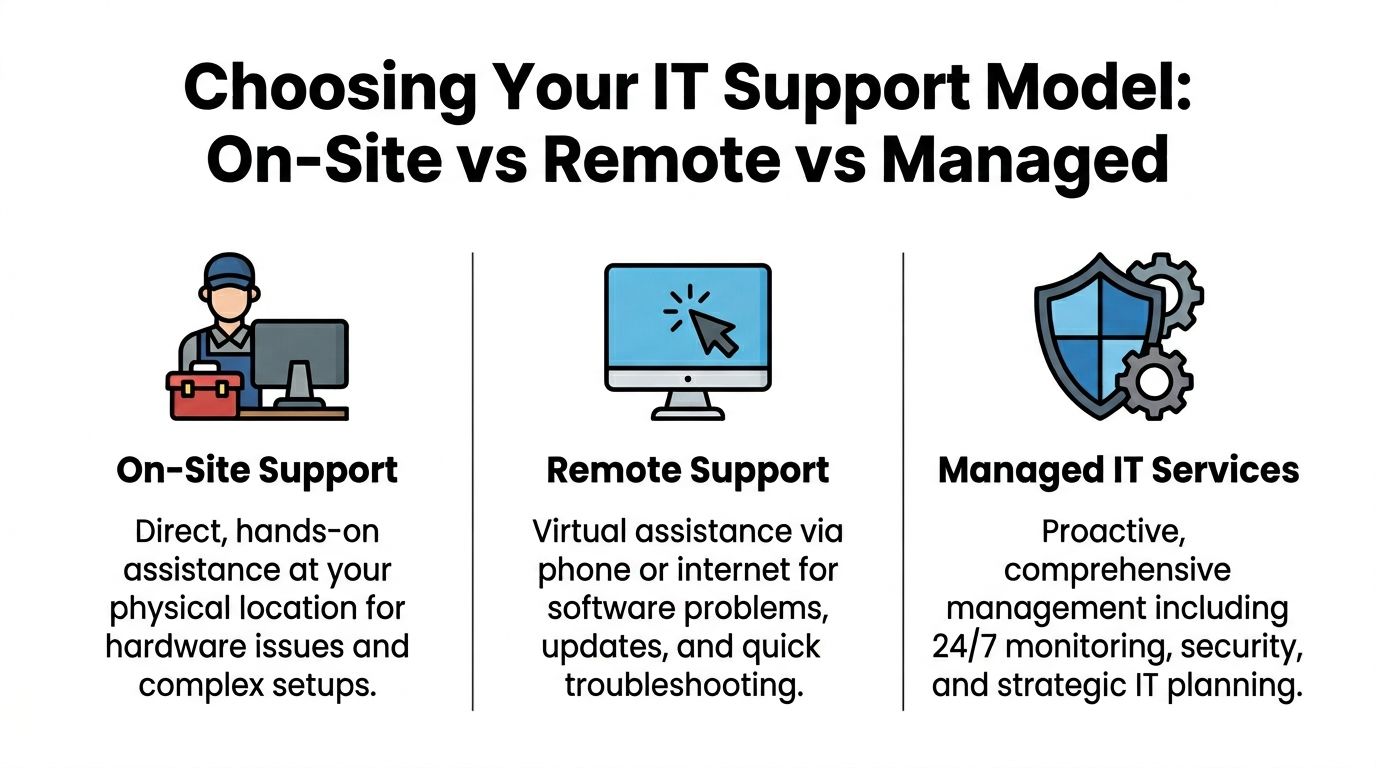
On-site support
On-site support is still necessary for physical problems.
That includes failed hardware, new device deployment, cabling, switch and firewall replacement, WiFi redesign, printer issues that require hands-on work, and office moves. If your business relies on physical infrastructure, local on-site capability is not optional.
The downside is speed and efficiency. On-site support is rarely the best first move for routine password issues, software errors, email configuration, or user troubleshooting. If every ticket waits for a visit, response times suffer.
Remote support
Remote support works well when the provider has strong tools and clear triage.
According to Splashtop’s remote IT support benchmarks, a solid remote support model should target first response under 15 minutes, mean time to resolution under 2 hours for most tickets, and first contact resolution of 80-90%. The same source notes that proactive maintenance in managed plans can cut security breaches by an estimated 40% for SMBs.
That benchmark matters because some providers market “remote support” as little more than a callback queue. Effective remote support should be immediate, documented, and able to solve the majority of user-facing issues without unnecessary delay.
One point many owners miss is the operational difference between intake-focused support and service management. If you want a plain-language resource on understanding the distinctions between a helpdesk and a service desk, that breakdown is useful before you compare proposals.
Managed services
Managed services are usually the right fit when you want fewer surprises.
Instead of waiting for failures, the provider monitors devices, handles updates, checks backups, supports users, and works from a documented environment. For a small business, that often means more predictable operations and less dependence on staff improvising around recurring issues.
Managed support differs from simple troubleshooting in this regard, as it includes preventive work, not just reaction.
To see the structure side by side, this video offers a useful overview before you compare plans:
Which model fits which business
A simple comparison helps:
- Choose mostly on-site if your biggest pain points are hardware, physical network issues, office setup, or new-location buildouts.
- Choose mostly remote if your environment is stable, cloud-heavy, and your issues are primarily software, user access, or day-to-day troubleshooting.
- Choose managed services if downtime, repeat issues, backup confidence, cybersecurity, and planning all matter at once.
One practical example is a provider that combines remote support with infrastructure work such as Cisco or Meraki network deployments, cloud backups, server maintenance, antivirus protection, and disaster recovery planning. GT Computing is one example of that mixed model for Connecticut businesses. If you are weighing that against hourly support, this comparison of managed services vs break fix is a useful decision aid.
Bottom line: Break-fix can solve incidents. Managed support reduces how many incidents you have in the first place.
Why Your Industry Dictates Your IT Support Needs
A generic IT provider can be competent and still be the wrong fit.
That happens when the provider understands devices and networks but does not understand what your industry must protect, document, and keep running. For lawyers and dentists, that gap shows up quickly.
Dental practices need more than basic uptime
A dental office depends on a chain of connected systems. Scheduling, charting, imaging, billing, email, scans, printers, network storage, WiFi, and often VoIP all feed into the patient day.
If one weak point fails, staff start creating workarounds. They use personal email, postpone updates, keep files on local desktops, or delay fixing backup problems because the office is busy. That is how operational friction turns into compliance risk.
According to CMIT Solutions’ discussion of industry-specific IT support gaps, 43% of healthcare SMBs faced a breach in 2025, and generic IT support often overlooks industry-specific compliance requirements. For a dental practice, that means your provider should be able to discuss protected health information, user access, backup handling, device security, and how specialized applications fit into the support plan.
What to probe in a dental setting
- Imaging and practice software support: Not necessarily direct vendor ownership, but clear coordination when updates or workstation issues affect those systems.
- Workstation reliability at chairs and front desk: Failures here disrupt patient flow immediately.
- Backup confidence: You want clarity on what is backed up, how often it is checked, and what recovery would look like after an incident.
- Access control: Shared logins and unmanaged devices create obvious problems in clinical environments.
Law firms have confidentiality and workflow demands that generic support misses
Legal work carries a different pressure. Attorneys and staff need dependable access to documents, email, calendars, case files, and secure communication. They also need systems that do not create ethical headaches.
The same CMIT source notes that 62% of legal firms cite compliance as their top IT worry. That tracks with what many firms experience in practice. The problem is not just cyber risk in the abstract. It is whether the provider understands document access controls, secure remote work, retention practices, mobile device exposure, and how to support confidential communication without creating loose ends.
Common weak spots in law offices
A generalist provider may miss issues like:
- staff keeping client files in the wrong locations
- inconsistent laptop encryption practices
- unsecured remote access habits
- inbox-heavy workflows with poor document discipline
- shared credentials or unclear permission structures
Those are not exotic technical failures. They are ordinary habits that create legal risk if nobody addresses them.
Expert view: Industry-specific support is less about selling a “special package” and more about asking sharper questions before problems occur.
One-size-fits-all support usually breaks at the edges
The provider who can reset passwords and install antivirus is not automatically the provider who should support a law firm or a dental practice.
A better fit understands the daily workflow. They know that a front desk outage has different consequences than a back-office inconvenience. They know some software issues need vendor coordination, not random tinkering. They know compliance-sensitive businesses need documented processes, cleaner access control, and careful change management.
When owners search business tech support near me, they often focus first on location. Location matters. But if your business handles regulated or confidential information, the more important filter is whether the provider understands your operating reality.
Key Questions to Ask Before Signing a Contract
By the time you are down to one or two finalists, the conversation should move from capability to accountability. Small businesses often become too deferential here, asking if support is included, what the monthly fee is, and how quickly someone can help. Those questions are fine, but they are not enough.
The expertise you are hiring is substantial. The Bureau of Labor Statistics reports that the median annual wage for computer and information technology occupations was $105,990 in May 2024, which is more than double the national median across all occupations. That is exactly why detailed questions matter. You are not buying vague reassurance. You are hiring professional judgment.
Questions that clarify the operating model
Use questions like these in the final interview:
- What does onboarding look like in the first month?
Listen for documentation, admin access review, backup validation, network review, device inventory, and user setup standards. - How do you handle recurring issues?
You want root-cause analysis, not repeated ticket closure. - What triggers an on-site visit versus a remote session?
This shows whether they have practical triage or just default habits. - How do you coordinate with software vendors?
Law and dental offices often rely on specialized applications. Your IT provider should be willing to work with those vendors rather than blame them by default. - How are after-hours problems handled?
Ask for the process, not the promise. - What is outside the monthly agreement?
Projects, hardware procurement, after-hours work, office moves, and major remediation work often sit outside standard support. - Who owns documentation, credentials, and configurations if we part ways?
That answer should be clean and direct.
Contract language to inspect closely
A weak contract can turn a decent provider into a frustrating relationship.
Check these items carefully:
| Contract area | What to verify |
|---|---|
| SLA terms | Are response expectations defined clearly for different issue types? |
| Scope | Does the agreement say what is included, excluded, and billed separately? |
| Term and renewal | Is there an auto-renewal clause or a restrictive exit process? |
| Onboarding assumptions | Does pricing assume a clean environment that may not exist yet? |
| Data and admin access | Is it clear that your business retains access and ownership? |
| Security responsibilities | Does the contract explain what the provider manages and what your staff must follow? |
If you want a reference point while reviewing language, this Service Level Agreement (SLA) template https://cloud-call-center.ae/2025/06/16/service-level-agreement-template/ is a helpful comparison tool. It is not a substitute for legal review, but it helps owners see what defined service expectations look like.
Red flags that deserve pushback
Some contract issues are common enough to call out directly:
- Vague SLAs: “Best effort” language without clear response definitions.
- Everything-is-extra pricing: A low base fee followed by broad exclusions.
- No transition language: If the relationship ends, there should be a handoff process.
- No mention of documentation: If they do not document, you stay dependent on memory.
- No fit for your industry software: A provider does not need to be the software publisher, but they do need a support approach around it.
If you want a second framework before making the decision, GT Computing’s guide on how to choose a managed service provider gives a practical lens for final comparison.
Final interview rule: If a provider gets irritated by detailed questions, that tells you something useful.
Building a Partnership for Long-Term Success
The right answer to business tech support near me is rarely the nearest company or the lowest quote. It is the provider whose process fits your business, whose support model matches your operations, and whose team understands the pressure points in your industry.
Small businesses usually make better decisions when they slow the process down. Inventory the environment. Identify the recurring issues. Vet local providers with operational questions. Choose the support model that matches your risk and workflow. Then read the contract closely enough to understand how the relationship will work on an ordinary Tuesday, not just during a sales call.
For lawyers and dentists, that discipline matters even more. Compliance, confidentiality, uptime, and vendor coordination are not side concerns. They shape the entire support decision.
Keep your business running without IT headaches. GT Computing provides fast, reliable support for both residential and business clients. Whether you need network setup, data recovery, or managed IT services, we help you stay secure and productive.
Contact us today for a free consultation.
Call 203-804-3053 or email Dave@gtcomputing.com
.