When you type "business IT solutions near me" into a search bar, you’ll get a flood of local providers. But hold on. Before you start making calls, the most important step happens right at your own desk. Taking a few minutes to figure out what you actually need will save you a ton of time and money down the road.
What To Look For in Local IT Support

Before you can find the right partner, you have to diagnose your own pain points. So many small businesses, from dental practices to law firms, just learn to live with daily IT headaches. They don't realize these frustrations are actually clear signals that it's time to call in a professional.
Think about your day-to-day operations. Is a slow, sluggish network grinding productivity to a halt? Are your employees constantly battling random computer crashes or quirky software glitches? These aren't just minor annoyances. They're symptoms of bigger problems that a good IT pro can spot and solve for good.
Identifying Your Core Needs
Grab a notepad and start a list of the recurring tech issues your team faces. This simple self-assessment is your roadmap; it will help you clearly explain your needs when you start talking to potential IT companies.
Here are a few things to consider:
- Downtime and Productivity Loss: Are you losing billable hours because your systems are down? For a busy law firm, even 30 minutes of server failure can mean thousands in lost revenue.
- Cybersecurity Worries: Do you ever worry if your client or patient data is truly safe? Concerns about ransomware, phishing attacks, and data breaches are one of the top reasons businesses finally seek out expert help.
- Compliance Requirements: If you're in an industry like healthcare, finance, or law, you know that compliance is non-negotiable. Maintaining HIPAA or other regulatory standards requires specialized IT knowledge.
For any business today, a potential provider's ability to implement and maintain strong website security best practices is absolutely essential. It's a foundational part of protecting your business.
The real goal here is to shift from being reactive—only fixing things when they break—to being proactive. A great IT partner prevents problems before they can ever disrupt your business. That’s the true value of strategic IT management.
Getting this clarity helps you figure out what kind of help you're looking for. Do you just need a one-time project, like a server upgrade? Or do you need ongoing, continuous support to keep things running smoothly? A quick fix might solve today's problem, but it won’t stop the next one from popping up.
This is where understanding different service models comes in. For many, a managed services plan offers the stability and security they're missing. If you want to learn more, our guide on managed IT services for small business breaks down how it works. With this knowledge, you can find a local partner that fits your needs and budget perfectly—without paying for services you don't need or, worse, underinvesting in critical protection.
Keep your business running without IT headaches.
GT Computing provides fast, reliable support for both residential and business clients. Whether you need network setup, data recovery, or managed IT services, we help you stay secure and productive.
Contact us today for a free consultation.
Call 203-804-3053 or email Dave@gtcomputing.com
.
Understanding Your Local IT Options
Once you’ve got a handle on what your business truly needs from its technology, you’ll find that most IT support providers fall into one of two camps. This is probably the biggest decision you'll make when you're searching for "business IT solutions near me," as it defines the entire relationship you'll have with your provider.
You’re either going to go with the traditional "break-fix" model or the more modern approach of a Managed Service Provider (MSP).
The Old-School "Break-Fix" Route
The break-fix model is exactly what it sounds like. When something breaks—a server crashes, a laptop dies, the network goes down—you call a technician. They come out, fix the immediate problem, and send you a bill for their time and any parts used.
On the surface, it can seem like a budget-friendly way to go, especially if you rarely have issues. But here's the catch: the costs are completely unpredictable. One major server failure could lead to a massive, unexpected invoice that blows your budget for the quarter.
Even more, a break-fix provider only makes money when your technology is down. There's no built-in incentive for them to be proactive and prevent problems from happening in the first place. This often creates a reactive cycle of downtime, lost productivity, and frustration.
The Proactive Partnership with a Managed Service Provider
On the flip side, you have the Managed Service Provider, or MSP. This is a totally different way of thinking about IT support. Instead of waiting for things to go wrong, an MSP actively manages your entire technology setup for a flat, predictable monthly fee. Their job is to stop problems before they can mess up your workday.
This model completely changes the dynamic. An MSP's success is directly tied to your stability and uptime. When your systems are secure, efficient, and running without a hitch, they've done their job right. It’s a true partnership built on keeping your business healthy and growing.
Think about a law firm that handles highly confidential client information. They need more than a quick fix for a broken printer. An MSP would provide them with managed cybersecurity to protect against breaches, encrypted cloud backups for disaster recovery, and constant monitoring to ensure everything stays compliant and secure. A local dental practice has similar needs, especially with HIPAA regulations.
Key Takeaway: Shifting from a reactive break-fix model to a proactive managed services plan changes the game. It transforms IT from a recurring, unpredictable expense into a strategic asset that supports stability and growth.
To really see the difference, it helps to put the two models side-by-side.
Comparing Break-Fix vs. Managed IT Services
Deciding between these two fundamental approaches to IT support is crucial. One is a transactional, on-demand service, while the other is an ongoing strategic partnership. This table breaks down the key differences to help you figure out which is the right fit for your business.
| Feature | Break-Fix Model | Managed IT Services (MSP) Model |
|---|---|---|
| Cost Structure | Unpredictable, hourly rates & parts | Predictable, flat monthly fee |
| Service Approach | Reactive (responds to issues) | Proactive (prevents issues) |
| Business Incentive | Profits from your downtime | Profits from your uptime & stability |
| Budgeting | Difficult to forecast | Easy and consistent |
| Cybersecurity | Basic, often an afterthought | Comprehensive & continuously managed |
| Strategic Planning | None, focused on single problems | Included, focused on long-term goals |
Ultimately, the right choice comes down to your tolerance for risk and your need for predictable costs. If you want to focus on running your business with the confidence that your technology is being professionally managed in the background, a proactive MSP is almost always the better long-term investment.
Keep your business running without IT headaches.
GT Computing provides fast, reliable support for both residential and business clients. Whether you need network setup, data recovery, or managed IT services, we help you stay secure and productive.
Contact us today for a free consultation.
Call 203-804-3053 or email Dave@gtcomputing.com
.
How to Properly Vet Potential IT Partners
You've got a shortlist of local IT providers. Now the real work begins. It’s easy to find a company that can fix a computer, but it’s much harder to find a genuine partner who understands your business and has your back. This is your chance to look past the sales pitch and really figure out if they’re reliable, experienced, and easy to work with. Remember, you’re not just buying a service—you’re trusting them with the digital keys to your entire operation.
When looking for business IT solutions, a little structure goes a long way. The same principles that apply when finding a local IT partner also apply to vetting them—a methodical approach prevents you from missing crucial details before signing on the dotted line.
Go Beyond Generic Testimonials
Every company website is plastered with glowing reviews. Your job is to be a detective and dig deeper. Don't just accept a list of happy clients; ask for specific case studies or references from businesses just like yours, both in size and in industry. If you run a dental practice, a testimonial from a construction company is nice, but it tells you nothing about their experience with HIPAA compliance.
Here's what to look for to spot real expertise:
- Industry-Specific Wins: Have they actually worked with law firms, medical offices, or businesses in your specific field? Ask for proof.
- Problem-Solving Stories: A good case study doesn't just say, "We made their network faster." It explains how they found a specific bottleneck and shows the measurable results they delivered.
- Client Longevity: A provider with clients who have stuck around for years is a huge green flag. It signals consistent service and a healthy partnership.
The right IT partner can make a massive difference. SMBs are increasingly outsourcing their tech needs, driving the U.S. managed services market from $179 billion in 2020 to a projected $395 billion by 2026. Why? Because the right provider can cut IT costs by 30-40% while improving reliability. For instance, some established providers have been delivering specialized managed IT since 1988, maintaining a 98% client retention rate simply by solving problems other companies couldn't.
Verify Certifications and Response Times
Certifications aren't just for show. They're proof that a provider invests in their team's training and stays current. Ask if their technicians hold certifications from major vendors like Microsoft, Cisco, or CompTIA. It’s a baseline indicator of professionalism and technical skill.
A guaranteed Service Level Agreement (SLA) is non-negotiable. This document is your contractually-backed promise for response times. If a provider seems hesitant to give you a clear SLA, walk away.
This is also the time to get crystal clear on their on-site support. Remote support is great for most things, but it won't help you when a server dies or your entire network goes down. A truly local provider must be able to get a technician to your office—fast. This hybrid capability is critical, giving you quick remote fixes for software glitches and reliable, hands-on help for physical hardware failures. For a more detailed checklist, check out our guide on how to choose a managed service provider.
This quick decision tree can help you visualize whether you need a reactive, pay-as-you-go model or a proactive managed services plan.
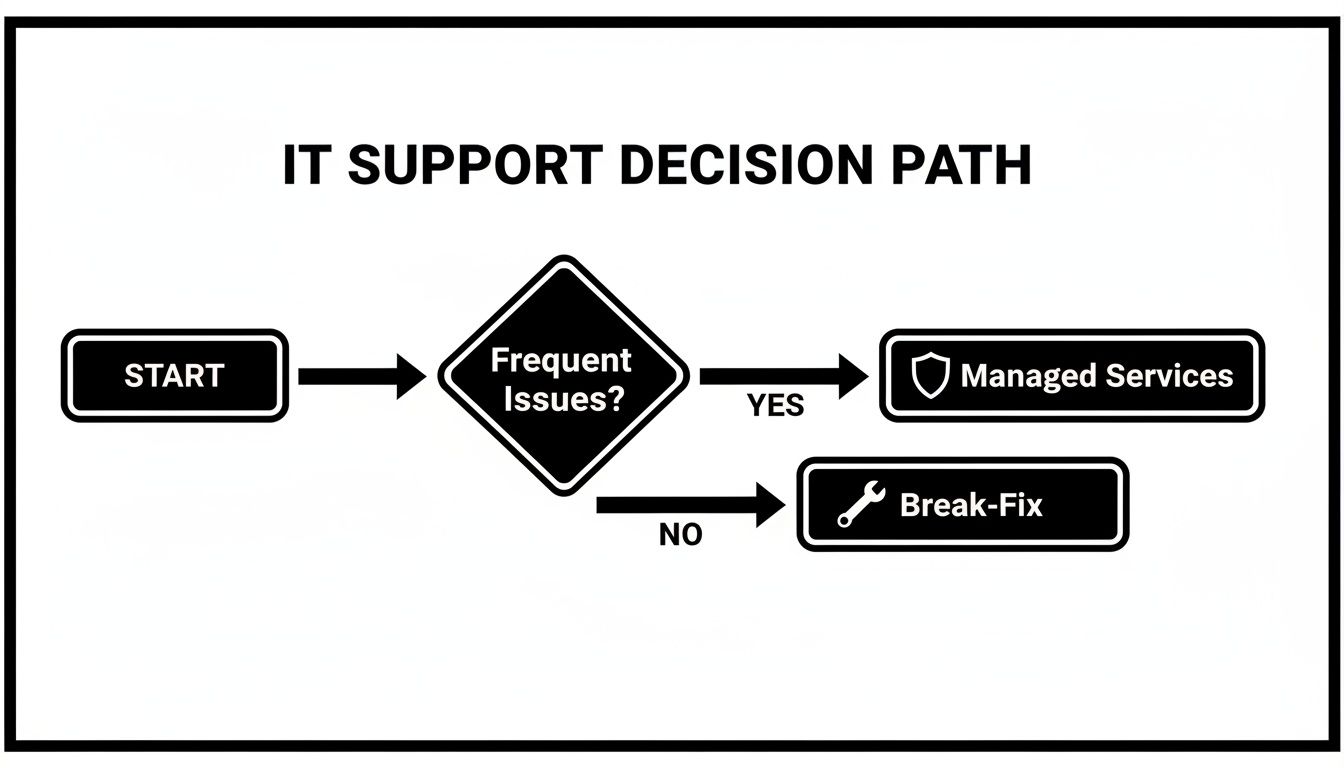
As the flowchart shows, the path is pretty clear: if you’re constantly dealing with IT issues that disrupt your workday, a managed services plan is the only way to get the stability you need.
Keep your business running without IT headaches.
GT Computing provides fast, reliable support for both residential and business clients. Whether you need network setup, data recovery, or managed IT services, we help you stay secure and productive.
Contact us today for a free consultation.
Call 203-804-3053 or email Dave@gtcomputing.com
.
Critical Questions To Ask In A Consultation
Alright, you’ve shortlisted a potential IT provider, and they’re coming to your office for a consultation. This is your moment. It’s the single best opportunity you'll have to see past the sales pitch and find out how they really operate.
Getting the right answers now can save you from a world of IT headaches down the road. Your goal is to go deeper than just a list of services and prices. You need to understand their process, their communication style, and how they handle a real crisis. This is how you separate a true partner from just another vendor.
How Do They Actually Solve Problems?
Anyone can say they offer "24/7 support," but what does that look like when things are actually on fire? The best way to find out is to throw them a few curveballs with some real-world hypothetical scenarios. This forces them to think on their feet and reveals their actual standard operating procedures.
Try asking these:
- "Walk me through, step-by-step, how you would handle a ransomware attack at a business like mine." A good answer will be detailed, covering immediate containment, isolating affected systems, investigating the entry point, restoring from clean backups, and a post-mortem review. If you get a vague, hand-wavy response, that’s a huge red flag.
- "My main server goes down at 10 AM on a Tuesday. What happens next on your end?" You're listening for specifics here. Do their systems automatically generate a critical alert? Who gets it? What’s their promised response time for an all-hands-on-deck emergency?
- "How do you keep clients in the loop during a major outage?" Will you get regular, proactive updates, or will you be stuck calling them, wondering what on earth is going on?
A great IT partner doesn’t just fix the problem; they communicate clearly and calmly throughout the entire process. Their ability to manage a crisis is just as important as their technical skill.
Gauging Their Chops on Security and Recovery
In 2026, cybersecurity and disaster recovery aren't optional extras—they are absolutely fundamental to any IT strategy. You need to feel confident that your provider takes them as seriously as you take your own business.
Don't be afraid to dig into the technical details.
Ask them to explain their security stack. What specific tools do they use for endpoint protection, email filtering, and network monitoring? A pro will be proud to walk you through their chosen solutions.
The same goes for disaster recovery. It's all about the details. To get a handle on the key concepts, it helps to understand the difference between your Recovery Time Objective and Recovery Point Objective. Knowing this will help you ask much smarter, more pointed questions about their backup and recovery systems.
What Does the Partnership Actually Look Like?
Finally, you need a clear picture of how the relationship will start and how it will work day-to-day. A rocky onboarding can poison the well from the very beginning.
- "What does your client onboarding process look like?" They should describe a thorough discovery phase. This means they'll want to map your network, document every piece of hardware and software, and run audits to find any existing vulnerabilities before they even start.
- "Who will be my primary point of contact?" Having a dedicated account manager or a small, familiar team is infinitely better than being just another ticket number in a massive, impersonal helpdesk queue.
The point of these questions isn't to play "gotcha." It’s about making sure their operational style, security posture, and communication habits are a perfect match for your business's needs.
Keep your business running without IT headaches.
GT Computing provides fast, reliable support for both residential and business clients. Whether you need network setup, data recovery, or managed IT services, we help you stay secure and productive.
Contact us today for a free consultation.
Call 203-804-3053 or email Dave@gtcomputing.com
.
Watching for Red Flags and Making Your Final Decision

Let’s be honest: picking the wrong IT provider can do more harm than having no support at all. As you get closer to a decision, you need to be on high alert for the warning signs that point to future headaches, surprise bills, and spotty service. A bad IT partnership won’t just frustrate your team—it can stall your growth and leave your business exposed.
The biggest red flag is the one-size-fits-all sales pitch. If a company hands you a quote without first digging into your business goals, your industry-specific needs (like HIPAA for a dental practice), and your team's daily frustrations, they don't see you as a partner. They see you as a transaction.
Red Flags You Can't Afford to Ignore
Some warning signs are subtle. They're less about what a provider says and more about what they conveniently leave out or dodge. Keep an eye out for these during your final talks.
- Dodging the Reference Question: Any good IT company is proud of their client list. If they hesitate, make excuses, or get cagey when you ask for references—especially from businesses your size and in your field—that’s a huge problem.
- Confusing Contracts and Hidden Fees: Your service agreement should be written in plain English. Be wary of contracts filled with dense technical jargon, vague terms about response times, or unclear language around what’s considered "out-of-scope" work. Those are where hidden fees live.
- A "Relaxed" Attitude Toward Security: In 2026, cybersecurity isn't a feature; it's the foundation. If a provider seems casual about their security tools, dismisses your questions about ransomware, or doesn't have a clear disaster recovery plan, they simply aren't qualified to protect your business.
Choosing a local expert is more important than ever. For small and mid-sized businesses, from law firms to dental practices, IT support has become a lifeline. In fact, research shows a staggering 60% of SMBs feel that IT is a major barrier to growth, mainly because they lack the right partner. This reflects a massive national market that hit $1.2 trillion in 2023, partly fueled by a 35% jump in SMBs adopting services like VoIP—the kind of tech local providers excel at. You can dig into more stats on how local experts are bridging this gap in this IT services industry report.
Comparing Proposals and Making the Call
At this point, you should have proposals from your top two or three contenders. Your job is to compare them line by line, not just by the final price.
I recommend creating a simple spreadsheet. Lay out what each plan actually includes: monitoring services, specific security tools, data backup limits, how many on-site visits are covered, and their guaranteed response times. This is the only way to do a true apples-to-apples comparison.
The cheapest quote is rarely the best value. Real value comes from a partner who prevents expensive downtime and helps your business grow, not just one who shows up to fix things after they’ve already broken.
Ultimately, your decision shouldn't come down to technical specs alone. Go with the team that showed a genuine interest in your success, communicated clearly, and made you feel confident. The right partner in your search for business IT solutions near me is the one you can see yourself working with for years to come.
Keep your business running without IT headaches.
GT Computing provides fast, reliable support for both residential and business clients. Whether you need network setup, data recovery, or managed IT services, we help you stay secure and productive.
Contact us today for a free consultation.
Call 203-804-3053 or email Dave@gtcomputing.com
.
Answering Your Questions About Local IT Solutions
When you're looking for the right IT partner, you're bound to have questions. After helping countless small businesses find their footing, I've found the same concerns come up time and time again. Let's clear the air on the most common ones so you can feel confident in your decision.
What Should A Small Business Budget For IT Support?
This is always the first question, and for good reason. The honest answer is: it depends, but it's far more predictable than you might think.
Many businesses start with a "break-fix" approach—you only pay when something breaks. The problem is, you have no idea if your bill will be zero one month or thousands the next after a server crash. That's a terrible way to run a business.
For predictable costs and proactive care, a Managed Service Provider (MSP) is the way to go. You pay a flat monthly fee, which typically runs from $75 to over $250 per user. So, for a 10-person law firm or dental practice, you should plan to budget somewhere in the ballpark of $1,000 to $3,000 per month.
That fee isn't just an expense; it's an investment in stability. It covers the critical services that prevent disasters in the first place, including:
- 24/7 monitoring to catch issues before they cause downtime
- Robust cybersecurity to protect your client data
- Reliable data backups to get you back online fast
- Unlimited support so your team never hesitates to ask for help
How Important Is It That My IT Provider Is Local?
In 2026, a lot can be fixed remotely, but "local" still matters—a lot. Think about it: what happens when your internet goes down for good, a server physically dies, or you need new workstations set up correctly? Remote support can't help you then.
When you have a physical problem, you need a technician who can be there, in your office, fast. Downtime is expensive, and waiting for someone to travel from hours away just isn't an option. A local team also understands the regional landscape—they know the best internet providers in the area and are aware of local issues, like power outages from a storm, that could affect your business.
The best setup is a hybrid one. You want an IT partner with top-notch remote tools for quick, everyday fixes, but also a local team that can be on-site when you have a real emergency. It’s the ultimate combination of efficiency and peace of mind.
At the end of the day, when a crisis can't be solved through a screen, proximity is everything. A truly local provider ensures you're never left high and dry.
What Is The Onboarding Process With A New IT Provider Like?
The onboarding process tells you everything you need to know about a new IT partner. If it’s disorganized or rushed, that’s a major red flag. A professional provider has a systematic, thorough plan.
It all starts after you sign the contract, with a deep-dive discovery phase. This isn't just a quick look-around. They should be mapping your entire network, documenting every piece of hardware and software, and running a full audit of your security. The goal is to uncover any hidden risks or gremlins in your system.
Once they have that complete picture, they'll deploy their management and security tools. This is also when they should present you with a strategic plan—outlining immediate fixes and long-term improvements. This foundational work is non-negotiable. It’s what allows them to support your business effectively from day one and deliver on the promises they made.
Keep your business running without IT headaches.
GT Computing provides fast, reliable support for both residential and business clients. Whether you need network setup, data recovery, or managed IT services, we help you stay secure and productive.
Contact us today for a free consultation.
Call 203-804-3053 or email Dave@gtcomputing.com
.