That frantic search for "business IT support near me" almost always starts with a crisis. A server gives up the ghost right before a big deadline, customer data seems to have vanished into thin air, or your entire network slows to an infuriating crawl.
This is the classic break-fix approach. It’s like waiting for a flat tire on the highway before you even think about looking for a mechanic. It’s stressful, incredibly disruptive, and almost always more expensive than you’d expect.
Why Smart Businesses Search for Local IT Support
Gambling with your technology on an emergency-only basis is a risk most small and mid-sized businesses simply can't afford to take. With the traditional break-fix method, you only call for help when something is well and truly broken.
The result? You're stuck with unpredictable bills and, far worse, crippling downtime that brings productivity to a screeching halt. Every minute your team is offline is a minute you aren't helping clients or making money.
Good IT support today is so much more than just fixing a computer that won’t turn on. It’s about building a proactive partnership with an expert who takes the time to understand the nuts and bolts of how your business operates. Think of it as having a dedicated technology specialist on your team—one whose main job is to stop problems from ever happening in the first place.
From Reactive Repairs to Proactive Partnerships
For a small business, the real pain goes deeper than a single broken laptop. It's the nagging, persistent fear of a devastating cyberattack. It's the daily frustration of dealing with inefficient systems. It's the missed opportunities that pile up because your technology is holding you back. A proactive IT partner is the one who helps you move from a state of recurring tech emergencies to one of stability and confidence.
Imagine running a busy law firm or dental practice right here in Connecticut. A single IT glitch could bring patient scheduling to a standstill or put critical legal deadlines in jeopardy. That’s a daily reality for many, but more and more businesses are choosing to invest in prevention. It's a global trend; worldwide IT services spending is on track to hit a staggering $1.87 trillion in 2026, a 9% jump from $1.72 trillion in 2025, solidifying its place as the biggest slice of the global tech market, as noted by CRN.com.
The goal isn't just to fix what breaks; it's to build a resilient technology foundation that empowers your team to be more secure and productive every day.
This partnership-first model is really the core of what we call managed IT services. Instead of just waiting for the phone to ring when disaster strikes, your IT partner is actively monitoring your systems 24/7, applying security updates, and making sure your computer network support is solid and dependable. This foresight turns your IT from a nagging, recurring expense into a powerful asset that actually helps grow your business.
The Core Services That Keep Your Business Running Smoothly
When you start searching for "business IT support near me," you're looking for more than just a computer repair person. You need a partner who offers a full suite of services that keep your business humming along without constant technical headaches. Let's pull back the curtain on the industry jargon and talk about what these services actually do for you.
Managed IT Services is probably the most important concept to grasp. Think of it like a retainer for your company’s technology. Instead of paying to fix things after they break, you have a team proactively managing your systems 24/7. This means we handle all the routine maintenance, security updates, and performance monitoring before a small glitch turns into a full-blown crisis. It makes your IT costs predictable and your operations stable.
Building Your Digital Foundation
A strong business needs a solid foundation, and in today's world, that foundation is your technology infrastructure. It all starts with the basics.
Network Installation & WiFi: This isn't just about plugging in a router from a big box store. A professional network installation is about mapping out your office to ensure fast, reliable connectivity everywhere. We eliminate those frustrating WiFi dead zones and build a network that can handle everything your team throws at it, from video calls to large file transfers.
Cybersecurity: This is your company's personal security detail, on duty around the clock. Of course, it includes the essentials like firewalls and antivirus software. But true cybersecurity is about constant vigilance—actively hunting for threats and plugging security holes before a hacker can find them. With cyberattacks on the rise, this is no longer optional; it's fundamental to protecting your client data, your finances, and your reputation.
An effective IT partner doesn’t just clean up the mess after an attack. They build layers of defense to stop intruders from ever getting in. That proactive approach is the difference between a minor hiccup and a business-ending catastrophe.
This is how we see it: good IT support doesn't just fix problems. It creates a stable environment that reduces risk while giving you the confidence to grow.
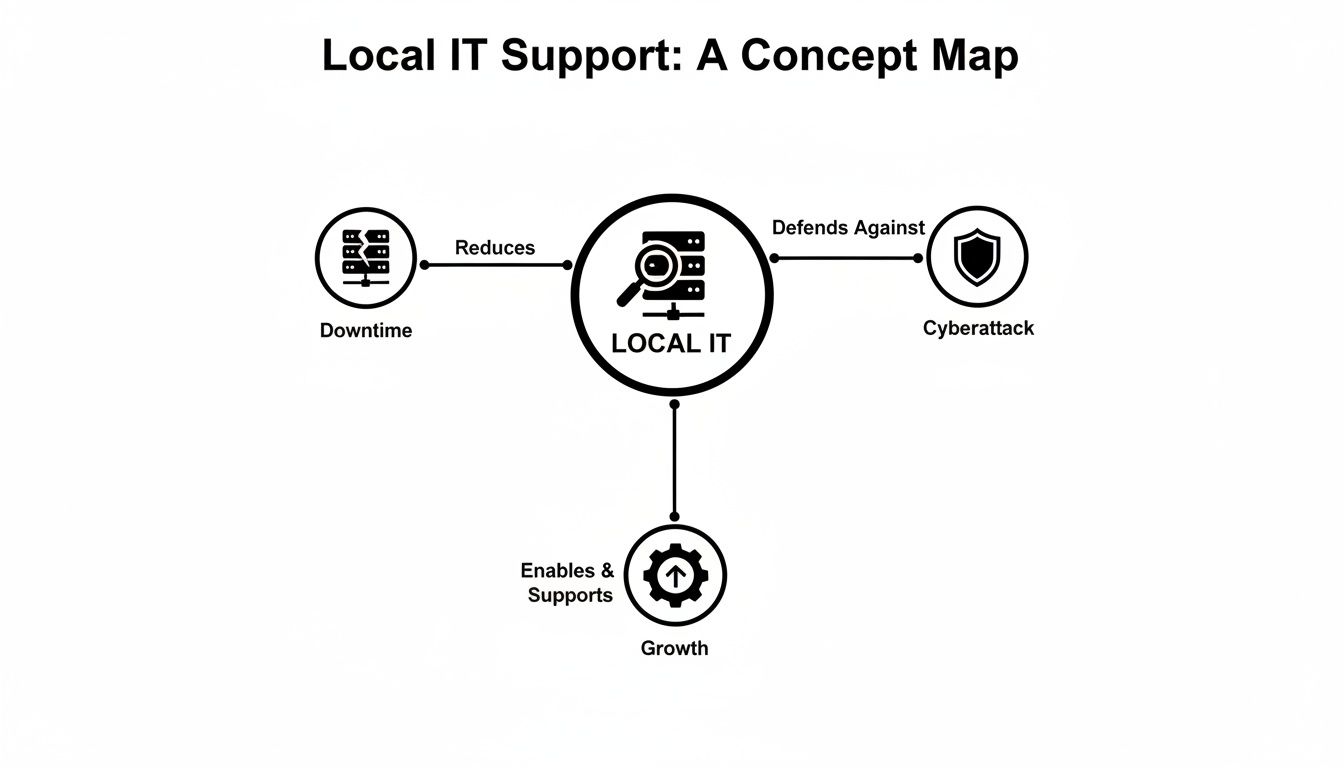
As you can see, these things are all connected. When you manage your technology proactively, you automatically lower your risk of downtime and cyber threats, which in turn frees you up to focus on scaling your business.
Ensuring Continuity and Communication
Finally, let's talk about two services that are absolutely critical for keeping your business resilient and connected in any situation.
Data Backups & Disaster Recovery is the ultimate insurance policy for your company’s information. This isn't just about making a copy of your files. It’s about having a tested, step-by-step plan to get your entire operation back online quickly, whether you're hit with a ransomware attack, a fire, or a simple server failure. Without a solid plan, you're just gambling.
VoIP Phone Systems have become the modern standard for business communication, and for good reason. They run over the internet, giving you the flexibility to make and take calls from anywhere—your desk phone, your computer, or your cell. It’s a reliable, feature-rich alternative that moves with your business, unlike old-school landlines that keep you tethered to the office.
The Real-World Benefits of Outsourcing Your IT
When you bring on an expert IT partner, your technology stops being a constant headache and starts becoming one of your biggest assets. It’s about more than just fixing computers; it’s about making a real, measurable difference in how your business runs every single day. The first thing most business owners notice is finally getting a handle on their IT budget.
Think about it. Instead of getting hit with a massive, unexpected bill when a server crashes or a computer gets a virus, you pay one predictable, flat monthly fee. This approach covers all the proactive maintenance and on-demand support you need, turning a volatile financial risk into a stable, manageable expense.
Get an Edge with Stronger Security and Better Productivity
It's a hard truth, but small and mid-sized businesses are the low-hanging fruit for cybercriminals. Attackers know that most smaller companies don't have the time or resources for a robust security defense. Working with an outsourced IT provider is like having your own dedicated security team, one that's always a step ahead of the latest threats.
An expert team brings in enterprise-grade tools—things like advanced firewalls, threat detection, and around-the-clock monitoring—that an in-house generalist could never manage alone. This constant vigilance has a wonderful side effect: your team’s productivity soars. When systems are maintained and running smoothly, you eliminate the frustrating lag, crashes, and downtime that bring work to a grinding halt.
Outsourcing your IT gives you access to a deep bench of certified specialists and powerful technology, all for a fraction of what it would cost to hire just one senior IT professional.
The Bottom Line: Real Savings and Peak Efficiency
The financial argument for outsourcing is compelling. Just imagine your law firm's server going down the day before a major court filing is due. Or your dental practice’s entire network failing with a waiting room full of patients. It’s no surprise that managed services have become the go-to solution, often slashing IT costs by up to 30-40% while simultaneously boosting efficiency. You can dive deeper into these market trends in IT professional services to see the data for yourself.
For many business owners, weighing the true cost of an in-house employee against the value of a managed services team makes the decision pretty clear.
In-House IT vs Managed IT Support: A Cost-Benefit Analysis
This table breaks down the true costs and benefits you should consider when deciding between hiring an in-house IT person and partnering with a managed services provider like GT Computing.
| Factor | In-House IT Staff | Managed IT Support |
|---|---|---|
| Cost Structure | High fixed salary, plus benefits, training, and overhead. | A predictable and scalable monthly subscription. |
| Expertise | Limited to the skills and knowledge of one or two people. | Access to a diverse team of certified specialists. |
| Availability | Typically restricted to business hours, sick days, and vacation time. | 24/7/365 monitoring and on-call support are available. |
| Technology | Dependent on your budget for acquiring expensive tools. | Leverages best-in-class, enterprise-grade software and hardware. |
By moving to a managed services model, you’re not just cutting direct costs. You’re gaining a partner who is genuinely invested in your stability and growth. This frees you up to do what you do best: run your business, confident that your technology is secure, efficient, and ready to support you.
How to Choose the Right Local IT Partner
Finding the right local IT support isn't just about Googling "business IT support near me" and picking the first name you see. Let's be honest, not all providers are the same. The one you choose becomes a trusted extension of your team, holding the keys to your most sensitive data and the systems that keep your business running.
It’s easy to get swayed by a good sales pitch, but the real proof is in the paperwork. You need to look straight at their Service Level Agreement (SLA). This isn't just another contract; it's the document that holds them accountable. It spells out exactly what they'll do for you and, more importantly, guarantees how quickly they'll respond when things go wrong. An SLA is your assurance that they're committed to keeping you online.

Look for Proven Expertise and Experience
A solid SLA is a great start, but it doesn't mean much without real-world expertise to back it up. This is especially true if you're in a regulated field. Generic IT knowledge just won't cut it. You need a partner who already knows the unique challenges of your industry inside and out.
- For Law Firms: Your IT team has to be obsessed with data privacy and secure client communications. They need a deep understanding of the confidentiality demands that are fundamental to the legal profession.
- For Dental Practices: HIPAA compliance is the name of the game, and there’s no room for error. A seasoned provider knows exactly how to secure protected health information (PHI) everywhere it lives—from your front-desk software to your digital X-ray machines.
As you dig in, it's also smart to understand the different ways support is delivered. Knowing the difference between a Service Desk vs Help Desk, for example, helps you match their service model to what your business actually needs.
Verify Certifications and Vet Partnerships
So, how do you verify they have the skills they're claiming? Ask to see their team's certifications and their official vendor partnerships. These are your third-party proof that they know their stuff.
Certifications from tech giants like Microsoft or Cisco, and partnerships with professional-grade hardware vendors like Ubiquiti, are a huge green flag. They show that a provider has met tough, independent standards for knowledge and skill.
These credentials aren't just fancy badges. They signal that the company invests in their team's training and has a direct line to the technology manufacturers for high-level support. It’s a clear sign you’re dealing with professionals who are serious about their craft. Our guide on how to choose a managed service provider digs even deeper into what to look for.
When you sit down to talk, go in armed with pointed questions. Ask about a specific crisis they handled for a business like yours. Ask them to walk you through their onboarding process. A confident, capable partner will give you clear, direct answers that build trust from the very first conversation.
Understanding IT Support Pricing Models
Let's talk about one of the biggest question marks for any business owner looking for IT help: the cost. When you start searching for "business IT support near me," you'll find that pricing isn't always straightforward. To really get a handle on your budget and avoid any nasty billing surprises, it helps to know the three main ways providers structure their fees.
Each model is built for a different kind of need, and knowing the difference is key to not overpaying or under-supporting your team.
Comparing Your Options
Break-Fix: This is the classic "pay-as-you-go" approach. Something breaks, you call for help, and you get a bill for the time and materials it took to fix it. It might seem like the cheapest option if you rarely have IT trouble, but the costs are completely unpredictable. A major server crash or security breach can lead to a massive, unexpected invoice, and you're paying to fix problems after they've already caused downtime.
Project-Based: This model is exactly what it sounds like. You have a specific, one-time job—like setting up a new office network, moving your data to the cloud, or a major hardware upgrade—and you agree on a fixed price for that entire project. It's fantastic for defined tasks because the cost is clear from day one. The catch is that it doesn't cover any of the day-to-day maintenance or support you'll need once the project is finished.
Managed Services: This has become the go-to model for most small and mid-sized businesses. Instead of paying for repairs, you pay a flat, predictable monthly fee for proactive support. This subscription covers monitoring, maintenance, security, and helpdesk support. It completely changes the dynamic; your IT provider is now motivated to keep your systems running flawlessly to prevent problems from ever happening. To get a feel for this, it's a good idea to examine their service plans and pricing from a few different providers to see how they bundle their services.
The right model really boils down to how much your business depends on technology. A solo operation might get by with break-fix, but any company with a team, deadlines, and client commitments will find that the predictability and preventative care of a managed services plan is a much smarter investment.
Getting a clear picture of these options is the first step toward making a confident financial decision. If you're curious about what a managed plan might look like for your specific business, our IT support cost calculator can give you a personalized estimate.
Putting IT Support to the Test with Real-World Scenarios
It’s one thing to talk about the benefits of IT support in theory, but what does it actually look like when things go sideways? Let's move past the feature lists and dive into a couple of real-world situations to see how having a dedicated IT partner can turn a potential disaster into a minor hiccup.
These aren't just hypotheticals; they're stories that show the real value of having an expert team in your corner.

This is where you see the difference between grinding to a halt for days and getting back to work with minimal fuss.
The Law Firm's Ransomware Scare
Picture a small law firm right here in Hamden on a typical Tuesday morning. An employee, rushing through emails, clicks a link that looks legitimate but isn't. In the background, a ransomware attack kicks off, silently starting to encrypt everything on the server—sensitive client records, case files, and billing data are all about to be locked away.
But this firm doesn't have to panic. They have a managed IT partner.
Almost instantly, automated monitoring tools spot the unusual encryption activity and sound the alarm. The infected computer is immediately quarantined from the rest of the network, stopping the ransomware in its tracks before it can cause widespread damage.
The best part? Because the firm's data is backed up to a secure, off-site location every hour, the IT team can simply wipe the affected system and restore everything from a clean point just minutes before the attack. The outcome is zero data loss and a brief interruption, not a week of downtime and a massive ransom demand.
The Dental Clinic's Seamless Network Upgrade
Now, think about a growing dental practice. The front desk is struggling with lagging scheduling software, digital imaging files take forever to pull up, and the Wi-Fi is so spotty that patients in the waiting room can't even connect. They know they need an upgrade, but they can't afford to shut down during business hours.
This is a classic IT problem. An expert team schedules the work after hours, coming in to perform a complete overhaul of the clinic’s network. They don't just plug in a new router; they map out the space and install professional-grade wireless access points to kill every dead zone, from the reception area to the back treatment rooms.
By the time the staff arrives the next morning, the network is night-and-day different. Digital X-rays pop up instantly, the practice management software is snappy and responsive, and a secure guest network keeps patients happy. It's a tangible upgrade that makes the entire staff more productive and improves the patient experience.
When downtime can cost a small business an average of $300,000 per hour, this kind of reliability isn't a luxury—it's essential. With ransomware now affecting 75% of SMBs, having the right IT service isn't just about convenience; it's about survival. The growth of the IT services market is driven by businesses realizing they can't afford to go it alone.
A Few Common Questions About Local IT Support
Even with all the benefits laid out, taking the leap with an IT partner is a big decision. It’s completely normal to have a few lingering questions. We believe in straight answers, so let’s tackle some of the most common things business owners ask when looking for local IT help.
"Is My Business Too Small for Managed Services?"
That’s a question we hear a lot, and the answer is almost always a resounding "no." Managed IT isn't just for large corporations; it's designed to be flexible and scale with your needs. Whether you're a one-person shop or a growing team of 30, the fundamental need for reliable, secure technology is exactly the same.
In our experience, it's often the smaller businesses that feel the most immediate impact. Think about it: you get the expertise of an entire IT department, a team that's always on call, for a single, predictable monthly cost. It's a powerful way to level the playing field.
"If Something Breaks, How Fast Will You Respond?"
When your system is down, every minute counts. This is where a Service Level Agreement (SLA) becomes your best friend. It’s not just a piece of paper; it’s a concrete promise that outlines exactly what to expect.
Any good IT partner will have a tiered response system based on how urgent the problem is.
- Critical Issues: A server crash, a network outage, or a potential security breach that stops your business cold? You should expect a response within 15-30 minutes.
- Standard Support: For everyday hiccups, like a printer acting up or a software issue affecting a single person, a response within a few business hours is a reasonable benchmark.
"What Does the Onboarding Process Actually Look Like?"
Bringing a new IT partner on board shouldn't feel like a second job. Our goal is to make the transition so smooth you barely notice it, except for the fact that things just start working better.
It all starts with a deep dive into your current setup, where we map out everything from your network to your security vulnerabilities. From there, we quietly deploy our monitoring tools to your devices. The final step is all about you—we document everything, show your team the simple process for getting help, and make sure you know exactly who to call.
Keep your business running without IT headaches.
GT Computing provides fast, reliable support for both residential and business clients. Whether you need network setup, data recovery, or managed IT services, we help you stay secure and productive.
Contact us today for a free consultation.
Call 203-804-3053 or email Dave@gtcomputing.com.