Organizing computer cables isn't just about making things look tidy. It's a strategic move that directly impacts your business's efficiency, safety, and ability to stay online. Tackling that "spaghetti" behind desks and in server closets is a real investment in your operational stability.
Why Disorganized Cables Are a Hidden Business Risk
Before you even think about unplugging a single wire, it's crucial to understand what’s really at stake. That tangled mess of power cords, network cables, and peripheral wires is far more than an eyesore—it's a significant, and often completely overlooked, threat to your entire operation. Ignoring the clutter creates a breeding ground for inefficiency, surprise costs, and even physical danger.
Too many businesses push cable management to the bottom of the to-do list, treating it as a low-priority "nice-to-have." But the consequences of neglect are very real.
Imagine a busy dental office where the server closet is a chaotic web of unlabeled, intertwined cables. The network suddenly goes down. A technician arrives but is forced to spend critical time manually tracing wires, trying to pinpoint the source of the failure. Every minute spent in that frustrating process is a minute patient records are inaccessible, appointments can't be scheduled, and revenue is lost.
The Real Cost of Cable Clutter
The financial and operational damage from poor cable management goes way beyond minor annoyances. It's a direct drain on productivity and a catalyst for expensive emergencies.
A disorganized setup makes routine maintenance and hardware upgrades a nightmare. What should be a simple task, like swapping out a faulty network switch, can easily turn into a multi-hour ordeal, all while you're running the risk of unplugging the wrong machine and causing an even bigger problem.
Industry benchmarks paint a pretty stark picture: poor cable organization can slash IT efficiency by up to 30% during troubleshooting. For professional services firms like law offices that rely on their VoIP phones and data backups, this clutter is a primary cause of outages. The data shows this problem inflates repair bills by an average of $5,000 annually for small and mid-sized businesses, turning a preventable issue into a recurring operational cost. You can find more data on the growing cable management market over on Allied Market Research.
An organized cabling system is the central nervous system of a modern office. When it’s compromised by clutter, every connected device—from workstations to critical servers—is at risk of unpredictable failure.
This quick comparison table really drives home what’s at stake.
Cable Clutter vs Organized System Key Business Impacts
| Impact Area | Disorganized Cables (The Risk) | Organized System (The Reward) |
|---|---|---|
| Troubleshooting | Technicians waste hours manually tracing unlabeled wires, drastically increasing downtime. | Labeled and routed cables allow for rapid problem identification, often in minutes. |
| Safety | Tripping hazards under desks; dust buildup creates fire risks and equipment overheating. | Clear pathways eliminate physical risks; proper airflow extends hardware lifespan. |
| Downtime | Frequent, unpredictable outages caused by accidental disconnections or heat-related failures. | High system reliability and stability; planned maintenance with minimal disruption. |
| Costs | Higher IT support bills due to longer service calls; premature hardware replacement costs. | Reduced labor costs for IT tasks; longer-lasting equipment and fewer emergency fees. |
| Scalability | Adding new equipment is a complex, risky project that can disrupt existing operations. | Simple, fast, and safe to add, move, or upgrade hardware without guesswork. |
Thinking about it this way, you can see how a clean setup isn't just a cost, but a real investment that pays for itself.
From Inefficiency to Outright Hazard
Beyond the productivity losses, disorganized cables introduce serious safety risks. That "rat's nest" of wires under a desk is a classic tripping hazard, creating a genuine liability for both employees and clients.
Even worse, these tangled bundles are magnets for dust and debris, which can choke off airflow and cause critical equipment to overheat. In a server room, poor airflow from cable blockage is a leading cause of hardware failure and, in extreme cases, can significantly increase the risk of an electrical fire.
Ultimately, organizing your computer cables is not just a cleanup project. It is a fundamental investment in your company’s efficiency, safety, and long-term continuity. By understanding these hidden risks, you can stop seeing it as a tedious chore and recognize it for what it is: a crucial step in protecting your business's assets and bottom line.
Keep your business running without IT headaches.
GT Computing provides fast, reliable support for both residential and business clients. Whether you need network setup, data recovery, or managed IT services, we help you stay secure and productive.
Contact us today for a free consultation.
Call 203-804-3053 or email Dave@gtcomputing.com
.
Developing Your Cable Management Blueprint
Don't even think about unplugging a single wire yet. I've seen it a hundred times: someone gets a burst of motivation, dives into a nest of cables without a plan, and an hour later, they're sitting in a bigger, more tangled mess than when they started. The absolute key to a successful cable cleanup—one that actually lasts—is to step back and create a blueprint first.
This initial planning phase is what separates a quick, messy fix from a professional, long-term solution. Think of it like a general mapping out a battlefield. You need to know the terrain and where all your units are before you send them into action. The same goes for your cables.
This simple flow chart really drives the point home. What starts as a simple mess quickly becomes a troubleshooting nightmare, and before you know it, it's a genuine operational risk.
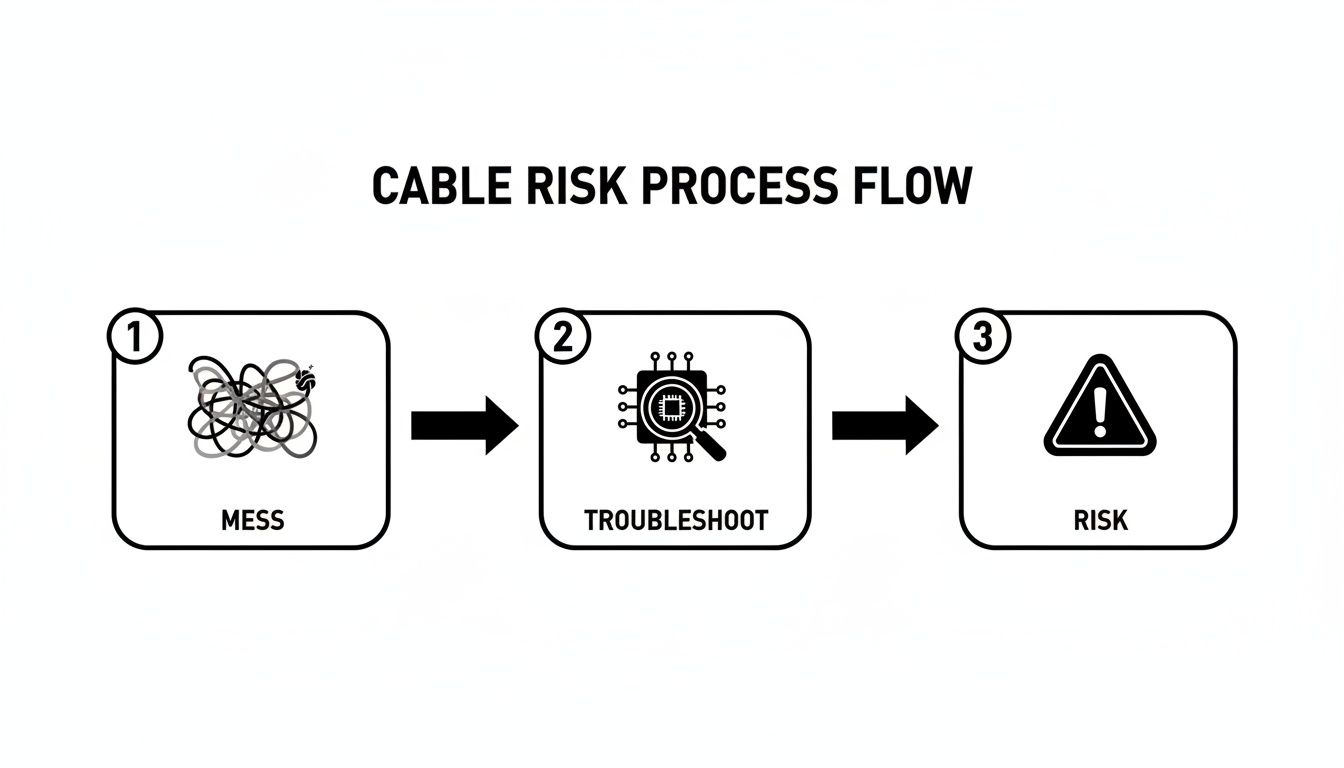
A solid plan is your best defense against this kind of escalating chaos.
Take Inventory of Your Entire Setup
First things first, you need to know exactly what you're working with. Walk through every single area—from individual desks to the server closet—and document every device and all the cables connected to it. I know it sounds tedious, but trust me, this is where you find the low-hanging fruit and prevent major headaches later.
Your inventory should nail down a few key things:
- All Devices: Computers, monitors, printers, phones, network switches, servers, and every little peripheral.
- Cable Types: Is it power, Ethernet, HDMI, USB, or something else? Note it down.
- Connection Points: Get specific. Where does each cable start and end? Think "Monitor 1 HDMI to Docking Station Port 2."
- Redundant Wires: You'll be amazed at how many forgotten, unplugged cables are just cluttering up the space. These can go immediately.
A simple spreadsheet works perfectly for this. This audit almost always uncovers silly inefficiencies, like three different power strips under one desk when a single, better-managed one would be safer and neater. After you've sized up the situation, you can get into the specifics of how to organize computer cables for a clutter-free workspace.
Map Your Cable Routes
Once your inventory is complete, it's time to visualize the ideal path for every cable. The goal here is to create clean, direct runs that keep your power and data lines from crossing paths. When they run parallel, you risk electrical interference that can slow down your network. It's a small detail that makes a big difference.
For a workstation, this could be as simple as planning a route from the monitor and keyboard along the back of the desk, down a single leg, and into an under-desk cable tray. In a network closet, it's more complex, involving mapping paths from patch panels to switches while leaving just enough slack for future work—not so much that you create big, messy loops. This kind of mapping can easily identify up to 50% excess cable slack that's just collecting dust.
This isn't just about looking tidy. In many small businesses, like dental offices I've worked with, messy cables can increase fire risks by as much as 22%, according to U.S. safety reports. That's why professional solutions like cable trays and raceways are a necessity, not a luxury.
A well-defined blueprint turns a chaotic cleanup into a structured, manageable project. It's the difference between wrestling with wires and executing a deliberate, efficient installation.
This planning is also foundational if you're thinking bigger. A clean setup today makes future upgrades, like a full network overhaul, much smoother. If that's on your radar, our guide on how to set up a small business network offers a great starting point for what comes next.
Keep your business running without IT headaches.
GT Computing provides fast, reliable support for both residential and business clients. Whether you need network setup, data recovery, or managed IT services, we help you stay secure and productive.
Contact us today for a free consultation.
Call 203-804-3053 or email Dave@gtcomputing.com
.
Choosing The Right Tools For The Job
Okay, you've got your blueprint. The strategic part is done. Now comes the fun part: gathering the gear that will turn that plan into a clean, organized reality. This is where the magic happens, and having the right tools is what separates a quick, temporary fix from a professional setup that lasts.
You don't need a giant, expensive toolbox, but picking the right items for your specific situation is key. What works for a single messy desk won't cut it for a server room, and vice-versa. The goal is to get tools that work now and won't box you in later when you need to make changes.
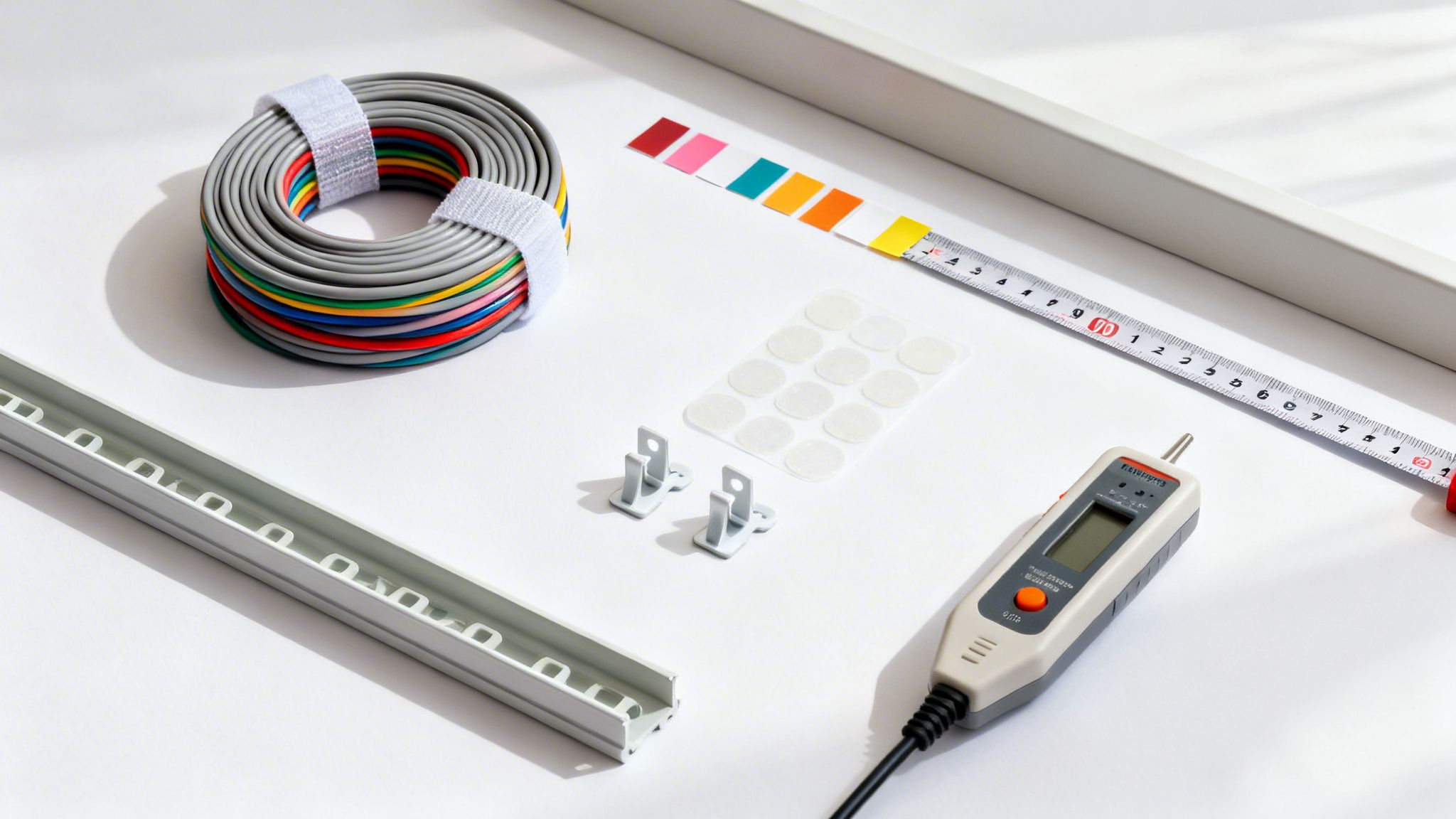
Core Tools: Bundling And Fastening
The first order of business is usually grouping related cables into neat bundles. I’ve seen it a hundred times: people grab a bag of cheap, single-use plastic zip ties. Please don't. It’s a rookie mistake that you’ll regret the first time you need to swap out a single cable.
Here's what the pros actually use:
- Reusable Velcro Ties: These are my go-to, and for good reason. Unlike plastic zip ties you have to snip off (and risk nicking your cable's jacket), Velcro straps can be opened and re-fastened in seconds. Adding or removing a cable becomes a tool-free, frustration-free task.
- Cable Sleeves: For that main bundle of cables running from a desk to the wall, a braided or neoprene sleeve is a fantastic choice. It wraps around the whole group, hiding everything inside a single, clean tube while also giving them an extra layer of protection.
- Adhesive Cable Clips: These little guys are perfect for guiding individual cables along the back of a desk, down a table leg, or against a wall. They're essential for preventing wires from dangling and creating those clean, intentional lines.
Pro Tip: Trust me on this—always opt for reusable fasteners like Velcro. Your future self will thank you when you’re not on your hands and knees with a pair of snips, trying to cut a single zip tie without damaging a $50 HDMI cable.
Advanced Gear: Routing And Hiding Cables
To get that truly polished, professional look, you need to go beyond just bundling. The real goal is to make the cables disappear. This is how you create an environment that's not just clean, but genuinely safe and distraction-free.
A great place to start is with your power. Exploring some good under-desk power strip solutions can be a game-changer, centralizing your power connections and getting a big chunk of the clutter out of sight immediately.
From there, you can tackle the data and peripheral cables with these solutions:
- Under-Desk Cable Trays: These are simple metal or plastic baskets that mount directly to the underside of your desk. They become a hidden channel where you can tuck your power strip, power bricks, and all the excess cable slack. Out of sight, out of mind.
- Cable Raceways: When you have to run cables along a wall or baseboard, a raceway is the answer. It’s a plastic channel, usually with an adhesive back, that you stick to the wall. Lay the cables inside, snap the cover on, and you've got a clean, paintable strip that blends right in.
- Vertical Cable Managers: If you're tackling a server rack or network closet, these are non-negotiable. They are vertical channels that attach to the rack, creating a structured pathway to route dozens of network cables cleanly from patch panels to switches. This is how you prevent that dreaded, tangled "waterfall" of wires.
To make sense of the different options, it helps to see them side-by-side.
Cable Management Solutions Comparison
| Solution | Best For | Pros | Cons |
|---|---|---|---|
| Velcro Ties | Bundling cables at desks or in racks | Reusable, gentle on cables, affordable | Can look bulky if not cinched properly |
| Cable Sleeves | Hiding a single group of cables (e.g., desk to wall) | Very clean look, offers good protection | Less flexible for adding/removing single cables |
| Cable Trays | Hiding power strips and slack under a desk | Hides everything, great for sit-stand desks | Requires drilling into the desk surface |
| Raceways | Routing cables along walls or baseboards | Hides cables completely, paintable | Less flexible for changes, adhesive can damage walls |
This table should give you a clearer picture of what to use and where, helping you invest in the right gear the first time around.
The Final Polish: Labeling and Testing
Once your cables are neatly routed, two final steps separate a decent job from a professional one: labeling and testing. Skipping this part is a recipe for a massive headache down the line.
A simple label maker is one of the most valuable tools you can own. I make sure every cable is labeled at both ends with what it is and where it's going (e.g., "MON-2 to DOCK-DP1"). This tiny bit of effort can save you hours of troubleshooting later. If you don't have a label maker, a roll of colored electrical tape can also work—assign a color to each type of cable (blue for network, red for power, etc.) for quick identification.
Finally, before you lock everything down, test your connections. This is especially critical for network cables. Use a simple cable tester to confirm every Ethernet cable is working perfectly. It is infinitely easier to swap a bad cable now than after it’s been perfectly woven into a bundle with ten others.
Keep your business running without IT headaches.
GT Computing provides fast, reliable support for both residential and business clients. Whether you need network setup, data recovery, or managed IT services, we help you stay secure and productive.
Contact us today for a free consultation.
Call 203-804-3053 or email Dave@gtcomputing.com
.
Creating a Clean and Functional Workstation
Let's start where your team spends most of its day: the individual workstation. A desk overrun with a spaghetti monster of cables isn't just ugly—it actively hurts focus, looks unprofessional, and kills productivity. The good news? Transforming a desk from chaotic to clean is a surprisingly simple process you can replicate across the entire office.
First things first: unplug everything. I know it sounds daunting, but you have to start with a completely blank slate. This is your chance to do a full reset. Before you plug anything back in, give all your surfaces a good wipe-down and clean your equipment. You'd be amazed at how much dust keyboards, monitors, and docking stations can collect.
Sort, Group, and Route with Purpose
With everything unplugged, take a minute to sort your cables into logical piles. It’s a small step that prevents you from recreating the same mess you just undid.
I usually group them by function:
- Power: All the power bricks and cords for your monitors, computer, and docking station.
- Display: Your HDMI, DisplayPort, or USB-C cables that connect to your screens.
- Data & Peripherals: This pile includes Ethernet cables and the USB cords for your keyboard, mouse, webcam, and other gadgets.
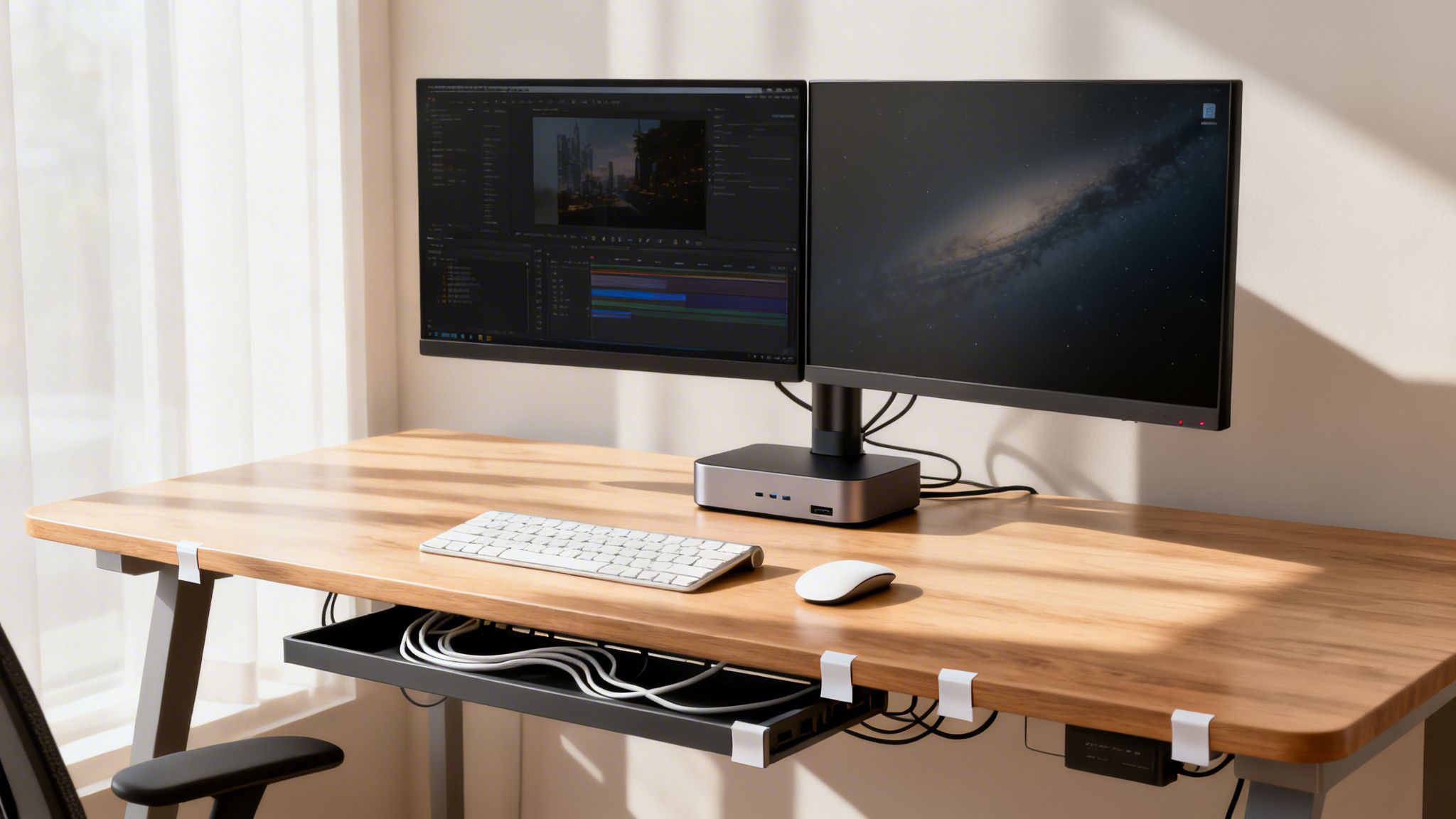
Once they're sorted, start plugging in your core components, but be strategic about it. Think about the path each cable will take from point A to point B. The goal is to create clean, intentional lines. I always aim to run cables along the back edge of the desk or guide them down a single desk leg. This is where your tools come into play, helping you lock that new order in place.
A clean desk is a direct reflection of a clear and organized workflow. By methodically routing and securing each cable, you’re not just cleaning up; you’re engineering a more efficient and less distracting environment for focused work.
Putting Your Cable Management Tools to Work
Now it’s time for the fun part. The undisputed hero of any clean desk setup is the under-desk cable tray. Mount one to the underside of your desk, place your power strip inside it, and tuck away all those bulky power bricks. Just like that, the biggest source of clutter is completely out of sight.
Next, grab your adhesive clips to guide individual cables along the paths you planned out. I find that placing a clip every 12-18 inches along the back of a desk is usually enough to stop monitor and peripheral cables from sagging and looking messy. For that main bundle of wires running from the tray down to the wall outlet, a simple cable sleeve can consolidate them into a single, tidy tube.
Think about a typical professional's desk—say, a lawyer with dual monitors, a laptop dock, a VoIP phone, and a printer.
- First, mount a power strip inside an under-desk tray and plug in all the power bricks.
- Next, run the monitor and dock cables along the monitor arms or stands, using small Velcro ties to keep them neat.
- Then, guide all the cables to the back of the desk and down one leg using adhesive clips.
- Finally, wrap the cables coming down that leg in a single sleeve that leads to the wall outlet.
This same logic applies everywhere. In a dental office, for example, cable management is a safety requirement. We use adhesive raceways to run intraoral camera and sensor cables along cabinetry, which prevents dangerous tripping hazards and protects expensive gear from getting yanked onto the floor.
The Final Touch That Saves Headaches: Labeling
Whatever you do, don't skip the labeling. It’s a simple step, but it pays off big time anytime you need to troubleshoot something down the road. In fact, studies show that labeling every cable from end-to-end drops error rates in network changes from 15% to under 2%.
Use a basic label maker to tag both ends of every single cable (e.g., "Monitor 1 – DP," "Dock to PC"). This turns what could be a five-minute guessing game into a ten-second fix. It's no wonder the market for these accessories, valued at $3.10 billion, is projected to hit $5.98 billion by 2034. If you're interested, you can learn more about the growth of cable management solutions.
By following this simple process—unplug, sort, route, fasten, and label—you can systematically turn every workstation in your office into a model of efficiency and professionalism.
Keep your business running without IT headaches.
GT Computing provides fast, reliable support for both residential and business clients. Whether you need network setup, data recovery, or managed IT services, we help you stay secure and productive.
Contact us today for a free consultation.
Call 203-804-3053 or email Dave@gtcomputing.com
.
Mastering Your Server Room and Network Closet
Alright, let's move beyond the desk and into the nerve center of your entire IT operation: the server room or network closet. This isn't just about appearances anymore. In here, how you manage your cables is a critical factor that directly impacts performance, reliability, and the lifespan of your most valuable hardware.
At a workstation, a cable mess is an eyesore. In a server room, that same mess can actively degrade network performance, block crucial airflow, and even lead to catastrophic hardware failure. Getting this right isn't just a "best practice"—it's fundamental to your business's uptime and stability.
The Foundation: Professional Rack Management
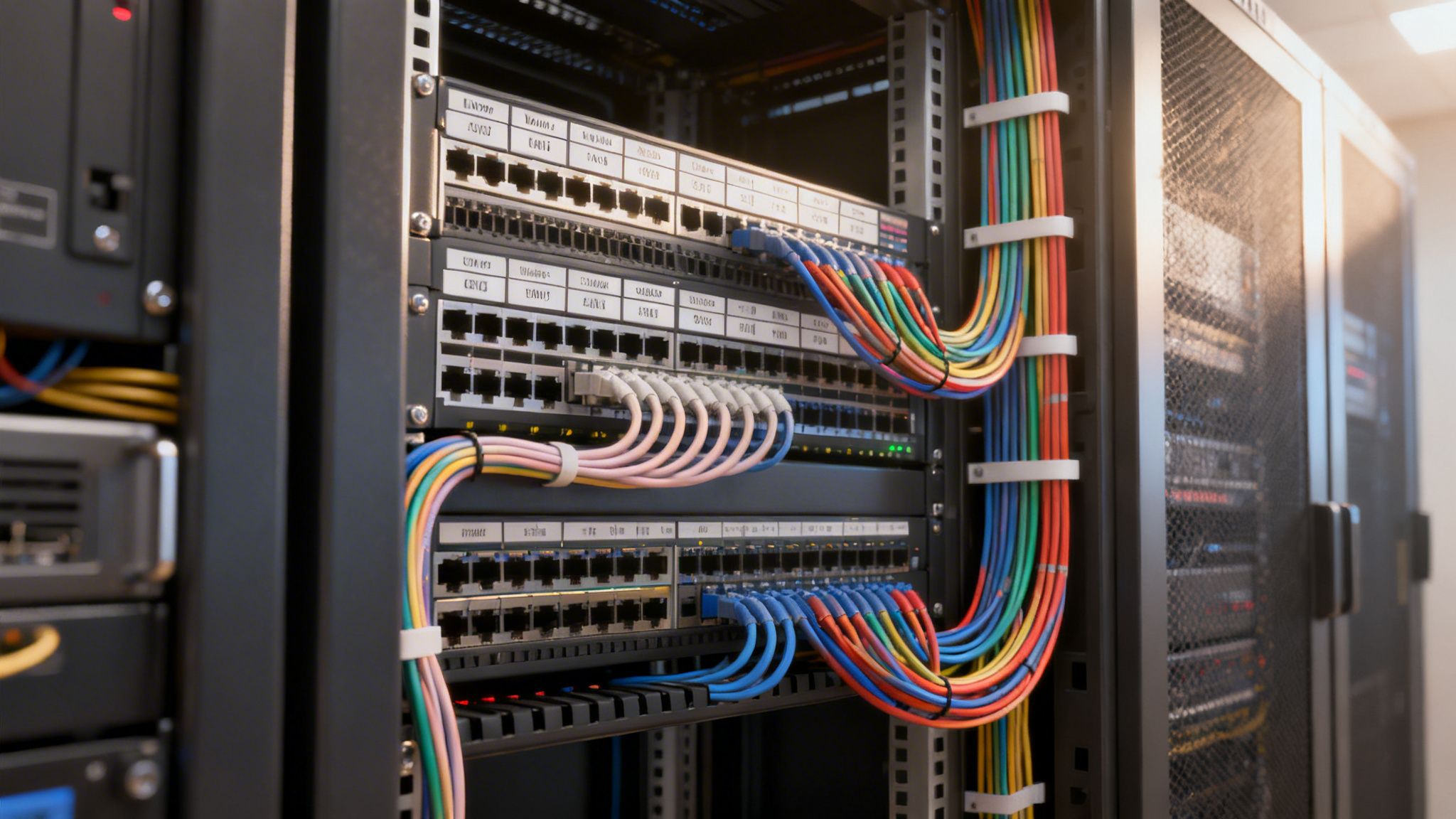
The server rack is the skeleton of any organized network closet. It gives you a standard framework for mounting servers, switches, and other gear. But just throwing equipment into a rack doesn’t solve the problem. The real work is in using professional-grade tools to build a logical, efficient, and serviceable setup.
These are the core components you’ll want to get familiar with:
- Patch Panels: I consider these the unsung heroes of a clean network. Instead of running a ton of long Ethernet cables from wall jacks all the way to a switch, you terminate those runs at a patch panel. Then, you simply use short, easy-to-manage patch cables to connect the panel to the switch. It's a game-changer.
- Horizontal Cable Managers: These are 1U or 2U panels with rings or slots that you mount right above and below your switches. They give your patch cables a dedicated channel to run through, preventing that ugly "waterfall" of wires that always seems to hide the one port you need to get to.
- Vertical Cable Managers: For taller racks, these channels run up the sides. They act like highways for routing bundles of cables from various devices to your switches and power distribution units (PDUs), keeping everything out of the way and accessible.
A well-managed rack is all about creating a predictable, repeatable system. When every cable has a designated path, tracking down a bad connection takes minutes, not hours of digging through a tangled mess.
This whole approach is the essence of professional IT. If you'd like to dive deeper into the methodology, our guide on what is structured cabling breaks down the principles that turn chaos into a rock-solid network backbone.
Airflow Is Everything: Preventing Overheating
One of the most immediate benefits you'll see from proper cable management is a massive improvement in airflow. Servers and network switches generate a ton of heat. If that hot air gets trapped, your equipment will start to overheat, leading to slow performance, random shutdowns, and a much shorter lifespan for your expensive hardware.
When cables are just a tangled web behind a rack, they form a dense wall that blocks air from moving. This effectively chokes your servers by trapping hot exhaust air right where the fans are trying to pull in cool air. By neatly routing cables through dedicated managers, you create clear, open channels for air to flow from the cool aisle to the hot aisle, just as the equipment was designed to do.
The difference is staggering. For many mid-sized businesses, simply adding overhead ladder trays can boost cooling efficiency in server racks by as much as 50%. This isn't just about being tidy; it's about smart business. Proper organization has a direct ROI, with some firms cutting energy use by 15% from improved airflow alone.
Pro-Level Techniques for Future-Proofing
A truly professional setup isn't just clean for today; it’s designed to make tomorrow's work—maintenance, upgrades, troubleshooting—as painless as possible. Put in a little extra effort now, and you'll save yourself from massive headaches down the road.
Separate Power and Data Cables
This is a golden rule. Run your power cables down one side of the rack and your network data cables down the other. When high-voltage power lines run right alongside data cables, they can create electromagnetic interference (EMI). That interference can corrupt data packets, causing slow, flaky network connections. A simple physical separation is the best way to protect your signal integrity.
Leave a "Service Loop"
When you're running cables, always leave a little bit of extra slack, coiled up neatly. This "service loop" gives you enough wiggle room to re-terminate a connector or move a server one slot up or down without having to rip out and run a completely new wire. It’s a tiny bit of foresight that can save you hours of work later.
Color-Code Your Cables
This is one of the easiest ways to make your network understandable at a glance. By assigning colors to specific functions, you and your team can instantly identify a cable's purpose. For example:
- Blue: Standard user workstations
- Yellow: VoIP phones
- Red: Critical infrastructure (server-to-switch links)
- Green: Crossover or special connections
This simple visual system makes troubleshooting faster and helps prevent someone from accidentally unplugging a critical server when they meant to unplug a printer. When you master these techniques, your network closet transforms from a liability into a reliable, efficient asset.
Keep your business running without IT headaches.
GT Computing provides fast, reliable support for both residential and business clients. Whether you need network setup, data recovery, or managed IT services, we help you stay secure and productive.
Contact us today for a free consultation.
Call 203-804-3053 or email Dave@gtcomputing.com
.
Maintaining Your System and Knowing When to Call an Expert
Getting your cables organized is a fantastic first step, but the real work is in keeping them that way. Think of it less like a one-time project and more like ongoing maintenance. As your business evolves, adds new people, and brings in new equipment, a perfectly managed setup can quickly slide back into chaos if you don't stay on top of it.
The good news is that this doesn't have to be some huge, time-consuming task. A simple quarterly review is usually all it takes to keep the cable spaghetti monster at bay. Just a quick inspection can preserve all the hard work you’ve already put in.
Your Simple Maintenance Checklist
Block off an hour or so every few months to give your workstations and network closet a quick once-over. This proactive habit helps you spot little issues before they snowball into big, messy headaches.
Here’s what to keep an eye out for:
- Spot "Cable Creep": Has a new monitor or printer been added with a wire just draped across the floor? Find those rogue cables and route them properly.
- Inspect for Damage: Give your cables a quick visual check. Look for frayed jackets, sharp bends, or anything that looks pinched. Damaged cables are a performance and safety risk.
- Check Your Labels: Are all your labels still attached and easy to read? If any have fallen off or faded, now’s the time to replace them.
- Clear Out Dust: Dust buildup is bad for airflow and a potential fire hazard. A can of compressed air or a gentle wipe-down for cable bundles and server racks goes a long way.
Maintenance is really about protecting your investment. A few minutes of prevention every quarter can save you hours of frustrating troubleshooting—and expensive downtime—down the road.
This simple routine does more than just keep things looking good; it ensures your system remains safe, reliable, and efficient as you grow.
When a DIY Approach Is Not Enough
While you can definitely handle day-to-day tidiness, some situations are best left to the pros. Knowing when to step back and call for help is just as critical as knowing how to wrap a cable. Trying to DIY a complex project can easily create more problems than it solves, often leading to bigger bills and longer downtime.
You should seriously consider bringing in a professional if you’re dealing with:
- A Full Office Relocation: Moving an entire IT infrastructure is a high-stakes job. One wrong move can be disastrous for your operations.
- Major Network Upgrades: Rolling out new servers, switches, or a company-wide VoIP system requires a level of planning and execution that only comes with experience.
- Complex Structured Cabling: Any time you need to run wires through walls, across ceilings, or between floors, you're in the territory of certified technicians.
There's a reason the global cable management market is projected to hit $64.7 billion by 2032—IT infrastructure is getting more complex every day. Professionals can prevent up to 80% of downtime incidents that are traced back to messy, poorly managed infrastructure. An expert might also recommend solutions you hadn't considered, like using adjustable cable baskets instead of basic zip ties, which can save 20% on future labor costs when it's time to upgrade. You can find more details on the growing cable management market on Allied Market Research.
Partnering with an IT expert ensures the job gets done right the first time, protecting your business and setting you up for future success. If you're considering it, take a look at our guide on how to choose a managed service provider.
Keep your business running without IT headaches.
GT Computing provides fast, reliable support for both residential and business clients. Whether you need network setup, data recovery, or managed IT services, we help you stay secure and productive.
Contact us today for a free consultation.
Call 203-804-3053 or email Dave@gtcomputing.com
.
Wrapping It Up: Taming the Cable Monster for Good
So, what have we learned? Tackling that mess of computer cables isn't just about making things look tidy. It's a fundamental step toward a more stable, safer, and more efficient business. When you stop reacting to cable-related problems and start managing them proactively, you turn a source of frustration into a streamlined, reliable part of your infrastructure.
The benefits are immediate. A clean setup cuts down troubleshooting from hours to minutes, helps prevent expensive hardware from overheating, and frankly, makes your workspace a much safer and more professional place to be. It’s the unsung hero of a dependable IT system.
From Clutter to Control
Moving from a tangled web of wires to an organized system is completely achievable with a solid plan. It all begins with a simple sketch, choosing the right gear for the job, and then working through it methodically, from the desks to the server room. Every cable you secure and label builds a system that's not just clean now, but easy to manage down the road.
If you remember nothing else, keep these points in mind:
- Plan First: Never, ever start unplugging without a map of where everything needs to go.
- Use the Right Tools: Reusable Velcro ties, cable trays, and a good label maker will make your life infinitely easier.
- Separate Power and Data: This one simple rule is your best defense against weird network glitches and signal interference.
- Give Your Gear Room to Breathe: In a server closet, good cable management equals good airflow, which means your equipment runs cooler and lasts longer.
The real point of learning how to organize computer cables is to make your technology work for you, predictably and reliably. A well-managed system is one you don't have to think about, freeing you up to focus on what actually matters—running your business.
Whether you’re just cleaning up the rat's nest under your own desk or taking on a full-blown network closet overhaul, the core ideas are the same. A bit of planning and a steady approach can solve your cable clutter problem for good, boosting productivity and protecting your tech investments for years.
Keep your business running without IT headaches.
GT Computing provides fast, reliable support for both residential and business clients. Whether you need network setup, data recovery, or managed IT services, we help you stay secure and productive.
Contact us today for a free consultation.
Call 203-804-3053 or email Dave@gtcomputing.com
.