When you think of IT support, you might picture someone fixing a sluggish laptop or resetting a password. But for a dental office, that's just scratching the surface. Real IT support for dentists is a highly specialized field, built to handle the unique software, advanced hardware, and stringent compliance rules that define a modern practice.
It’s about making sure your patient management system never falters during a busy check-in and, more importantly, protecting sensitive patient data from ever-present cyber threats. This isn't a job for a generalist IT provider; it requires deep industry knowledge.
Why Generic IT Fails in a Modern Dental Practice
Imagine your waiting room is full on a Monday morning, and your practice management software suddenly crashes. No access to schedules, no patient records, no billing info. It’s a complete operational shutdown, not just a minor tech hiccup. This is exactly why a one-size-fits-all IT plan is a recipe for disaster in a dental practice.
A dental office is a sophisticated tech environment, far from a typical small business. It's an ecosystem where digital imaging software, Electronic Health Records (EHR), and complex practice management systems must all communicate seamlessly. Most generic IT providers simply don't have the experience to troubleshoot proprietary dental software or grasp the non-negotiable requirements of HIPAA.
The Unique Technology Stack of a Dental Office
Your practice runs on a foundation of specialized tools that demand expert care. If even one piece of this puzzle fails, it can bring your entire day to a grinding halt.
Here are the core systems that need a specialist's touch:
- Practice Management Software (PMS): Think of tools like Dentrix or Eaglesoft as the central nervous system of your practice. They manage everything from the appointment book to insurance claims.
- Digital Imaging and Radiography: Your cone-beam CT scanners and digital X-ray machines produce huge files. This requires a network that’s not just fast but also robust and secure enough to handle and store that data properly.
- Electronic Health Records (EHR): Keeping patient records secure, accurate, and accessible isn't just good practice—it's a legal requirement under HIPAA.
This digital shift is accelerating. The global dental practice management software market hit USD 2.4 billion in 2024 and is expected to climb to USD 2.6 billion in 2025. It’s a clear sign that technology is becoming more and more integrated into daily dental operations.
The fundamental problem is that generic IT providers see all data as equal. In a dental office, patient data isn't just information. It's a protected asset carrying immense legal and ethical weight.
To better understand these hurdles, let's break down the main IT challenges that are specific to dental practices.
Key IT Challenges Unique to Dental Practices
| Challenge Area | Specific Problem | Impact on Your Practice |
|---|---|---|
| HIPAA Compliance | Misconfigured networks, improper data storage, or weak access controls can lead to massive fines and reputational damage. | A data breach could cost you tens of thousands in fines, destroy patient trust, and trigger a lengthy, stressful audit. |
| Software Integration | Getting your PMS, imaging software, and billing platforms to "talk" to each other without glitches is a constant battle. | Wasted time, data entry errors, and workflow bottlenecks that frustrate staff and slow down patient care. |
| Hardware Management | Specialized equipment like intraoral cameras and 3D scanners requires specific drivers, updates, and maintenance. | Equipment downtime means canceled appointments, lost revenue, and an inability to provide critical diagnostic services. |
| Data Security | Dental practices are prime targets for ransomware because of the valuable patient data they hold. | A single security incident can lock you out of your systems for days, costing a fortune in ransom and recovery efforts. |
As you can see, the stakes are incredibly high. Each of these challenges requires a level of expertise that goes far beyond standard IT support.
While we've touched on why generic solutions don't cut it, you can explore this topic further in this detailed guide on specialized IT support for a medical practice.
Building Your Digital Fortress for HIPAA and Cybersecurity
Protecting sensitive patient data isn’t just an operational task—it’s your most critical legal and ethical responsibility. For most dental practices, the technical safeguards required by the Health Insurance Portability and Accountability Act (HIPAA) can feel like a maze of complex rules. But with the staggering financial and reputational cost of non-compliance, robust cybersecurity has become a cornerstone of any successful practice.
Think of it like building a digital fortress. A basic firewall is just the outer wall; true, resilient protection requires multiple, sophisticated layers of defense working together. This is where specialized IT support for dental offices becomes essential, turning abstract legal requirements into a concrete, multi-layered security plan.
Beyond the Basics of HIPAA Compliance
HIPAA compliance isn't a one-and-done checklist. It's an ongoing commitment to protecting electronic Protected Health Information (ePHI) from a constantly shifting landscape of digital threats. A single breach can be devastating, with healthcare data breaches costing an average of $11 million per incident.
A solid security posture for a dental office needs several core components:
- Advanced Firewall and Network Security: This is your first line of defense. It acts as a gatekeeper, inspecting all traffic coming into and out of your network to block malicious activity while letting legitimate data from your practice management and imaging software flow freely.
- Encrypted Data Backups: If you're hit with a hardware failure, natural disaster, or a ransomware attack, encrypted backups are your lifeline. They ensure you can restore patient records and get back up and running quickly and securely.
- 24/7 Threat Monitoring and Detection: Cyberattacks don’t work 9-to-5. Continuous monitoring means someone is always watching your network for suspicious activity, allowing threats to be shut down before they can do real damage.
This diagram shows how all the core IT systems in a dental office are interconnected and all need protection.
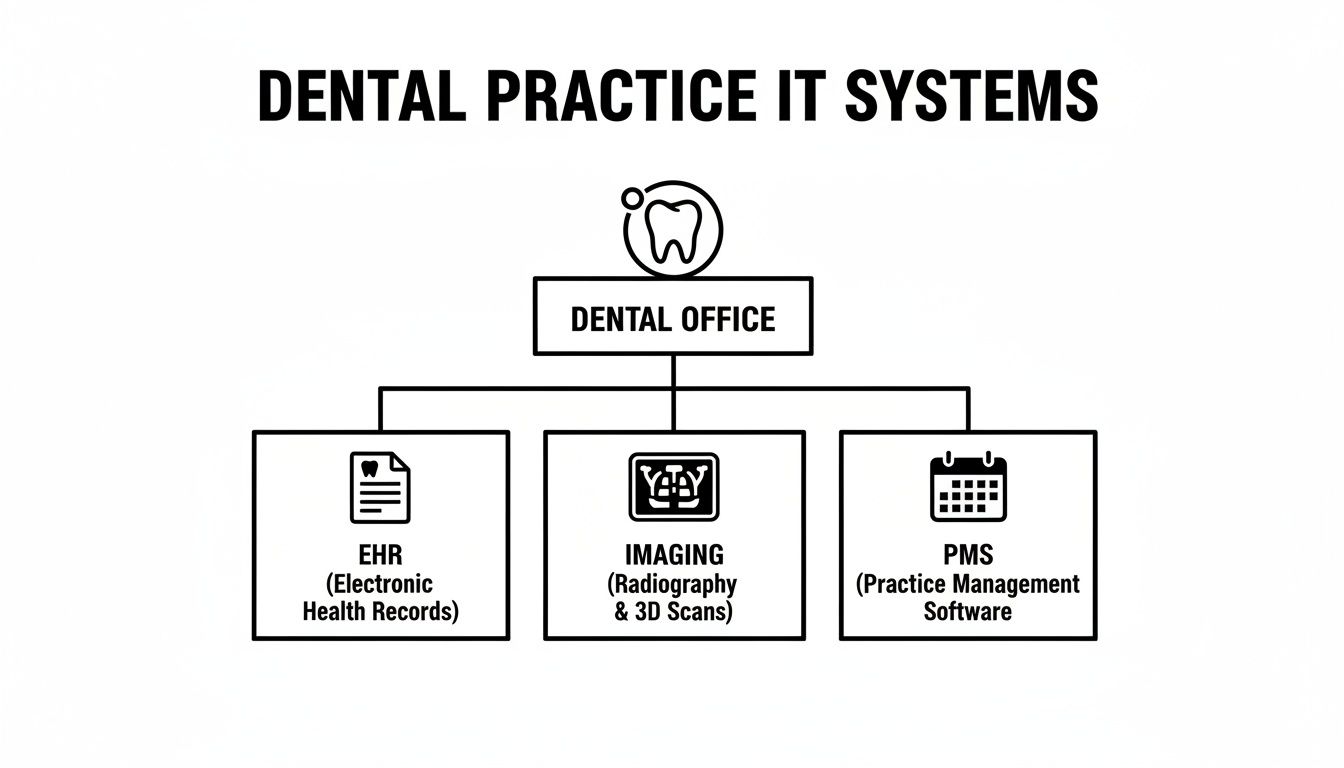
As you can see, your EHR, imaging systems, and practice management software are all critical hubs of sensitive patient data. Each one requires its own layer of security within your overall IT fortress.
The Human Element of Cybersecurity
Technology alone can't secure your practice. Your team is both your greatest asset and, without the right training, your biggest vulnerability. Phishing emails—deceptive messages designed to trick staff into revealing passwords or clicking malicious links—are one of the top ways hackers get into healthcare systems.
That’s why security awareness training is a non-negotiable part of HIPAA compliance. It empowers your staff to become a human firewall.
A well-trained team can recognize and report a phishing attempt, effectively stopping a potential data breach before it ever begins. Conversely, a single uninformed click can bypass even the most advanced security hardware.
Effective training turns your employees from potential targets into active defenders of your practice. To truly secure communications, it's wise to explore all your options. For a deeper dive, check out this great resource on secure messaging for healthcare, including a HIPAA compliance guide.
Building a Proactive Defense Strategy
A great IT partner doesn't just react to problems—they build a proactive strategy to prevent them in the first place. This means doing regular security risk assessments, penetration testing to find weak spots, and helping you develop policies that align every part of your operation with HIPAA's technical rules. You can learn more about safeguarding your data in our guide on HIPAA compliant cloud backup solutions.
By combining advanced technology with ongoing staff education and strategic planning, you create a formidable defense. This multi-layered approach ensures your digital fortress can stand up to modern threats, protecting your patients, your reputation, and your practice's future.
Designing a Network That Powers Your Practice
Think of your office network as the central nervous system of your entire practice. It’s the invisible framework that connects every digital tool, from the front desk to the operatory, and dictates how quickly and reliably things get done. A standard, off-the-shelf business network just wasn't built for the unique pressures of a modern dental office, where massive imaging files and a constant flow of patient data are the norm.
Let's use a highway analogy. A generic setup is like a single-lane country road. It works fine for light traffic, but the moment your team tries to send a large 3D CBCT scan while the front desk is processing patient records, you get a digital traffic jam. The result? Frustrating lag, slow software, and a major hit to productivity.
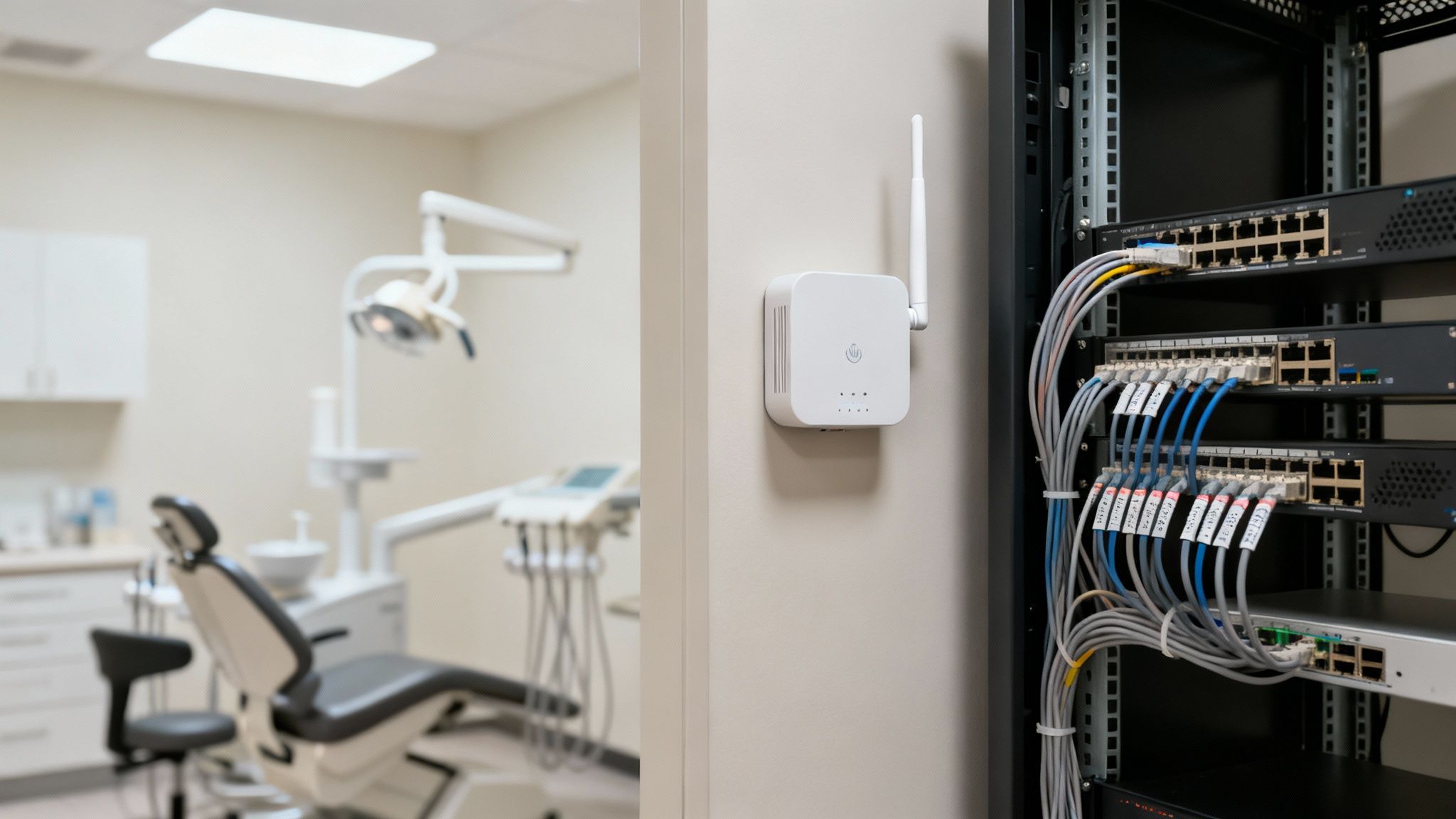
A network designed specifically for a dental environment, on the other hand, is a multi-lane superhighway. It’s engineered to make sure your most valuable cargo—critical patient data—moves fast and securely between every single device in your practice, without a single bottleneck.
The Foundation of a High-Performance Network
A truly robust dental network is built with two things in mind: professional-grade hardware and intelligent design. The consumer-grade equipment you'd find at a big-box store simply can't handle the constant demand and throughput required to keep a busy practice running smoothly. This is where specialized IT support for dental offices becomes a game-changer.
Here are the core components of a network that won't let you down:
- Professional-Grade Routers and Switches: Think of these as the expert traffic controllers of your data highway. Devices from brands like Cisco and Ubiquiti are built for high-volume, 24/7 operation and come with advanced security features that are your first line of defense against outside threats.
- Structured Cabling: This is the physical pavement of your network. Having a professional install high-quality Ethernet cabling (like Cat6 or better) is non-negotiable. It eliminates weak spots and ensures a rock-solid, high-speed connection for every computer and imaging machine.
- Business-Class Wi-Fi Access Points: From tablets used for patient consultations to staff smartphones, reliable wireless is a must. Strategically placed access points blanket your entire office in seamless Wi-Fi, getting rid of frustrating dead zones and dropped connections for good.
This kind of professional infrastructure is the only way to guarantee your team has instant, delay-free access to the digital tools they need, no matter where they are in the office.
Segmenting Your Network for Security and Speed
Not all data traffic is created equal, and it shouldn't all travel in the same lane. A well-architected dental network uses a technique called network segmentation to separate different types of traffic into their own virtual "lanes," which boosts both performance and security.
For instance, your core practice management data—which needs to be lightning-fast and ultra-secure—can be completely isolated from the guest Wi-Fi network you offer patients. This simple separation means a security issue on the public network can never pose a threat to your protected patient records.
By creating separate pathways for critical operations, patient services, and internal staff devices, you ensure that a surge in one area—like several patients streaming video on the guest Wi-Fi—never slows down the essential tools your clinicians rely on.
This intelligent design is also a huge asset for HIPAA compliance. Segmenting the network makes it far easier to control and audit who has access to ePHI, creating a more defensible and secure environment against potential breaches. You can explore more of these fundamentals in our guide on how to set up a small business network.
Planning for Future Growth
A great network doesn't just solve today's problems; it anticipates tomorrow's. As your practice grows, you’ll inevitably add more workstations, adopt new imaging technologies, and rely more heavily on digital tools. A scalable network is built from day one with the capacity to handle this increased load without forcing you into a costly and disruptive overhaul.
This kind of forward-thinking approach means your initial investment pays dividends for years to come. It gives you the freedom to evolve and embrace new technology with confidence, knowing your digital foundation can support your ambitions instead of holding you back.
Automating Your Workflow for Peak Efficiency
How much of your team's day gets eaten up by tedious but necessary tasks? Think about all the time spent on appointment confirmations, new patient intake, and chasing down billing. These manual routines are a huge drain on time that could be much better spent focusing on what really matters: your patients. The right automation, put in place by an expert in IT support for dental offices, is how you get that time back.
Think of it as adding a highly efficient digital assistant to your team. This assistant works quietly in the background, taking care of the repetitive jobs that always seem to create bottlenecks at the front desk. The idea isn’t to replace your amazing staff, but to free them from the monotonous work so they can focus on high-value, personal interactions with patients.
Slashing No-Shows and Reducing Manual Entry
One of the first places you’ll see a massive impact from automation is patient communication. We all know how much time is lost to manual reminder calls. An automated system can send out customized reminders via text or email at just the right time, which has been shown to dramatically cut down on no-show rates.
Another game-changer is sending digital intake forms to patients before their visit. They can fill out their information from the comfort of their home, on their own schedule. This simple shift gets rid of the front-desk scramble, slashes waiting room time, and ensures all that information gets into your system accurately, without any staff member having to decipher handwriting.
The results speak for themselves. Dental offices using this kind of tech are seeing huge reductions in their administrative workload and no-show rates. Some have reported cutting admin time by up to 40% and seeing a 30% drop in missed appointments. You can learn more about how modern technology is reshaping dental practices at NovaComputerSolutions.com.
All that time saved adds up to a calmer, more organized office and a healthier bottom line.
Why Seamless Software Integration is Critical
Here’s the catch: for automation to actually work, your software has to talk to each other. Your Practice Management Software (PMS), your digital imaging tools, and your patient communication platform can't operate on separate islands. When they don't communicate, your team is stuck manually copying and pasting information between programs, which is a recipe for errors and wasted hours.
A properly integrated system creates a smooth, connected workflow. When a patient clicks to confirm their appointment from an automated text, your PMS schedule updates on its own. When a new patient fills out that digital form, their information flows right into their electronic health record. Data moves effortlessly from one step to the next without anyone having to lift a finger.
To really see the difference, let’s compare how things used to be done versus how they can be done now.
Manual vs Automated Dental Office Tasks
| Task | The Old Manual Way | The Modern Automated Way |
|---|---|---|
| Appointment Reminders | Staff spends hours each day making phone calls, leaving voicemails, and manually tracking confirmations. | System automatically sends text and email reminders. Patients confirm with a click, and the schedule updates instantly. |
| New Patient Intake | Patients fill out paper forms with a clipboard in the waiting room. Staff manually transcribes handwriting into the PMS. | Patients receive a secure link to complete forms online before their visit. Data is imported directly into their file, error-free. |
| Billing & Follow-Up | Staff prints and mails paper statements, then makes follow-up calls for overdue balances. | System sends automated e-statements and payment reminders. Patients can pay online 24/7 through a secure portal. |
This kind of integration is the backbone of a modern, efficient practice. It transforms a series of clunky, separate tasks into a single, well-oiled machine, letting your team get more done with less stress and fewer mistakes.
Implementing Proactive Support and Disaster Recovery
Picture this: it’s a Monday morning, your waiting room is full, and your practice management server suddenly crashes. The old way of handling IT, known as the "break-fix" model, means you only call for help after the disaster strikes. This reactive approach is a recipe for canceled appointments, lost revenue, and a whole lot of stress.
A much smarter strategy is proactive, managed IT support. Think of it this way: break-fix IT is like waiting for your car's engine to seize up on the highway before calling a tow truck. Proactive IT is like getting regular oil changes and tune-ups to make sure your car never breaks down in the first place.
It's about shifting your mindset from putting out fires to preventing them entirely, turning your technology from a potential liability into one of your practice's greatest assets.

From Reactive Repairs to Proactive Prevention
The heart of proactive support is all about keeping a constant, watchful eye on your entire technology setup. Instead of waiting for that frantic "nothing is working!" phone call, your IT partner uses specialized tools to monitor the health and performance of your critical systems around the clock. This constant oversight is a cornerstone of expert IT support for dental offices.
This isn't just a passive process. It involves several key activities:
- Continuous Server Health Monitoring: We're talking 24/7 watchfulness. Specialized software tracks your server’s vital signs—memory usage, processor load, storage space. If anything starts to look stressed, your IT team gets an alert, often allowing them to fix the problem before you or your staff even notice.
- Automated Security Patching: Cybercriminals are always looking for open doors in your software. Proactive support ensures every system, from your PCs to your specialized dental software, is consistently updated with the latest security patches. This slams those doors shut before an intruder can peek inside.
- Performance Optimization: Monitoring tools can also spot performance hiccups, like a sluggish network or a workstation that's grinding to a halt. This allows your IT partner to make tweaks that keep your practice running at top speed.
This entire approach is designed to stop small issues from snowballing into practice-halting emergencies. It's all about maintaining uptime so you can focus on what you do best: caring for your patients.
Crafting a Bulletproof Business Continuity Plan
Even with the best preventative care, disaster can strike. A major storm could knock out power, a critical piece of hardware could fail without warning, or a sophisticated ransomware attack could find its way through. This is where a rock-solid business continuity and disaster recovery (BCDR) plan becomes your ultimate safety net.
A BCDR plan is your step-by-step playbook for how your practice will recover its data and get back to business after a major disruption.
A common mistake is thinking a simple data backup is enough. A true disaster recovery plan goes much further, defining the exact steps, who is responsible for what, and the technologies needed to restore everything within a specific timeframe to ensure you can keep operating.
A strong BCDR plan is built on these essential pillars:
- Automated and Redundant Backups: Your data needs to be backed up automatically and often. The industry gold standard is the 3-2-1 rule: keep at least three copies of your data, on two different types of media, with at least one copy stored securely off-site in the cloud.
- Clear Recovery Time Objectives (RTO): This is the crucial question: how quickly do you need to be back online after a disaster? An RTO of four hours requires a very different strategy and technology than an RTO of two days. This needs to be defined upfront.
- Regular Testing and Validation: A plan is worthless if you don't know it works. Your IT partner should be testing your backups and running recovery drills regularly. This ensures that when a real crisis hits, the restoration process is smooth, predictable, and successful.
Imagine ransomware encrypts every patient file. With a tested BCDR plan, you don't panic—you execute the plan. Your IT partner can isolate the attack, wipe the infected systems, and restore everything from a clean, recent backup. You're back to seeing patients in hours, not days. For a deeper dive, check out our guide on how to build a small business disaster recovery plan.
How to Choose the Right Dental IT Partner
Picking an IT provider is a huge decision for your practice. It’s not just about hiring someone to fix a computer when it breaks; it's about bringing on a partner who will protect your business, keep you efficient, and help you grow. The right team feels like an extension of your own staff, spotting problems before they happen. The wrong one? They can cause costly downtime, put you at risk for compliance violations, and create a constant headache for you and your team.
You have to look past the generic sales pitches promising "fast service." What you really need is a partner with a deep, proven background in the dental industry. Their real value isn't just in how fast they respond to a support ticket, but in how well they understand the specific software, equipment, and regulations that define a modern dental practice. That's the difference between a simple vendor and a genuine strategic asset.
Key Questions to Ask a Potential IT Provider
Before you even think about signing a contract, you need to put any potential provider to the test. How they answer the following questions will tell you everything you need to know about their expertise and whether they’re truly equipped to handle the unique needs of a dental office. A top-tier provider won't hesitate and will have solid, detailed answers ready to go.
Here's a quick checklist to guide that conversation:
- Dental Software Experience: "What's your hands-on experience with dental software like Dentrix, Eaglesoft, or Dexis? Can you walk me through a few examples of how you've solved complex issues with these systems?"
- HIPAA and Security Expertise: "How, specifically, do you keep our practice HIPAA compliant? What are the exact security measures you put in place, like encrypted backups and real-time threat monitoring?"
- Guaranteed Response Times: "What are your guaranteed response times for emergencies, both for remote and on-site support? Can I see that in writing in a Service Level Agreement (SLA)?"
- Proactive Support Model: "Describe your proactive monitoring process. How do you actually get ahead of IT problems before they can impact our patient schedule?"
A truly qualified partner won't just say they "know HIPAA." They'll be able to clearly explain their entire security strategy, from initial risk assessments to ongoing staff training, proving they’re serious about protecting your patients' sensitive data.
Identifying a True Strategic Partner
Your goal is to find a company that gets your long-term vision. Look for a provider that’s genuinely invested in your success and can offer strategic advice on technology upgrades, new equipment, and future-proofing your practice. They should essentially act as your virtual Chief Information Officer (vCIO), helping you make smart IT investments that directly improve patient care and boost your profitability.
At the end of the day, the best it support for dental offices does more than just fix tech issues. It gives you the peace of mind that comes from knowing a dedicated team of experts is always working behind the scenes to keep your practice secure, compliant, and running like a well-oiled machine.
Frequently Asked Questions About IT for Dental Offices
When you're thinking about bringing in an IT specialist for your dental practice, a lot of questions come to mind. It’s completely normal to wonder about the cost, how they'll handle your specific software, and what the transition will look like. Let's walk through some of the most common questions we hear from dentists.
How Much Does Specialized IT Support for a Dental Office Cost?
There's no one-size-fits-all price tag, as the cost really depends on the size of your practice, how many workstations you have, and exactly what services you need.
Most experienced IT partners in the dental space have moved to a flat-rate monthly fee. This model is a game-changer because it takes the guesswork out of your IT budget and is far more affordable than getting hit with a massive, unexpected bill when something breaks. It covers proactive monitoring, security, and all the support you need, which helps prevent costly downtime in the first place.
To get a real number, the best path forward is a custom quote after a thorough discussion about your practice's specific needs.
Can an IT Company Support Our Specific Dental Software?
Yes, and this is a non-negotiable question you should ask any potential provider. A true dental IT specialist won't just know about computers; they'll have hands-on experience with the exact software that runs your practice. We're talking about platforms like Dentrix, Eaglesoft, and Dexis.
They do more than just fix a broken computer. A good IT partner understands how your network, servers, and security all have to work together perfectly to keep your critical software running smoothly. They'll even act as your technical go-between with software vendors to get tricky issues sorted out fast.
How Do We Switch IT Providers Without Disrupting Our Practice?
This is a common concern, and a professional IT company has the process down to a science. A smooth transition is all about planning. It starts with a deep dive into your current network and a detailed onboarding plan tailored to your office.
Any work that could potentially cause disruption, like installing new monitoring tools or moving data, is always scheduled for after hours or over the weekend. The goal is to ensure there is zero impact on patient care or your daily operations. A stress-free switch comes down to clear communication and a solid, well-documented plan.
Your Foundation for a Modern Dental Practice
When it comes down to it, investing in the right IT support is one of the single most important things you can do for the future of your practice. It’s the difference between technology being a constant headache and it becoming your greatest asset.
Think about it: with an expert partner handling your network, security, and compliance, your team gets to do what they do best—focus completely on patient care. A stable, secure, and thoughtfully managed IT system isn't just a background detail; it's the very foundation that a successful, modern dental practice is built on. It’s what keeps everything running smoothly, day in and day out.
Keep your business running without IT headaches.
GT Computing provides fast, reliable support for both residential and business clients. Whether you need network setup, data recovery, or managed IT services, we help you stay secure and productive.
Contact us today for a free consultation.
Call 203-804-3053 or email Dave@gtcomputing.com