A server locks up at 10:15 on a Tuesday. The front desk cannot check patients in. The legal assistant cannot open case files. Email stalls. The phones still ring, but nobody can answer with confidence because the information they need is trapped behind a system problem.
That is the moment many owners start searching for small business tech support near me.
The mistake is treating that search like a hunt for the cheapest repair person. For a small business, IT support is not just about fixing computers. It protects appointments, deadlines, billing, client trust, and staff productivity. A local provider should help you stay operational, reduce avoidable risk, and make technology less disruptive to run.
If you run a law office, dental practice, accounting firm, or growing service business, the right support partner is the one that understands what an outage costs your operation. That is the standard that matters.
Why "Good Enough" Tech Support Is Costing Your Business

A lot of businesses settle for support that is "fine most of the time." That usually means a freelancer who answers when available, a break/fix shop that steps in after a failure, or the office employee who is "good with computers."
That approach works until it does not.
When a system goes down in a professional office, the damage spreads fast. Staff lose billable time. Appointments get delayed. Clients notice confusion. In regulated environments, the problem is bigger than inconvenience because poor recovery handling can create security and compliance exposure.
Recent 2025 data cited by the National Business guide reports average downtime costs of $9,000 per minute for mid-sized businesses, and small professional services can face 20-30% higher relative impacts. The same source says 43% of small businesses underestimate these costs, which leads many of them to underinvest in proactive monitoring and support (National Business guide on small business tech support).
What owners usually get wrong
The biggest misunderstanding is thinking tech support is an occasional expense. It is a business continuity function.
If your systems support scheduling, records, billing, communication, document access, or payment processing, then IT support affects revenue directly. You may not need an enterprise stack. You do need standards.
Common weak points show up in plain sight:
- Slow response habits: Your provider eventually gets back to you, but not fast enough when staff are stuck.
- No prevention work: Nothing is monitored, updated, checked, or tested unless something breaks.
- No recovery discipline: Backups may exist, but nobody has confirmed they can restore clean data.
- No business context: The technician can fix a PC, but does not understand how your office works under pressure.
Good support does not start when something breaks. It starts with reducing the chances that the break happens at all.
The right decision
When you search for local support, you are not choosing who can reboot a machine. You are choosing who gets access to your operations when the day goes sideways.
That changes the buying criteria. Response time matters. Security practices matter. Familiarity with legal, dental, healthcare, or other regulated workflows matters. The provider should understand that some issues are annoying, while others stop the business cold.
First Look Inward What Your Business Needs from IT
Before comparing providers, get clear on your own environment. Most bad IT buying decisions happen because the business never defined its essential requirements.
Start with a simple self-audit.
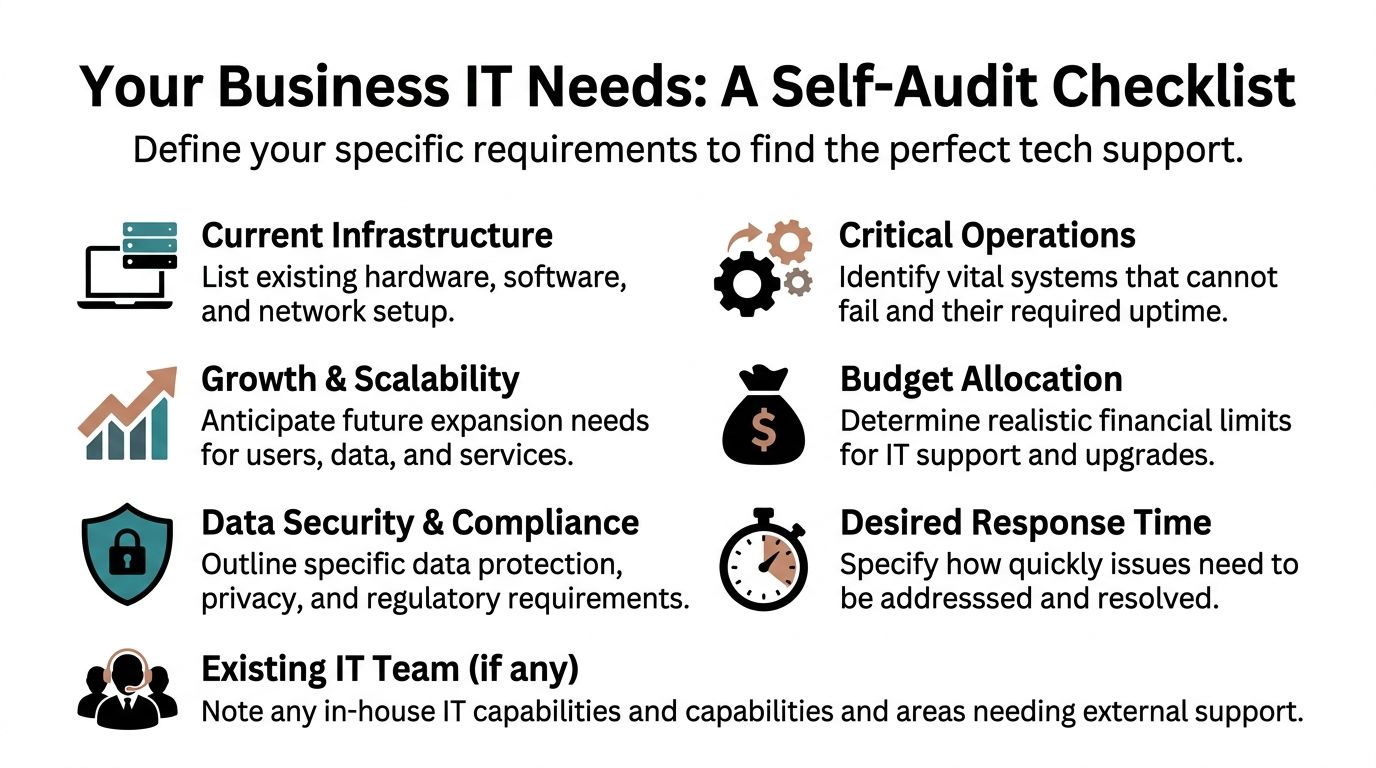
Build your own scorecard first
Write down the basics without trying to sound technical.
- Users and devices: Count staff, laptops, desktops, phones, printers, servers, and any shared systems.
- Critical software: List the applications your team cannot work without, including practice management software, case file systems, billing tools, cloud apps, and email.
- Data sensitivity: Note whether you handle protected health information, legal records, financial files, or other confidential material.
- Operational bottlenecks: Identify what fails first during an outage. Front desk check-in, file access, phone service, internet, printing, remote access, or backups.
- Growth plans: Consider whether you expect more staff, new locations, heavier WiFi demand, more remote workers, or a phone system upgrade.
The point is not to produce a perfect technical diagram. The point is to know what your office cannot tolerate.
Track what is happening
If your team says, "IT issues happen all the time," translate that into usable information. The best starting move is practical and simple.
Track support demand over a typical month. Log issue frequency, task duration, and how critical fast turnaround is for each problem. Then define a few service KPIs, including first-contact resolution rate, with an efficient-provider benchmark of over 70-80% according to Network1 Consulting's cost guidance for small business IT support (Network1 Consulting on optimizing IT support costs).
A basic log can include:
- What broke: Internet drop, user lockout, printer failure, VoIP issue, backup alert, malware concern.
- Who was affected: One user, one department, or the whole office.
- How long it lasted: Not exact to the minute. Close enough to reveal patterns.
- How work was affected: Delayed appointment, missed intake, lost access to records, inability to bill, or client communication problems.
If you cannot describe the business impact of your IT problems, you will have a hard time buying the right level of support.
Define your core requirements
A dental office and a small retail shop may both need support, but not at the same level. A law firm may care about document access, secure communication, and after-hours recovery. A dental practice may care more about chairside workflows, imaging systems, secure backups, and reliable front-desk operations.
Your minimum requirements might include:
- Fast critical response
- Secure remote support
- Cloud backup verification
- Industry-aware compliance handling
- Support outside normal hours
- A clear plan for onboarding new staff and devices
Once you have that list, "small business tech support near me" becomes a filtered search, not a desperate one.
Finding and Vetting Your Local Tech Support Partner

A Google search is a starting point. It is not a selection process.
The strongest local providers are often found through business referrals, local professional networks, and conversations with owners who run companies similar to yours. A provider that works well for a design studio may not be the right fit for a dental office or legal practice.
Where to look besides search results
Try a few channels at once:
- Local business associations: Chambers, merchant groups, and networking organizations often reveal which providers show up consistently.
- Industry peers: Ask other dentists, lawyers, or office managers who handles their support and how they perform during urgent issues.
- Professional service networks: Accountants, attorneys, and consultants often know which IT firms are organized and which create cleanup work.
- Provider websites: Review whether they explain services clearly, mention tools like Cisco, Meraki, or Ubiquiti, and show they understand environments beyond home PC repair.
If you want a more detailed framework for screening vendors, this guide on how to choose a managed service provider is a useful checklist.
What separates a fit from a mismatch
A provider can be technically capable and still wrong for your business.
Look for signs they understand the working reality of small organizations:
- They ask about workflows, not just devices.
- They discuss backups, security, and response times early.
- They can explain support in plain language.
- They have experience with offices your size.
- They understand regulated data handling when relevant.
One issue that rarely gets enough attention is whether the provider offers customized, culturally competent support. That matters more than many firms realize. Data from the 2025 Milken Institute shows 65% of minority-owned small businesses cite lack of customized IT as a growth barrier (NEI Insights on underserved small businesses).
That is not an abstract social point. It affects communication, trust, training, adoption, and whether the provider can support the actual business in front of them instead of pushing a generic template.
Questions worth asking in the first call
Do not ask only, "What do you charge?" Ask questions that expose how they think.
- What kinds of small businesses do you support most often?
- How do you handle urgent issues that stop operations?
- What does onboarding look like in the first few weeks?
- How do you approach backups and recovery testing?
- Can you support secure remote work, VoIP, and office networking?
- How do you document systems, users, and vendor contacts?
- What happens if our office needs after-hours support?
A good provider gives direct answers. A weak one stays vague, avoids process questions, or talks only about tools.
Mentioning one local example, GT Computing offers managed services, network installations, cloud backups, antivirus protection, remote support, VoIP, and structured cabling for Connecticut businesses. That service mix is the kind of breadth many small firms need from one partner, especially if they want both day-to-day support and project work handled in the same relationship.
Decoding IT Support Packages and Pricing Models
Most owners compare IT quotes the wrong way. They look at the monthly number first and stop there.
The better approach is to compare risk, predictability, and coverage. A lower upfront cost can produce a much higher operating cost when emergency work, downtime, and patchwork fixes pile up.
Small businesses in major U.S. markets typically spend $125–$225 per user per month on managed IT services, while SMBs nationally invest $10,000–$50,000 annually in technology according to CTS Complete's pricing overview (CTS Complete on IT support costs).
The two models most businesses see
One model is reactive. The other is proactive.
| Factor | Break/Fix Model | Managed Services (MSP) Model |
|---|---|---|
| How billing works | Pay when something breaks | Pay a recurring monthly fee |
| Budget predictability | Low | Higher |
| Incentive structure | Provider gets work after failure | Provider has reason to prevent failure |
| Monitoring and maintenance | Usually limited or ad hoc | Usually included as part of the service |
| Best fit | Very small, low-complexity environments with minimal risk tolerance requirements | Businesses that rely on uptime, secure data access, and stable daily operations |
| Response style | Event-driven | Ongoing and process-driven |
| Long-term outcome | Can feel cheaper until emergency work stacks up | Often easier to plan around operationally |
When break/fix still makes sense
There are cases where break/fix is acceptable.
A very small office with limited systems, little compliance exposure, and a high tolerance for downtime may choose to pay only when needed. If the business can operate manually for stretches of time and does not rely heavily on integrated software, that can be a workable short-term choice.
But many owners underestimate what "can operate manually" really means. It sounds fine until the office loses file access, internet reliability, printing, line-of-business applications, or remote login on a busy day.
Why managed services usually win for professional offices
For firms that need consistency, managed services usually make more business sense. You are paying not only for repair labor, but also for routine maintenance, monitoring, security attention, remote support, and a provider that already knows your systems.
That changes the operating model. Problems get caught earlier. Support requests are handled in context. Technology planning becomes less chaotic.
If you want to estimate what your own environment might cost, a practical place to start is this IT support cost calculator.
How to read a quote without getting fooled
A quote should tell you what is included, not just what it costs.
Review these items carefully:
- Coverage scope: Does it include users, devices, servers, network gear, cloud apps, and remote support?
- Response expectations: Are there defined service levels for critical and routine issues?
- Security basics: Is antivirus, patching, account protection, and backup oversight included?
- Project work: Are network upgrades, cabling, hardware installs, or VoIP changes separate?
- Onsite vs remote support: Clarify what triggers an onsite visit and whether that affects price.
Cheap support is often cheap because the provider excluded the work you need.
A predictable monthly agreement is not automatically better. It is better only when the service scope matches your business risk. That is the appropriate comparison.
Beyond Break-Fix Essential Services Your IT Partner Must Offer
Repair-only support leaves too many holes.
If your provider shows up only after a failure, then your business is carrying the operational risk in between. That may be acceptable for a spare laptop at home. It is not acceptable for a business that depends on records access, secure communication, and reliable connectivity.
Monitoring and maintenance
A serious IT partner should watch your environment continuously, not casually. That includes workstations, servers, backups, antivirus status, storage alerts, and network health.
For small offices, much instability starts here. A user ignores a warning. A backup fails without warning. A line-of-business machine stops syncing properly. Nobody notices until the issue affects the front desk or the whole office.
This is one reason managed support changes outcomes. According to Prototype IT, MSPs can boost productivity by 25-40% via efficient operations and cut cybersecurity breaches by 60%, while 43% of SMBs are affected by breaches yearly (Prototype IT on small business IT support costs).
Backup and recovery
Backups are essential. Verified recovery is the true standard.
A provider should be able to explain:
- Where data is backed up
- How often backups run
- How backup failures are flagged
- How restores are tested
- What the recovery process looks like for a single file, a workstation, or a larger outage
For law firms and dental practices, recovery planning has to account for sensitive data, document integrity, and operational urgency. Prototype IT notes that for dentists and lawyers, a HIPAA-compliant recovery plan ensures 100% data integrity in the context of their service recommendations and benchmarks.
If a provider talks confidently about backups but vaguely about restores, keep asking questions.
Security layers that belong in the baseline
Small businesses do not need security theater. They need disciplined basics done consistently.
That usually includes:
- Managed antivirus or endpoint protection
- Multi-factor authentication
- Patch management
- Account and password reviews
- Email security controls
- User awareness training
- Secure remote access
If you are evaluating more advanced security oversight, this explanation of managed detection and response helps clarify where standard support ends and deeper threat monitoring begins.
Network quality and business infrastructure
A lot of support frustration is really a network design problem.
Unstable WiFi, poor switch layout, weak firewall configuration, and consumer-grade gear create recurring complaints that users describe as "the internet is weird today." Good providers solve that at the infrastructure layer with properly planned wired and wireless networks, often using business-grade platforms such as Cisco, Ubiquiti, or Meraki where appropriate.
That matters even more if your business relies on:
- VoIP phone systems
- Distributed WiFi across a larger office
- Structured cabling
- Shared printers and scanners
- Remote access for hybrid staff
A provider should not position these as extras unless your environment is unusually simple. For many small firms, these are the foundation that keeps normal work normal.
Your Smooth Onboarding Checklist and Conclusion
Choosing a provider is only half the job. The handoff matters just as much.
A messy onboarding process creates blind spots, duplicate work, and preventable downtime. A clean one gives your new IT partner the information and access they need before the first urgent call lands.
What to prepare before support begins
Gather the operational basics in one place.
- Admin credentials and access records: Include workstations, servers, email platforms, cloud services, domain-related accounts, backup systems, firewall access, and vendor portals.
- Key business contacts: Identify who approves changes, who reports issues, and who should be notified first during an outage.
- Vendor list: Internet provider, phone provider, software vendors, copier company, and any building access contacts tied to IT equipment.
- Asset list: Even a simple spreadsheet of devices, users, and locations helps immediately.
What the first weeks should include
A strong onboarding plan usually covers a few things quickly.
- Kickoff meeting: Set communication rules, escalation paths, support hours, and priorities.
- Documentation review: Confirm systems, users, licenses, and dependencies.
- Monitoring deployment: Install the tools needed to see device health, alerts, and backup status.
- Security cleanup: Review passwords, multifactor authentication, antivirus coverage, and account access.
- Backup verification: Confirm jobs are running and restores are possible.
- Network review: Check internet reliability, firewall posture, WiFi layout, switches, and cabling where needed.
The first goal of onboarding is visibility. Your provider cannot protect what they have not fully mapped.
What success should feel like
Good IT support is not dramatic. Staff stop improvising. Recurring issues get quieter. Systems feel more stable. Problems still happen, but fewer of them become business interruptions.
That is the standard to use when evaluating any search result for small business tech support near me. Look past the promise of fast fixes. Choose the partner that understands downtime, protects your revenue, and supports the way your business operates.
Keep your business running without IT headaches. GT Computing provides fast, reliable support for both residential and business clients. Whether you need network setup, data recovery, or managed IT services, we help you stay secure and productive.
Contact us today for a free consultation.
Call 203-804-3053 or email Dave@gtcomputing.com
.