Think of your disaster recovery plan as a set of emergency instructions. It might look great on paper, but what happens when you actually need it? Will it work? That's where disaster recovery testing comes in—it's the fire drill for your IT systems.
You’re not just checking a box; you're running a live rehearsal to make sure you can get back on your feet after a server dies, a cyberattack hits, or a flood takes out your office. It's the only way to turn a theoretical document into a battle-tested strategy you can count on.
Understanding the Core of Disaster Recovery Testing
At its heart, disaster recovery testing is a controlled experiment. You intentionally simulate a disruptive event to see how your people, processes, and technology hold up. The goal isn't to get a perfect score; it's to find the cracks in your armor before a real disaster does.
This process is about more than just data backups. It’s a comprehensive effort to test for resilience across every critical part of your business, from your customer database to your phone system.
The Problem with "Shelfware" Plans
An untested disaster recovery plan is what we call "shelfware"—it sits on a shelf collecting dust and giving you a false sense of security. Technology evolves, people change roles, and new threats emerge. A plan written two years ago might be completely useless today.
For small and midsize businesses—like law firms or dental practices that rely on constant access to client records—the stakes are incredibly high. A failed recovery isn't just an inconvenience; it can mean lost revenue, damaged client trust, and a reputation that’s tough to rebuild.
Without regular testing, an estimated 75% of disaster recovery plans fail when they're needed most. This staggering number shows the huge difference between simply having a plan and having one that actually works under pressure.
To put these concepts into perspective, here's a quick breakdown of the essential terms you'll encounter.
Key Concepts in Disaster Recovery Testing at a Glance
This table provides a quick summary of the essential terms and goals associated with disaster recovery testing.
| Concept | What It Means for Your Business | Why It's Critical to Test |
|---|---|---|
| Recovery Time Objective (RTO) | The maximum amount of time you can afford to be without a specific system after a disaster strikes. For example, "Our billing system must be back online within 4 hours." | Testing validates whether your recovery procedures can actually meet this time-sensitive goal. |
| Recovery Point Objective (RPO) | The maximum amount of data loss you can tolerate, measured in time. For example, "We can't afford to lose more than 15 minutes of transaction data." | Testing confirms that your backups are frequent and reliable enough to restore data within this limit. |
| Failover | The process of automatically switching to a redundant or standby system (like a backup server) when the primary system fails. | A failover test ensures the switch happens smoothly and the backup system performs as expected under a real-world load. |
| Failback | The process of returning operations from the backup system to your original primary system once it has been repaired and is stable. | This test is often overlooked but is crucial for ensuring you can return to normal operations without causing a second outage. |
Understanding these terms is the first step. The next is putting them into practice.
Turning Theory into Actionable Insight
The real magic of testing is in the discoveries you make. A test might show your data backups are perfect, but then you realize the new server you'd restore to doesn't have the right software licenses installed. Finding that out during a drill is a minor inconvenience; finding it out during a real crisis is a catastrophe.
Businesses are taking this so seriously that the global market for disaster recovery testing automation has grown to USD 3.2 billion. They're investing in tools to run these tests more often and more efficiently.
After all, with the average outage costing small businesses a shocking $8,600 per minute, an untested recovery plan is a gamble you simply can't afford to take. This process is about shifting from hopeful preparation to confident readiness, ensuring you can hit your recovery targets when everything is on the line.
Keep your business running without IT headaches.
GT Computing provides fast, reliable support for both residential and business clients. Whether you need network setup, data recovery, or managed IT services, we help you stay secure and productive.
Contact us today for a free consultation.
Call 203-804-3053 or email Dave@gtcomputing.com
.
Why Disaster Recovery Testing Is a Business Necessity
A disaster recovery plan gathering dust in a folder is just a theory. It's the testing of that plan that turns a piece of paper into a genuine lifeline for your business. Think of it less as an IT expense and more as a core part of your company's survival strategy.
Without testing, you're just hoping for the best. Imagine a dental practice hit by a server crash, suddenly unable to access years of patient records and X-rays. Or a law firm paralyzed by a ransomware attack, with critical case files locked down just days before a major court deadline. An untested plan in those moments is worthless.
Protecting Your Bottom Line from Catastrophic Losses
The most obvious reason to test your DR plan is simple: money. Every single minute your business is offline, it's bleeding cash. It’s not just about lost sales; it's about paying employees who can't work and potentially facing penalties for breaking service agreements.
A well-tested disaster recovery plan is your best defense against devastating financial fallout. The goal of testing is to find and fix vulnerabilities before they can drain your bank account during a real crisis.
By running a simulated disaster, you can see exactly how long it takes to get back up and running and how much data you might lose in the process. This lets you fix the weak spots now, shrinking a potential outage from days down to just a few minutes.
Safeguarding Your Hard-Earned Reputation
In business, trust is everything. When your systems are down, you’re not just offline—you’re telling your customers you aren't available for them. A prolonged outage can quickly shatter that trust, sending clients running straight to your competitors who are available.
Regular DR testing is proof that you take reliability seriously. It shows your clients and partners that you have a working, validated plan to keep operating no matter what happens. That kind of preparedness is a powerful way to build and protect your brand's reputation.
Meeting Compliance and Insurance Demands
For a lot of businesses, testing isn't just a good idea—it's the law. Regulations like HIPAA in healthcare or FINRA in finance demand that companies not only protect sensitive data but also prove they can recover it. Failing to comply can lead to massive fines and legal headaches. When you dig into understanding the real impact of IT downtime, you see how quickly the consequences stack up.
On top of that, your cyber insurance provider is paying attention. Carriers are getting much stricter, often requiring proof of successful DR testing before they’ll even issue or renew a policy. If you can't show them a tested plan, you risk having a claim denied, leaving you to foot the entire bill for a disaster.
This is a big reason why Disaster Recovery as a Service (DRaaS) has become so popular. Just look at the 2021 Colonial Pipeline attack. Their recovery plan was untested, leading to a six-day shutdown and a $4.4 million ransom payment. In response, U.S. companies ramped up their testing frequency by 35%, a move that dramatically cut average downtime across the board. The data from the disaster recovery service market is clear: testing works.
Keep your business running without IT headaches.
GT Computing provides fast, reliable support for both residential and business clients. Whether you need network setup, data recovery, or managed IT services, we help you stay secure and productive.
Contact us today for a free consultation.
Call 203-804-3053 or email Dave@gtcomputing.com
.
Exploring Different Types of Disaster Recovery Tests
Disaster recovery tests aren’t all or nothing. Thankfully, you don't have to shut down your entire operation just to see if your plan works. Think of it like a fire drill—you start with a simple, planned evacuation before you ever simulate a real fire with smoke machines and blocked exits. The goal is to build confidence and competence step-by-step.
The same idea applies to getting your business ready for an IT disaster. There are several ways to test your plan, each with its own level of intensity, cost, and potential for disruption. Knowing the difference helps you pick the right drill for the right time, creating a testing strategy that grows right along with your business.
H3: Tabletop Exercise: The Guided Walkthrough
The tabletop exercise is where most businesses get started, and for good reason. It’s essentially a structured conversation where your team gathers around a table (or a video call) to talk through a pretend disaster.
Imagine the scenario is "a ransomware attack just locked up our main server." The team would then verbally walk through your recovery plan, step by step. Who makes the first call? What systems need to be restored? How do we communicate with customers? It’s a low-stakes drill focused entirely on the human element of your plan—no actual systems are touched.
- Goal: Pinpoint gaps in your procedures, clarify everyone's roles, and make sure the team actually understands the plan they’re supposed to follow.
- Best For: Companies new to DR testing or those wanting to check communication plans without any technical risk.
- Limitation: It only confirms that your plan makes sense on paper, not that your technology will actually work when you need it.
H3: Simulation Test: The Controlled Drill
A simulation test goes one step further. It takes the ideas from the tabletop exercise and puts them into practice in a safe, isolated environment. This is where your IT team or provider gets their hands dirty, actually performing recovery steps on non-production systems to see if the technical procedures hold up. Think of it as a dress rehearsal for your tech crew.
For instance, your team might restore a critical database from the latest backup onto a separate, "sandboxed" server. From there, they can check if the data is intact and if the applications that rely on it can connect properly—all without putting your live business operations at risk.
A simulation test is where theory meets reality. It’s where you discover the technical gremlins—like incompatible software drivers or forgotten passwords—that a simple conversation would never catch.
This test gives you priceless feedback on whether your recovery tools are truly up to the task, bridging the gap between talking about the plan and actually doing it.
The infographic below shows exactly what these tests are designed to protect.
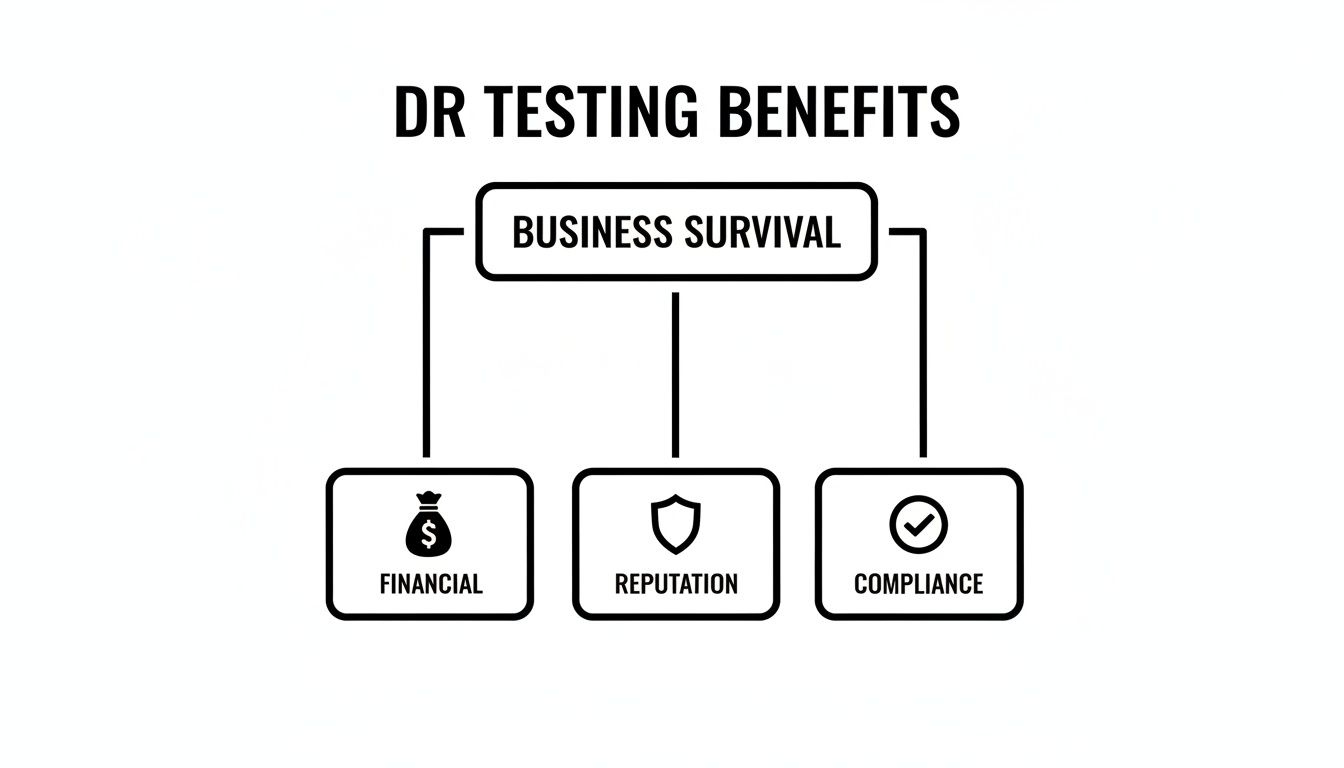
As you can see, solid testing is the foundation for business survival, directly protecting your finances, reputation, and ability to meet compliance rules.
H3: Full Failover Test: The Ultimate Proof
The full failover test is the real deal. This is the most authentic and thorough test you can run, where you intentionally switch your live, daily operations over to your backup disaster recovery site. You are, in effect, triggering a "disaster" on your own terms to prove you can run your business from the backup systems.
This is the ultimate stress test. It validates every piece of your DR strategy, from the hardware and software to your team's procedures and vendor response times. While it carries the highest risk of disruption if something goes wrong, it also delivers the highest level of confidence that you’re truly prepared.
A successful failover proves you can genuinely operate from your secondary infrastructure and hit your target Recovery Time Objectives (RTOs). For any business where significant downtime is simply not an option, a periodic full failover test is non-negotiable.
Comparing Disaster Recovery Test Types
Choosing the right test depends entirely on your goals, budget, and how much risk you're willing to take on. The table below breaks down the key differences to help you decide which approach fits your business best.
| Test Type | Complexity Level | Potential Disruption | Best Use Case |
|---|---|---|---|
| Tabletop Exercise | Low | None | Validating communication plans and team roles. Ideal for getting started with DR testing. |
| Simulation Test | Medium | Low (in an isolated environment) | Verifying technical recovery procedures and tool functionality without affecting live operations. |
| Full Failover Test | High | High | Proving the entire DR plan works under real-world conditions and confirming RTO/RPO targets can be met. |
Each test type has its place. The key is to create a well-rounded strategy that starts simple and builds toward more comprehensive tests as your team and technology mature. This layered approach ensures you're always improving your resilience without taking unnecessary risks.
Keep your business running without IT headaches.
GT Computing provides fast, reliable support for both residential and business clients. Whether you need network setup, data recovery, or managed IT services, we help you stay secure and productive.
Contact us today for a free consultation.
Call 203-804-3053 or email Dave@gtcomputing.com
.
Running Your Disaster Recovery Test: A Step-by-Step Guide

Now that we've covered the different kinds of tests, it's time to get practical. Actually running a disaster recovery test can feel like a massive undertaking, but it’s really just a series of logical steps. Think of it less as a disruptive drill and more as a controlled experiment designed to make your business stronger.
The goal here isn’t to create chaos—it’s to find the weak spots in a safe environment. With smart planning, you can turn what seems like a stressful exercise into one of your most valuable learning opportunities.
Define Your Objectives First
Before a single server is touched or a single backup is checked, you have to know why you’re running the test. A test without a clear goal is just going through the motions. You need to be specific and set measurable targets that tie directly back to what your business needs to survive.
Get started by asking some direct questions:
- Can we prove that our main customer database can be restored in under one hour?
- Is the point of this test to make sure our team knows who to call and in what order when a crisis hits?
- Are we just trying to validate that our backup internet connection actually works when we switch over to it?
Answering these questions helps you pick the right type of test and gives you a clear definition of what "success" looks like.
Get the Right People in the Right Roles
A DR plan is useless without the people who bring it to life. The next step is to assemble your recovery team and make sure everyone knows exactly what they’re supposed to do. This isn't just a job for the IT department; it needs people from across the company to work.
Your team should include:
- Test Coordinator: The person in charge of the entire event. They schedule the test, keep everyone informed, and handle the final report.
- Technical Team: These are the hands-on folks who will actually restore the backups, switch over the servers, and handle the technical side of the recovery.
- Observers: A few key people who simply watch, take detailed notes, and identify gaps in the process without getting involved in the technical work.
- Communicators: The designated person responsible for keeping management, employees, and even customers (if needed) in the loop.
When roles are clearly defined, there's no confusion when the test kicks off. Everyone knows their job. For a deeper dive into building this framework, check out our guide on creating a small business disaster recovery plan.
Schedule the Test and Let Everyone Know
Timing is critical. You want to run your test when it will cause the least amount of disruption to your actual business operations. For most companies, that means scheduling it for after hours or over a weekend.
Once you’ve picked a date, communicate it clearly to everyone involved. Make sure department heads and key employees know what’s happening, when, and what to expect from them. Good communication prevents panic and makes sure the test itself doesn't create a real-world problem.
The biggest difference between a controlled test and a real crisis is communication. A well-informed team is a prepared team.
Run the Test and Document Everything
When the day arrives, it’s time to follow the plan. The Test Coordinator should lead the way, making sure the team sticks to the script you've laid out. As you execute each step, the single most important task is to document everything.
Write down every action taken, the time it was completed, and the outcome. You need to be especially detailed about what goes wrong—that's where the most valuable lessons are. Did a data restore take twice as long as you planned? Was a critical password missing from your documentation? These details are pure gold.
This meticulous record-keeping is what you'll use for your post-test analysis, which is where true improvements happen. This isn’t about ticking a box; it's about ensuring you can bounce back when it matters. Companies that test their DR plans quarterly often hit 99.9% uptime, a stark contrast to the 85% achieved by those testing just once a year. The stakes are real; after the 2013 Target breach, where poor testing led to a 19-day delay in detection and cost $300 million, the retail sector saw a 60% jump in DR testing frequency.
Keep your business running without IT headaches.
GT Computing provides fast, reliable support for both residential and business clients. Whether you need network setup, data recovery, or managed IT services, we help you stay secure and productive.
Contact us today for a free consultation.
Call 203-804-3053 or email Dave@gtcomputing.com
.
Key Metrics That Define a Successful Test
So, how do you know if your disaster recovery test actually worked? It's not as simple as flipping a switch and seeing the lights come back on. A truly successful test is measured against the specific goals your business needs to survive an outage.
This is where two critical metrics come into play: Recovery Time Objective (RTO) and Recovery Point Objective (RPO). Grasping these two concepts is what turns a simple IT drill into a powerful business exercise. They give you a clear, no-nonsense way to define what "recovered" actually means when a crisis hits.
Recovery Time Objective (RTO): The Stopwatch
Think of your RTO as the stopwatch ticking down during a disaster. It’s the absolute maximum amount of downtime your business can handle before you start feeling serious pain—lost revenue, angry customers, or operational chaos. It answers the question, "How fast do we need to get back up and running?"
For instance, an e-commerce site might have an RTO of 30 minutes for its online store. Any longer, and sales grind to a halt. That same company, however, might be perfectly fine with a 12-hour RTO for its internal HR system, which isn't customer-facing.
A successful test proves you can restore a system within its designated RTO. If your test shows it took four hours to recover a system with a one-hour RTO, that's not a failure—it's a massive success. Why? Because you found a critical flaw in a safe environment, not during a real emergency.
Recovery Point Objective (RPO): The Rewind Button
While RTO is all about downtime, RPO is all about data loss. It's the "rewind button" that determines the maximum amount of data—measured in time—that you can afford to lose forever. It answers the question, "How much work are we willing to re-do from scratch?"
Your RPO directly dictates your backup frequency. If an accounting firm has an RPO of 15 minutes for its client billing system, it means losing more than 15 minutes of transaction data is unacceptable. This forces them to back up that system at least every quarter-hour. Digging into the details is vital, and you can learn more about building a solid foundation with these data backup best practices.
Setting Realistic Targets for RTO and RPO
The trick is to set realistic goals. You don't need a five-minute recovery time for every single application—that would be incredibly expensive and unnecessary. A much smarter approach is to tier your systems based on how critical they are to your daily operations.
- Tier 1 (Mission-Critical): These are the systems your business can't live without, like a customer database or order processing platform. They need aggressive RTOs and RPOs, often measured in minutes.
- Tier 2 (Business-Critical): Important systems that can tolerate a bit of downtime. Think internal email or project management tools. Here, an RTO of a few hours might be perfectly acceptable.
- Tier 3 (Non-Critical): These are the "nice-to-have" systems, like a development server or data archive. They can often handle an RTO of 24 hours or more without causing a major disruption.
Ultimately, a disaster recovery test succeeds when it either meets these RTO and RPO goals or shows you exactly where your plan falls short. Finding a problem during a test isn’t a sign of failure; it’s an opportunity to fix it before it costs you real money.
Keep your business running without IT headaches.
GT Computing provides fast, reliable support for both residential and business clients. Whether you need network setup, data recovery, or managed IT services, we help you stay secure and productive.
Contact us today for a free consultation.
Call 203-804-3053 or email Dave@gtcomputing.com
.
Common Disaster Recovery Testing Mistakes to Avoid
Even with the best intentions, it's easy to get disaster recovery testing wrong. A poorly run test can do more harm than good, creating a false sense of security that leaves you completely exposed when a real crisis hits. Knowing what these common tripwires are is the first step toward running tests that actually make your business safer.
Let's walk through the most frequent missteps we see and, more importantly, how you can sidestep them to ensure your DR testing truly prepares you for the worst.
Relying on an Outdated "Set It and Forget It" Plan
This is probably the biggest mistake of all: treating your disaster recovery plan like a document you create once and then file away. Your business isn't static. You bring in new software, employees come and go, and you upgrade hardware. A plan that was rock-solid a year ago could be totally useless today.
When a plan is gathering dust, the test is doomed from the start. During the simulation, your team might find themselves trying to follow procedures for servers that were decommissioned months ago or calling people who no longer work for the company.
Solution: Your DR plan has to be a living document. Make a point to schedule quick quarterly reviews to update contact lists, document new software dependencies, and note any hardware changes. This simple habit keeps your plan grounded in reality, not history.
Testing Systems in Isolation
Think about how your business actually runs—it's a web of interconnected systems. Your accounting software needs to talk to your customer database, which is linked to your project management tools. A classic testing error is to restore a single application without checking if the other systems it depends on can also be recovered and reconnected.
You might successfully bring your main sales application back online, but if it can't pull data from the inventory database, what good is it? Testing in these silos misses the bigger picture of restoring a full business process, leaving critical gaps that you won't find until it's too late.
Failing to Learn from the Test Results
A DR test isn't a pass/fail exam. The whole point is to find the weak spots before a real disaster does. The only true failure is running a test, finding problems, and then doing nothing about them. Too often, teams breathe a sigh of relief when the drill is over and file the report away without taking any action.
This habit completely defeats the purpose of testing. The insights you gain are worthless unless they lead to real-world improvements. Every unaddressed weakness is just a future crisis in waiting.
To make sure this doesn't happen, you need to build a feedback loop after every single test:
- Hold a Post-Mortem Meeting: Get the team together right after the test. Talk about what worked, but spend most of the time on what broke or went sideways.
- Create an Action Plan: Document every single issue. Assign each one to a specific person with a firm deadline for a fix.
- Update the DR Plan: Use what you learned to revise the official plan with better procedures.
- Verify the Fixes: The next time you run a test, make it a priority to confirm that the problems you found last time have actually been solved.
By turning what you learn into concrete actions, you create a cycle of continuous improvement. With every test, your business gets a little bit stronger and a lot more resilient.
Keep your business running without IT headaches.
GT Computing provides fast, reliable support for both residential and business clients. Whether you need network setup, data recovery, or managed IT services, we help you stay secure and productive.
Contact us today for a free consultation.
Call 203-804-3053 or email Dave@gtcomputing.com
.
Your Disaster Recovery Testing Questions Answered
We get a lot of questions from business owners trying to wrap their heads around disaster recovery testing. It's a topic that can feel a bit overwhelming, so let's clear up some of the most common points of confusion.
How Often Should We Test Our Disaster Recovery Plan?
The honest answer? It depends. But if you’re looking for a starting point, aim to conduct some form of DR test at least annually. For businesses that handle sensitive data or operate under strict compliance rules, testing quarterly is a much smarter and safer bet.
More important than sticking to a rigid calendar, though, is testing whenever something significant changes. Did you just upgrade a server? Roll out new company-wide software? Did a key person on your response team leave? All of these are triggers to run a test and make sure your plan still holds up.
Is Disaster recovery Testing Disruptive to Daily Operations?
It doesn’t have to be. A full-blown failover test, where you actually switch everything over to your backup site, can certainly be disruptive. That’s why we always schedule those for after hours or on a weekend.
But most other types of tests are designed specifically to avoid interrupting your day-to-day work. Tabletop exercises and simulations happen in a controlled environment, completely separate from your live systems. They let you find the weak spots in your plan without causing a single minute of downtime.
What Is the Real Difference Between a Backup and a Full DR Plan?
This is a big one. Think of it this way: a backup is just an ingredient—a copy of your data. A full disaster recovery plan is the entire recipe that tells you how to use that ingredient, plus all your other resources, to get the business back up and running.
A real DR plan answers crucial questions:
- People: Who's in charge of what when a crisis hits? Who makes the critical calls?
- Processes: What are the exact, step-by-step instructions for getting systems back online?
- Technology: Where is the data being restored to? How do we reconnect everything and get employees working again?
Backups are absolutely essential, but they're just one piece of a much larger puzzle. To see how a comprehensive plan comes into play during a specific crisis, check out our guide on how to recover from a ransomware attack.
Can a Small Business Truly Afford Comprehensive DR Testing?
Yes. One hundred percent. The great thing about DR testing is that it’s completely scalable. You don't need to jump into the deep end with a complex, expensive failover test right out of the gate.
Start small. A simple tabletop exercise costs next to nothing but delivers immense value by making sure everyone knows their role. Once you’ve mastered that, you can gradually work your way up to more technical tests. When you weigh the small cost of a planned test against the devastating financial and reputational damage of a real disaster, it’s one of the best investments you can make.
Keep your business running without IT headaches.
GT Computing provides fast, reliable support for both residential and business clients. Whether you need network setup, data recovery, or managed IT services, we help you stay secure and productive.
Contact us today for a free consultation.
Call 203-804-3053 or email Dave@gtcomputing.com
.
Ready to Shore Up Your Business Continuity?
If all this talk about RTOs, RPOs, and failover tests feels a little overwhelming, you're not alone. Building a truly resilient disaster recovery plan is a major undertaking, but it’s one you don’t have to tackle by yourself.
GT Computing is here to take the complexity out of IT and disaster recovery. We partner with businesses like yours to set up, manage, and test the systems that keep you running, no matter what happens. From network setup to bulletproof data recovery plans, our goal is to ensure you stay secure and productive.
Let’s have a conversation about your business. We can help you build a DR plan that actually works when you need it most.
Contact us today for a free, no-pressure consultation. Call 203-804-3053 or email Dave@gtcomputing.com.
Keep your business running without IT headaches.
GT Computing provides fast, reliable support for both residential and business clients. Whether you need network setup, data recovery, or managed IT services, we help you stay secure and productive.
Contact us today for a free consultation.
Call 203-804-3053 or email Dave@gtcomputing.com
.