Picture this: a backup pilot instantly takes control the moment the main pilot needs a break. The plane keeps flying smoothly, and you, the passenger, are completely unaware of the switch. That's exactly what failover clustering does for your business's IT systems.
It’s an automated safety net where a group of servers works together, ensuring your critical applications—like your client database or billing software—always stay online. This simple concept is the key to preventing incredibly costly downtime.
Unlocking Business Continuity with Failover Clustering
In the simplest terms, a failover cluster is a team of two or more servers, called "nodes," that are linked together and share the same storage. These nodes constantly monitor each other's health.
If one server goes down—whether from a hardware glitch, a software crash, or a power outage—another server in the cluster automatically and instantly picks up its workload. This seamless transition is called "failover," and it's the heart of what we call high availability. It keeps your business running without you or your team having to lift a finger.
From Technical Concept to Practical Necessity
Think about how crucial uninterrupted access is for your daily operations. Imagine you're a dentist in Connecticut running a busy practice. Your patient records, appointment schedules, and billing system are all tied to a single server. If that server fails, your entire practice grinds to a halt. You can't see patients, you can't bill for services, and you can't access critical health information.
For small to mid-sized businesses like the law firms and dental offices we work with at GT Computing, this isn't just an inconvenience; it's a direct threat. Failover clustering protects against the kind of catastrophic data loss events that, according to IT reliability studies, have led to 90% of businesses failing within a year.
A failover cluster’s entire purpose is to eliminate a single point of failure. By creating redundancy, it transforms your IT infrastructure from a fragile liability into a resilient asset that actively supports your business goals.
The table below shows the real-world difference this makes.
Business Impact With and Without Failover Clustering
| Scenario | Without Failover Clustering | With Failover Clustering |
|---|---|---|
| Server Hardware Failure | Operations stop. Staff is idle, clients are angry. It could take hours or even days to get a new server, restore from backup, and get back online. | The second server takes over in seconds or minutes. Staff and clients notice little to no interruption. Business continues as usual. |
| Routine Maintenance | You must schedule downtime, often after hours or on weekends, to apply security patches or software updates. This means overtime costs and lost productivity. | You can perform maintenance on one server while the other handles the workload. No downtime is required. Your systems stay secure without disrupting business hours. |
| Unexpected Outage | Panic. You're scrambling to call your IT support, unsure of how long you'll be down or if your data is safe. Revenue is lost with every passing minute. | The system handles the problem automatically. You receive an alert that a failover occurred, allowing you to address the issue on your own schedule, not in the middle of a crisis. |
As you can see, the difference isn't just technical—it's about maintaining momentum, client trust, and your bottom line.
The Foundation of Resilience
This concept is a cornerstone of building a robust IT system. It works hand-in-hand with other strategies, like network redundancy, to create multiple layers of protection. When set up correctly, a cluster makes individual server failures almost irrelevant to your day-to-day work.
You can learn more by checking out our guide on what is network redundancy to see how this fits into a larger reliability strategy.
Keep your business running without IT headaches.
GT Computing provides fast, reliable support for both residential and business clients. Whether you need network setup, data recovery, or managed IT services, we help you stay secure and productive.
Contact us today for a free consultation.
Call 203-804-3053 or email Dave@gtcomputing.com
How a Failover Cluster Works Behind the Scenes
To really get what a failover cluster does, we need to pop the hood and see how the pieces fit together. Think of it like a well-drilled team where every player knows what the others are doing at all times. This "team" is built on a few core components that work together to eliminate any single point of failure.
At its heart, you have multiple servers, which we call nodes, all hooked up to the same central, shared storage. This is where the important stuff lives—your client files, patient records, and critical applications. But the real magic happens over a private network that sends out a constant pulse, a bit like a heartbeat.
This heartbeat is more than just a connection; it's a nonstop stream of "Hey, you still there?" messages passed between the nodes every few seconds.
The Heartbeat and Quorum
Each node in the cluster is constantly sending out these heartbeat signals to its partners. If one node suddenly goes quiet—maybe it lost power, a piece of hardware gave out, or a network cable got unplugged—the other nodes immediately notice the silence. This is where a sort of democratic process called quorum takes over.
The healthy nodes left in the cluster hold a quick vote to decide if the silent node is genuinely down. This is a crucial step that prevents a "split-brain" situation, where different parts of the cluster might try to take charge at the same time. Once the quorum agrees a node has failed, the failover process kicks in automatically.
This diagram gives you a simple visual of how the failover process works when one server goes down and another steps up.
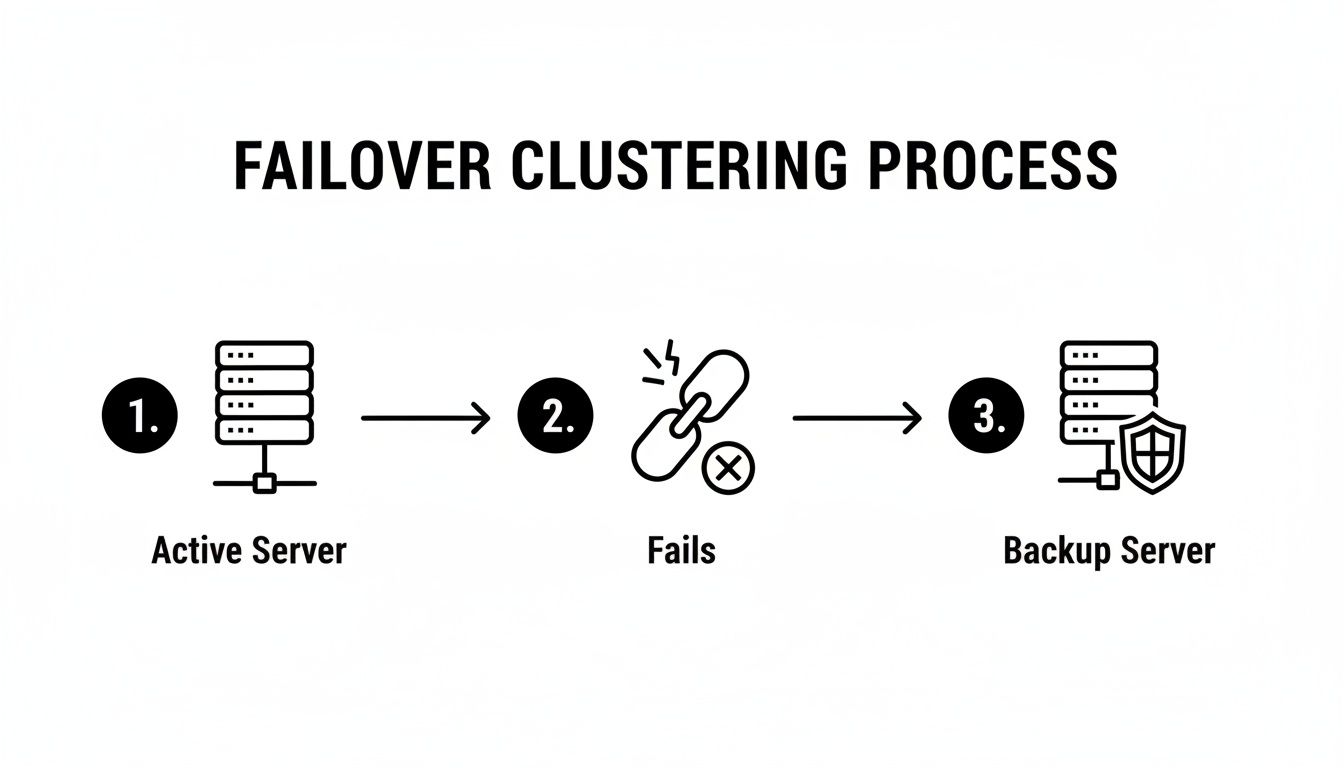
As you can see, the whole system is designed for resilience, with a healthy node always on standby, ready to pick up the slack instantly.
The Automatic Failover Process
Once a failover is triggered, the designated backup node takes control of the shared storage and smoothly takes on the identity of the failed server. It grabs its IP address and network name, so to your employees and clients, it looks like nothing ever happened. The applications and services they were using just keep on running, now from the healthy node.
This entire handoff—from noticing the failure to reaching a quorum and switching services over—usually happens in seconds or minutes. Best of all, it happens without anyone needing to lift a finger. This automation is what makes high availability and true business continuity possible.
The process makes sure that even if one server dies, the services you rely on don't. For a look at how similar principles apply to network traffic, you can read up on DNS Failover, which helps keep websites and online services reachable during an outage. Of course, none of this works without proper setup and routine checks, which are fundamental parts of any good server maintenance strategy.
Keep your business running without IT headaches.
GT Computing provides fast, reliable support for both residential and business clients. Whether you need network setup, data recovery, or managed IT services, we help you stay secure and productive.
Contact us today for a free consultation.
Call 203-804-3053 or email Dave@gtcomputing.com
Why Your Business Needs a Failover Cluster
Alright, let's get past the technical jargon and talk about what this really means for your business. The single biggest reason to set up a failover cluster is to achieve what we in the IT world call high availability. It’s a fancy term for a simple, powerful idea: keeping your most important systems online, no matter what.
For a small or mid-sized business, this isn't just a nice-to-have feature. It’s the bedrock of your business continuity plan. It keeps the revenue flowing, protects the reputation you’ve worked so hard to build, and makes sure your team can actually do their jobs, even if a server decides to give up the ghost.
Maximize Uptime and Reliability
The ultimate goal for reliability is often called "five nines," or 99.999% availability. That number sounds abstract, but its impact is incredibly real. It means you're looking at a potential downtime of just over five minutes for the entire year.
Now, compare that to a typical single-server setup. One bad day—a failed power supply or a fried motherboard—could easily knock you offline for eight hours or more. The difference is staggering when you start calculating the cost of every minute your business is at a standstill.
Think about a law firm in Hamden trying to file a critical motion when their server dies. Suddenly, all client data is gone, deadlines are at risk, and the firm’s credibility is hanging by a thread. According to benchmarks from the Uptime Institute, hitting that 99.999% availability target means just 5.26 minutes of downtime annually. It's the kind of reliability that ensures a dentist's imaging server or a lawyer's document management system is always there when they need it, working hand-in-glove with other essential services like antivirus and remote support. For more on this trend, you can find insights into the growing clustering software market.
Simplify Maintenance and Reduce Disruptions
Unexpected outages are bad enough, but what about the downtime you plan for? System maintenance can be just as disruptive. Without a cluster, applying security patches or software updates usually means scheduling late-night work, paying overtime, and hoping everything goes smoothly.
A failover cluster pretty much eliminates that entire headache. You can take one server node offline for maintenance while the other one picks up the slack, handling the full workload without missing a beat.
We call this a "rolling upgrade," and it's a game-changer. It turns what used to be a stressful, all-hands-on-deck emergency into a routine, non-disruptive task. Your systems stay secure and updated, and your business never stops.
Strengthen Data Integrity and Compliance
If you handle sensitive information—and businesses like legal practices and dental offices certainly do—keeping data available isn't just good practice; it's the law. Regulations like HIPAA, for instance, have strict rules about ensuring patient information is both protected and accessible.
A failover cluster is a direct answer to these compliance demands. Here’s how:
- Ensuring Continuous Access: It guarantees that critical data is always available, even if one piece of hardware fails. This is a core tenet of HIPAA's availability requirements.
- Protecting Against Data Corruption: With data managed on robust shared storage, the cluster helps maintain the integrity of every client file and patient record.
This kind of solid infrastructure is a cornerstone of any smart IT strategy. To see how we build these solutions for businesses like yours, take a look at our managed IT services for small businesses.
Keep your business running without IT headaches.
GT Computing provides fast, reliable support for both residential and business clients. Whether you need network setup, data recovery, or managed IT services, we help you stay secure and productive.
Contact us today for a free consultation.
Call 203-804-3053 or email Dave@gtcomputing.com
Real-World Scenarios for Failover Clustering
The theory behind failover clustering is great, but where does the rubber meet the road? Let's move away from diagrams and talk about how this technology acts as a critical safety net for real businesses—especially professional services where every minute of uptime is money.
For any business that depends on constant access to critical information, an outage isn't just a minor hiccup; it's a full-blown crisis. Failover clustering is what stops that crisis before it ever starts.

A Connecticut Law Firm Under Pressure
Think about a bustling law firm right here in Connecticut. Everything they do—practice management software, terabytes of client files, email—lives on a central server. It's the digital lifeblood of the firm.
Now, imagine that server dies from a hardware failure. It's 4:00 PM, and the team is rushing to meet a non-negotiable court filing deadline. Chaos. Without a failover cluster, work stops dead. Lawyers can't pull up case files, paralegals can't find evidence, and that critical deadline is suddenly at risk.
But with failover clustering in place, the secondary node instantly and automatically picks up the entire workload. To the legal team, nothing changes. They keep working, completely oblivious to the fact that a server just failed beneath their feet. Every document, email, and application is still there, preserving the firm's productivity and, just as importantly, its professional reputation.
A Dental Practice Safeguarding Patient Care
Let's shift gears to a local dental practice. Their servers are just as vital, managing the Electronic Health Record (EHR) system, storing digital X-rays and 3D scans, and handling all the appointment scheduling. It’s the core of their patient care operations.
What happens if the server holding all the patient imaging goes down? The dentist can't review a critical X-ray before starting a procedure. If the EHR system is offline, the front desk can't check patients in or access their medical histories. The whole workflow breaks down, directly impacting patient safety and the practice's ability to function.
For healthcare providers, failover clustering is more than an IT strategy; it's a component of patient care and regulatory compliance. It ensures the practice remains HIPAA compliant by guaranteeing the availability and integrity of protected health information, even during a hardware failure.
By setting up a failover cluster, the practice guarantees that a single point of server failure won't derail patient appointments, cause treatment delays, or create a compliance nightmare. The backup server just takes over, and the practice keeps running smoothly and securely.
Keep your business running without IT headaches.
GT Computing provides fast, reliable support for both residential and business clients. Whether you need network setup, data recovery, or managed IT services, we help you stay secure and productive.
Contact us today for a free consultation.
Call 203-804-3053 or email Dave@gtcomputing.com
Choosing Your Implementation: On-Premise, Cloud, or Hybrid?
So, you’ve decided that failover clustering is the right move for your business. That’s a huge step toward building a truly resilient operation. The next big question is: where will this cluster live? There's no single right answer here—the best choice really boils down to your specific business needs, your budget, and how hands-on you want to be with your tech.
This decision will have a direct impact on your costs, how much maintenance you're on the hook for, and how easily you can grow. Let's walk through the three main ways you can set this up: on-premise, in the cloud, or a mix of both.

The On-Premise Model: Full Control, Full Responsibility
The classic on-premise setup is exactly what it sounds like: you own and manage everything yourself. The physical servers, the storage drives, and all the networking gear sit right there in your office or a dedicated server room.
This approach gives you the absolute maximum control over your data and security protocols. The flip side? It requires a pretty hefty upfront investment in hardware, not to mention the ongoing costs and effort of maintenance, power, cooling, and keeping the physical space secure. It’s a solid choice for businesses with strict regulatory or compliance needs, or for those who simply prefer to have direct, physical oversight of their systems.
The Cloud Model: Flexibility and Scalability on Demand
Going with a cloud-based model completely flips the script. Instead of buying your own hardware, you essentially rent computing resources from a major provider like Microsoft Azure or Amazon Web Services (AWS). These platforms are built for high availability, often offering failover clustering features as part of their services, which can simplify the setup process.
The biggest draws here are flexibility and scalability. You can spin up new resources or dial them back down whenever you need to, which helps you avoid massive capital outlays. The trade-off is that you have less direct control and are dependent on your provider's infrastructure, security, and pricing.
For small businesses, this is more than a convenience; it's essential insurance. The market for this technology is booming—the global clustering software market is expected to jump from USD 5.06 billion to USD 13.17 billion by 2032. Here in North America, it's already a USD 30 billion market, driven by industries like finance and healthcare that know downtime can cost an eye-watering $9,000 per minute. You can dig into more of the numbers on clustering software market growth on stellarmr.com.
The Hybrid Model: The Best of Both Worlds
A hybrid model offers a smart, balanced strategy by combining your on-premise gear with cloud services. For example, you might keep your most critical applications and sensitive data running on a local server cluster but use the cloud for disaster recovery, backups, or less vital workloads.
This approach gives you a powerful mix of control and flexibility. It lets you keep your most important assets safely in-house while still tapping into the cloud's fantastic scalability and cost benefits for everything else.
This "best of both worlds" setup is becoming incredibly popular. It allows businesses to modernize their IT without having to ditch the investments they've already made, creating a perfect bridge between their traditional infrastructure and the cloud.
Keep your business running without IT headaches.
GT Computing provides fast, reliable support for both residential and business clients. Whether you need network setup, data recovery, or managed IT services, we help you stay secure and productive.
Contact us today for a free consultation.
Call 203-804-3053 or email Dave@gtcomputing.com
Partnering with an Expert for a Resilient Infrastructure
Getting your head around failover clustering and how it keeps your business safe is the first, most important step. But actually building one that works when you need it most? That takes a level of expertise that goes way beyond simply plugging in a few extra servers.
Implementing a failover cluster is a journey through a minefield of technical details. You have to worry about hardware compatibility, navigate tricky software licensing, and get the network configuration just right so the servers, or nodes, can talk to each other instantly. One small misstep in any of these areas can mean your backup system fails right when you're counting on it.
And it’s not a “set it and forget it” project, either. A cluster needs constant health checks and, most importantly, regular testing. An untested failover cluster is really just wishful thinking. This is exactly where bringing in an IT expert makes all the difference.
Why Professional Management Matters
Working with an experienced IT partner like GT Computing takes the guesswork and the risk completely off your plate. We don't just build it and walk away; we provide the ongoing management that ensures your business stays up and running, no matter what.
Our approach means we handle every piece of the puzzle:
- Custom Design: We don’t do cookie-cutter solutions. We architect a cluster that’s built specifically for your applications, your data, and your budget—whether it's in your office, in the cloud, or a mix of both.
- Expert Deployment: Our team takes care of the entire setup process. From racking servers and configuring network switches to installing and integrating the software, we make sure every component plays nicely together.
- Proactive Monitoring: We keep a vigilant eye on your cluster’s health 24/7. Our tools alert us to potential problems long before they have a chance to cause an outage.
- Scheduled Testing: We conduct routine, non-disruptive failover tests. This confirms that the system will switch over seamlessly in a real emergency, just like it’s supposed to.
A failover cluster is like a fire extinguisher; you don't want to find out it's broken when your building is on fire. Professional management and routine testing ensure it's always ready to go.
Thinking about building a truly resilient system also involves planning for worst-case scenarios, like your primary provider going down. Exploring strategies for multi-provider failover reliability is a key part of creating a bulletproof infrastructure. A managed approach gives you the confidence of knowing your business continuity is handled by experts who are on call for you 24/7.
To show the difference, let's compare what it takes to do it yourself versus having it managed by a professional team.
Comparing DIY vs Managed Failover Clustering
| Consideration | DIY Approach | Managed by GT Computing |
|---|---|---|
| Initial Setup & Design | You're responsible for all research, design, hardware sourcing, and complex configuration. High risk of misconfiguration. | We design a custom solution, handle all procurement, and implement it based on proven best practices. |
| Technical Expertise | Requires deep, specialized knowledge in networking, server hardware, virtualization, and specific clustering software. | You get immediate access to our team of certified experts who live and breathe this stuff. |
| Ongoing Maintenance | You must perform all updates, patch management, and system health checks, taking time away from your business. | We proactively manage all updates and maintenance, ensuring the system is always secure and up-to-date. |
| Monitoring & Alerting | Requires setting up and managing your own monitoring tools, and someone must be available to respond to alerts 24/7. | We provide 24/7/365 monitoring with our advanced toolset and our team responds instantly to any issue. |
| Failover Testing | You have to plan, schedule, and execute regular tests yourself, which can be risky and disruptive if done incorrectly. | We schedule and perform regular, non-disruptive tests to guarantee the cluster works when needed. |
| Cost | Potentially lower upfront hardware cost, but high hidden costs in terms of your time, stress, and the risk of extended downtime. | A predictable monthly cost that includes all expertise, management, and support. Better ROI through guaranteed uptime. |
While a DIY approach might seem tempting to save money, it often introduces significant risks and hidden costs in the form of your own time and potential business downtime. Partnering with a specialist ensures it's done right from day one and managed correctly for the long haul.
Keep your business running without IT headaches.
GT Computing provides fast, reliable support for both residential and business clients. Whether you need network setup, data recovery, or managed IT services, we help you stay secure and productive.
Contact us today for a free consultation.
Call 203-804-3053 or email Dave@gtcomputing.com
Ready to Keep Your Business Running, No Matter What?
At GT Computing, we're all about providing fast, reliable IT support that just works—for businesses and home offices alike. From setting up a rock-solid network to recovering critical data and managing your entire IT infrastructure, we’re here to make sure you stay secure and productive.
Let's talk about how we can help.
Contact us today for a free, no-obligation consultation.
Call 203-804-3053 or email Dave@gtcomputing.com
Keep your business running without IT headaches.
GT Computing provides fast, reliable support for both residential and business clients. Whether you need network setup, data recovery, or managed IT services, we help you stay secure and productive.
Contact us today for a free consultation.
Call 203-804-3053 or email Dave@gtcomputing.com